

I don’t know about you, but hung print jobs are the bane of my Windows existence. Have you ever had the “canceling . . .” message that just won’t go away? If you have, there is a simple way to purge your Windows print jobs, using a batch file.
I don’t know about you, but hung print jobs are the bane of my Windows existence. Have you ever had the “canceling . . .” message that just won’t go away? If you have, there is a simple way to purge your Windows print jobs, using a batch file.

Over on Google+, Kevin Rose recently asked his users a simple question: what was your first computer? Since the 40Tech demographics might skew a bit older than the San Francisco startup scene, that got me wondering how the 40Tech community would answer that same question. So I’ll ask it – what was your first computer?

The revamp that Twitter rolled out on the Twitter website a few months ago was, by and large, a nice upgrade. The sidebar is now pretty useful, and the whole experience is a bit more streamlined and efficient. One feature that many people don’t like, though, is how the new Twitter handles retweets. The old method of retweeting (the “RT @” method) allowed you to editorialize a bit, if you wanted. Under new Twitter, the retweet button simply rebroadcasts the original tweet, unedited. You no longer have the ability to add any thoughts to the tweet, short of starting a new tweet. Google+, and the way it fosters interaction, has shown us that geeks love discussion and editorial, if the topic is right. If you want to bring back the classic RT to Twitter web, you can. Here’s how.

Summify has been acquired by Twitter and will be shutting down. See this post for more detail.
I’d like to take a moment to step away from the general worship and awe of Google+, and circle back (hehe) to our old friend Twitter. Actually, I plan to talk about Summify, and how it can take the often-overwhelming amount of information that is travelling through your Twitter stream at any given time, and sort it into a “highlight reel” that can be shared as a whole and as individual posts. It’s easy, it’s effective, and maybe just a little bit brilliant — and I have no doubt it will save you time and make your online reading much less hectic.
Summify isn’t just about Twitter, either. Sure, it can connect to as many Twitter accounts as you like, but it also connects with Facebook and Google Reader. In fact, the more accounts you add, the better your summary will be.
You get to decide how often you get a summary, how many stories it contains, when it gets delivered to you, how it gets delivered, who gets to look at it, and whether or not it gets published to your accounts. For example: my Summify is set up to deliver a new summary of 10 stories, twice per day (at 8:30am and 8:30pm), to my email inbox. Others can view it, and I automatically publish a link to the summary on my main Twitter and Facebook accounts. I could have allowed Summify to send me a Twitter DM notification as well, but between email and the recently released iPhone app, I’m covered.


When you select a link in Summify (from email or your main summary), the article opens up with a handy toolbar on top (which you can close, if you want) that allows you to share the post on one or all of your connected networks. You can also see the avatars of the people who shared the article with you in the centre of the toolbar, and hover over them to view the originating tweet and click through to their account.

If you don’t like the article and think it shouldn’t have been in your summary, you can click the little thumbs-down button to add it to your Filters list. This is a nice and easy way to weed out spammers and other annoying sites that occasionally sneak through. In fact, when you are in the Summify web app, itself, you can thumb an offending article down right then and there, without ever opening it. You can also filter by contributor, allowing you to block specific people from contributing to your summary. All you have to do is hover over one of the avatars below any given article, and then move your mouse over the little “x” that appears in the top right, and click it. This, and the thumbs-down functionality aren’t available in the email, of course, but they are also missing from the iPhone app; something that I hope changes, soon. Thankfully, though, Summify is smart enough that it gets it right about 98% of the time. And the iPhone app is pretty, and so is easily forgiven.

When Summify sends out a summary message it takes great care to do two things: 1) It mentions some of the people who provided you with the information in the first place; which makes for nice Twitter etiquette. 2) It varies the messages so they aren’t always the same boring words with a new link. As an example, take a look below at three recent tweets (not clickable) that Summify sent out on my behalf.


It should also be noted that mentions are automatically included in share of single posts, as well, and that you can edit the content of single-post shares before posting.
Take the section-title anyway you like, but understand that it’s true, and it’s awesome! The apps (and even the emails) are easy on the eyes and easier to work with, and the service is smart enough to not only consistently deliver articles that you like, but it also will list out several other stories from websites that post multiple posts. This makes sure that you get all the highlights from Mashable and other large sites without having to visit them directly or open up another app.
I’ve been using Summify for a month or two now, and I’ve lost count of the number of hours I’ve saved by not scanning through the muck that is sometimes Twitter, and by not chasing down every shiny post in my 49 or so RSS feeds. Summify helps keep things clear and easy to manage, and has even kept me relevant on Twitter while I play with Google +. Speaking of Google +, I’m hoping that we’ll see it integrated into Summify soon (they already have the +1 button). Even better, Summify should be integrated into the Sparks feature! Now, that would be sweet! * pokes Google *
Note: For those interested, Summify is located right here in my (rarely) sunny home-city of Vancouver, and they have had the benefit of advising from the CEO of another little local social app called HootSuite. Maybe you’ve heard of it? :D
Give Summify a try and tell us what you think!
UPDATE: Summify has recently updated its look (pretty much the day after this post went up). It was pretty before, but now it’s awesome! It also includes Instapaper integration.

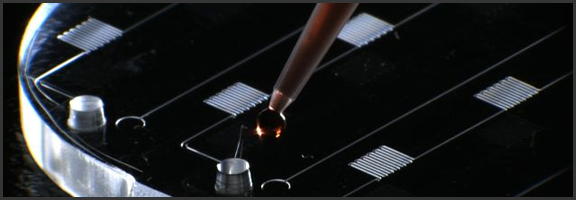
This is one time when downscaling technology isn’t a cliché. None of that “cell phone implanted in your tooth” malarkey– the mChip is serious business. Serious, potentially game (and life) changing business.
Once upon a time, getting tested for HIV involved a trip to the doctor, a bit of blood-letting, and a rather tense wait. It was months, at first, then weeks, then days, and eventually it worked its way down to minutes. That’s all fine and dandy if you live in a developed country, but if you happen to live in Africa, where HIV is running rampant, then visiting your local doctor’s office could involve something of a trek. A trek you may not be able to afford or, due to fear of results, lack of time, or whatever other reason, may not be inclined to make.
Researchers at Columbia University have found a way to help.
Using nanoparticles and microfluidics, they have taken an entire laboratory and miniaturized it in the mChip. All it takes is a drop of blood and a cheap optical sensor and the chip gives results in 15 minutes that are plain as day and require no interpretation. It can test for HIV and/or syphilis and has a 100% detection rate. There is a 4-6% chance of a false positive, as well, but that is the same margin in a traditional lab test. A false positive may be scary, but it beats the hell out of a false negative.
The best part about the mChip is the price. It only costs $1, which is amazing for a new piece of technology meant to help people. Or maybe I’m just a wee bit cynical… Either way, the price is fantastic.
The mChip also has the potential to be instantly actionable. If the user has a digital medical file, the mChip can reportedly use cellphone or satellite technology to interface with medical files and include the new record.
This is a fantastic step forward in the fight against HIV in undeveloped countries, but it’s possible technology like this will find its way into your local Wal-Mart pharmacy at some point. It would only make sense, wouldn’t it? And dating could get just a bit safer — if a bit awkward: “Just put a drop of your blood here, please. If all goes well, we can get started in about 15 minutes.”
Side Note: There is also an mChip that diagnoses prostate cancer that has been approved for use in Europe.
What are your thoughts on the mChip?
(via engadget, DVICE, FastCompany, Nature Medicine)