
One of the biggest bitches for me when it comes to Facebook is the way it handles social gaming. Yes, social gaming can be fun, and the quest to get the most points, coin, trophies, et al has its satisfying moments — but the constant invitations, notifications, and culling of said items from my Facebook stream is annoying as hell. I know I’m not alone in that sentiment, either. Google+ is jumping in to the games space today, and I’m happy to report that they, once again, appear to have gotten it right.
If you need a Google+ Invite, get it here.
The Facebook method of social gaming is actually very effective if your goal is to use social pressure and addiction propensity to keep people on your social network. Those things, in many ways, are the basis of how Facebook and its attached products work, and many people are tired of it. Google+ broke that model right from the start by removing any mention of “friends” and letting you decide how to label people in your social circles. Google+ games, which is rolling out today, keeps the low-pressure approach by keeping the crap out of your stream. As they say right in their blog post: ” Games in Google+ are there when you want them and gone when you don’t.”
Rejoice!
First of all, Games will have their own page that is accessible from the top of your stream. If you don’t see it yet, don’t fret, you know how Google loves a staggered rollout — just give it time. Once you’re on the page, you can see all of the latest updates from your circles, run through the invites you have (or ignore them entirely), and take a look at the games that other people you’re connected with have been playing. If you are the type that loves to broadcast your score and rub your awesomeness in the face of the masses, you can still do that — but the masses will be your circles, and they will only see your bragging and/or challenges when they feel like gaming themselves and can respond accordingly.
Better for everyone that way…
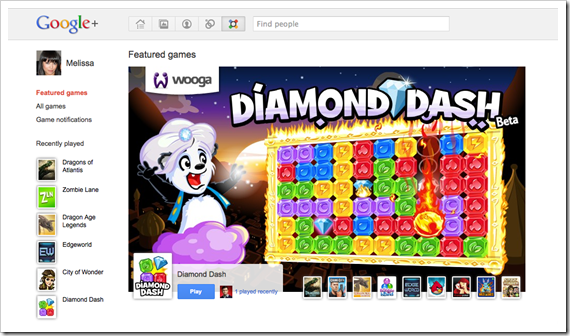
There are several games available already, such as Bejeweled Blitz, Bubble Island, and Diamond Dash for the Columns/Tetris style games lovers; Zynga makes an appearance with Zynga Poker, and there are also Sudoku, Dragons of Atlantis, Crime City, Zombie Lane, Dragon Age Legends (hell yeah!), and more. Angry Birds is in there too — but I don’t think I want to have to kill them again. The first time was difficult enough! I nearly had to call Mike Tyson to help me out…

So far, the Google+ Games implementation doesn’t disappoint. Remember, though, as with everything else about Google’s new social network, it’s still only a preview. If you run into some problems, try not to hold it against them. Yet.
Let us know about your Google+ Games experience!
Image credits: The Official Google Blog





How Important Are Grammar And Spelling Online?
One might think that the world wide web, which is still predominantly text-based, would be the spearhead in the rise to new heights of literary articulation. Unfortunately, if you were the one who was thinking that, you were sadly misinformed. In actuality the ability or willingness to write with proper grammar and spelling has been replaced by a general acceptance of a lower standard. The acceptance appears general, that is. Where do you stand on the subject?
Image by JD Hancock
I confess that poor spelling and grammar is a pet peeve of mine. When I am reading something that runs rampant with glaring errors, I find it difficult, irritating, and that the work loses credibility in my eyes. There are levels, however. While misspellings like “definately” and “loose” (for lose) always make me cringe a bit, I make allowances for posts and comments that have mistakes in them. I recognize that, while English is the most prominent language on the web (at least in my own experience), many of the active participants of the social and interactive super-real-time web are not native speakers (or writers). If I were to have to communicate in other languages, I have no doubt that my writings could easily be the stuff laughing stocks are made of.
Where I draw the line, however, is with “texting” or “IM” style writing. Some of that has its place, too — or had, before the mass adoption of full hardware and software keyboards — but forgive me if I think that there is never a good excuse to write “wat” in place of “what.” That’s almost enough to get me to stop reading altogether. I also can’t stand l33t. Practically unheard of for a tech-geek, I know, but the secret code of elite nerds always struck me as a really annoying oxymoron.
Now before those that are inclined start tearing apart some of the grammatical inconsistencies of this post, I should mention that I am ok with conversational writing. That is to say that I don’t mind some liberties being taken to convey tone and flow that, on some level, emulates how two friends or acquaintances would talk with one another. In fact, I think that sort of writing is essential on the web. It is part of what makes a blog post resonant, and helps the reader and writer to identify with one another. How far I’m willing to accept this style of writing is dependent on the subject matter, the points I made above, and quite likely, my age/maturity level while reading. And I’m fully aware and accepting of the fact that my maturity level can fluctuate… :P
Is my acceptance of even a limited degradation of writing on the web part of the overall problem? Probably. Is it one of the factors that leads to established journalists getting lazy (and sometimes disappointing) with their writing? Again, probably. It’s all tied in with other factors like language barriers and the attention deficit fostering speed of the online world. Is there a line that should be drawn in the sand somewhere, though? Should people be publicly flogged for ignoring the oh-so-convenient spell-check integrations out there? Personally, I think that spell-check, auto-correct, and especially auto-complete are actually part of the problem. Since I started using the iPhone and iPad, for example, I have noticed a marked increase in mistakes while typing on a full keyboard — especially with contractions.
What about you? Where do you draw the line — or do you care at all? Why?