Menu Close

Archives (page 68 of 199)

How to Take Screenshots With Your Mac

Mac screenshots

You’ve got your new Mac, and want to take a screenshot. Where’d that Print Screen key go? Things work a bit differently on the Mac. You could go with a third party solution, such as Skitch or Littlesnapper. Or, you could use your Mac’s built in ability to take screenshots. There are three different ways to take a screenshot on your Mac, by holding down key combinations. All screenshots go to your desktop by default.

Read more


What’s Your Favorite App – Ever? [Reader Feedback]

Favorite app ever

In a recent TWiT podcast, one of the hosts mentioned WordPerfect 5.1 as an all-time great piece of software. That got my mind racing, trying to think of some great apps that I’ve used over the years. While those of us in the 40+ age bracket might have a longer timeline of app usage to draw from, we probably all have our favorite apps. What are yours?

Read more


Producteev Gets a Massive Upgrade: Android App, Windows Desktop App, and an All Around Makeover

Producteev Gets a Makeover | 40Tech

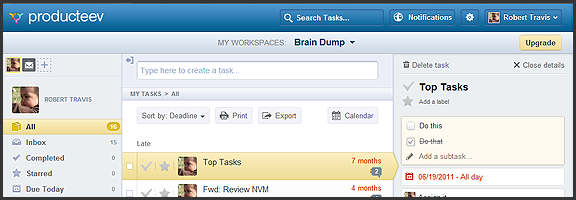
Producteev, one of our favourite  — and one of the best — to-do apps, has released a massive upgrade that includes some long-awaited features and platform updates. The web and iPhone apps have gotten a makeover, the much clamoured-for Android app has finally arrived, and there is now a Windows 7 desktop app to balance out the Mac version. Even the logo has been updated (bye bye Tasky the beaver)!

To top it all off, Producteev has added a few new features into the mix — and yes (drumroll), that does include sub-tasks…

Check out the video below for the overview of some of the new functionality in the multi-platform task manager.

http://www.youtube.com/watch?v=qBnzWfAdVQs

There have been usability and visual enhancements across all apps, improvements to some of the main Producteev feature-set (discussed in previous posts), and some brand new features such as integration with TaskRabbit (a service for crowdsourcing small tasks), the ability to print tasks and export them to CSV, as well as the aforementioned sub-tasks.

Now, I know many of you have been waiting patiently for sub-tasks, but don’t get too excited. At this time, sub-tasks are really nothing more than a checkable list added to the top of the main task’s detailed view. There is no way to interact with them outside of that view, or to add specific dates, labels, or anything else. Also, they don’t appear to work in the mobile apps yet, either. Hopefully, there will be improvements, and soon, especially in the case of the missing mobile integration.

The Android app is great. I can now use Producteev with my wife’s phone just as easily as my own, and with an interface that’s nearly identical to the iPhone’s. As Producteev mentions in this post, however, Android users should be aware that the new app is in beta. Don’t expect an error-free experience, just yet.

As always, Producteev is free to use for workspaces that have one or two people. If you want to collaborate with larger teams, unlimited people and storage space can be had for $20 USD per month (it gets cheaper the more workspaces you buy).

Update: Google Calendar integration has been temporarily disabled due to stability issues. It should be back up and running within the week — and it will be better than before. Two way task-sync with Gcal, folks!


Summify Acquired by Twitter (and Going Bye Bye)

Summify Acquired by Twitter (and Going Bye Bye) | 40Tech

Back in August of last year, we wrote about Summify, a fantastic tool for getting to and sharing the highlights of your social streams and feeds. I’ve used this tool religiously for the past several months and have found it to be incredibly useful, especially with Twitter. Just last week, however, I received an email from the Vancouver-based start-up and discovered that they had become yet another in a long line of services to be snatched up and absorbed by a tech giant — in this case, Twitter. Great for them, but sad for you and me.

The Summify team will be moving to San Francisco, where they will become a part of Twitter’s growth team. Summify the service will be stripped down for the time being, and will eventually shutdown altogether as a standalone product.

Here’s the main list of changes from their announcement:

  • New account registrations have been disabled.
  • Email summaries remain, but only for a few weeks, and then they are gone as well.
  • Users will still receive their summaries via the web app (and the iPhone app, as well, I believe), but will no longer be able to make them public.
  • Profile and influence pages are gone, as is auto-publish.

I’ve also noticed that sharing posts to Twitter from Summify no longer adds credits to the end of the tweet. Previously, the tweet would add in an @mention to a few of those in your network that shared the information with you in the first place, but this is no longer the case, at least from the mobile app.

There is no word yet as to when Summify will shut down completely, or what cool newness might arise in Twitter as a result. Either way, while I’m happy for the people behind the great service, I will really miss Summify as a standalone tool. Hopefully, something truly great comes out of this. In the meantime, we can only hope that Zite — and maybe Flipboard — will pick up the slack by improving how they filter our streams.


Easily Preview the Output of Your HTML and CSS With A Web App

NewImage

If you ever play around with HTML, CSS, and JavaScript, and don’t want to set up a testing environment, check out JSFiddle. JSFiddle is a web app that lets you input HTML, CSS, and JavaScript, hit a button, and see the results of your code.

Read more