
Menu Close

Archives (page 151 of 199)

Hey, Power Users: Believe It or Not, You May Love Internet Explorer 9

ie9 beta

Over at Technologizer, Harry McCracken took a look at the first beta of Internet Explorer today, and his opinions may surprise you. He believes that IE9 has finally caught up with the competition in most respects, and in some ways it has surpassed it. Among the highlights:

  • In testing, the IE9 beta blows through animation-rich HTML5 that some other browsers can barely run at all;
  • Like in Chrome, the address bar also doubles as a search field;
  • The Address Bar shares space with tabs, and shrinks to free up space as tabs are opened;
  • IE9 has tight integration with Windows 7 (for example, tabs can be pinned to the Taskbar).

Head on over to Technologizer for a thorough rundown, including a look at how Microsoft seems to be cautious about extensions. If you’re brave, you can also go get the beta.

Is there any chance you’d ever switch to Internet Explorer 9 when it is out of beta?

Internet Explorer 9: Microsoft’s Browser Gets Back in the Game [Technologizer]


10 Killer Content Consumption Apps for the iPad, Part 2

child using ipad as content consumption device

A couple of days ago, we looked at five awesome iPad apps for consuming content.  Since content consumption is where the iPad really shines, a list of five apps doesn’t do the iPad justice.  So, here are five more great content consumption apps to liven up your iPad.

Read more


What Is Worse: Apple’s Restrictive App Store, or Android Bloatware That You Can’t Remove?

android bloatware vs iphone restrictiveness

Engadget posted an interesting article yesterday, pondering whether carriers are destroying Android, by preloading Android devices with “bloatware.”  The article compared this to what happened in the PC industry, where computer vendors loaded all sorts of crapware on machines, filling up the drive and slowing the system down.

It’s deja vu all over again for mobile phones. More and more devices I look at are coming installed with applications I don’t want, often popping up messages to try and upsell me on services I have no interest in. Even worse, unlike PCs where offensive applications can be removed or the OS reinstalled cleanly, there’s often nothing that can be done to get rid of unwanted mobile software without arduous work.

The iPhone certainly restricts what apps can get into the App Store, but at least the user isn’t forced to keep an undesirable program on the phone (aside from the basics, like the App Store app, the Photo app, Mail, etc.).  Or is it worse to not have access to certain apps at all, like on the iPhone?

You tell us – what is worse, a smartphone where you can’t even get certain applications because of a restrictive app review process, or a smartphone preloaded with garbage that you can’t remove?

Entelligence: Will carriers destroy the Android vision? [Engadget]

Photo by svensonsan.


10 Killer Content Consumption Apps for the iPad, Part 1

ipad as a content consumption device on a subway full

The iPad can be hammered and molded into a content creation device, but not without compromises.  Where the iPad really shines is as a content consumption device.  Whether it be watching video, browsing your Twitter feed, or listening to music, there does seem to be an app for everything.  Here are 10 of our favorite apps for consuming content.

Read more


Evernote Site Memory Inserts Your Brain Right Into Your Favourite Sites

Evernote Site Memory Inserts Your Brain Right Into Your Favourite Sites | 40Tech

It’s an established fact that we’re Evernote freaks here at 40Tech. Kosmo even joked that Evernote-love is a requirement to be a writer here. Well, be that as it may, the fact remains that we love the service — and that their latest offering loves blogs and Evernote users, both. In fact, the new Evernote Site Memory service is exactly what another one of our Tech Grown-Ups, Ellen, was searching for in a comment on this post.

Evernote Site Memory Buttons

Evernote Site Memory basically “embeds a mini-version of Evernote” right into a page or a post, making it extremely simple for readers to clip and save your content, directly from the post itself. This makes it really easy for readers to save a blog’s content to their Evernote, complete with tagging and notebook choice. It even allows sites to suggest tags, and to designate which areas of the page can be clipped, cutting out any ads, comments, or other things that you may not want in your notebooks. Clips render in Evernote much better this way and I think that this feature, alone, makes Evernote Site Memory far superior to the web clipper and browser plugins.
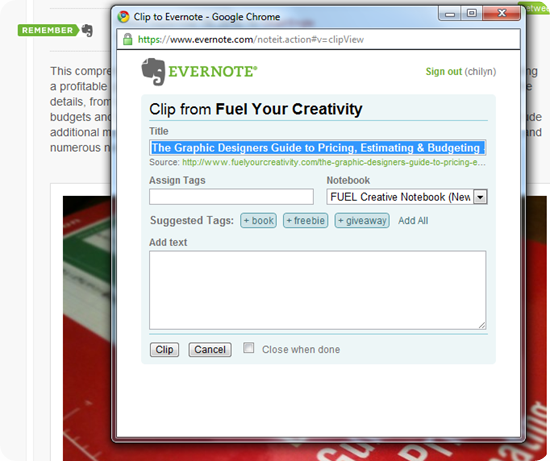
Evernote Site Memory in Action on Fuel Your Creativity

Some additional niceness for readers is the ability to use the Site Memory button to see what other posts you’ve clipped from the site you are on, essentially giving you a “site favourites” list for any site you’re on that uses the button. For sites, Evernote will be doing monthly features of sites that get a lot of use out of the Site Memory button, and is now offering a piece of the proverbial pie to websites via an affiliate program. If a user signs up to Evernote through your Site Memory button, and later adopts a paid subscription, Evernote will give your site the first $10 bucks that they make off of that new user. Not a bad gig, considering that Evernote has surpassed 4 million users — and received more than a million of those in the past month.
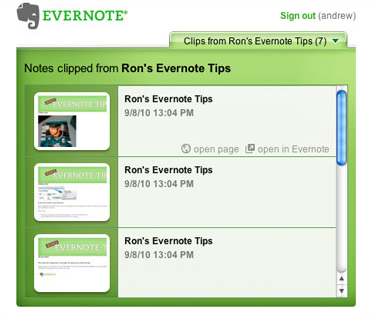
Evernote Site Memory Favourites Feature

The announcement for Evernote Site Memory appeared yesterday on the Evernote Blog, so we haven’t adopted it yet. There are some nice instruction sets for integration into WordPress and other platforms on Evernote’s site, so you can bet we will be playing with an implementation on our test site soon.

What do you think of Evernote Site Memory? Is it a feature you would like to see on 40Tech?

The Evernote Site Memory Button [Evernote Blog]


Update: Evernote Site Memory is now live on 40Tech! Save all the 40Tech posts you love to Evernote with a click!