Menu Close

Archives (page 145 of 199)

Forget Lego! Build Your Geekdom With Minecraft

Build Your Geekdom with Minecraft | 40Tech

Minecraft is all kinds of insane. It’s called a computer game, technically, but it’s really more like Lego — Lego that you can use to build your own, well… pretty much anything!

For example, you might have heard about this one fellow that built the framework of the USS Enterprise D (Star Trek: The Next Generation). Yeah, he built it on a 1:1 scale. 1:1!! Do you have any idea how HUGE that is? If you don’t, not to worry — the builder’s words on the subject leave very little to the imagination. He put out a call on YouTube a couple of weeks ago, showcasing his creation and asking for people to help him out in creating the interior of every room on the ship. Pretty amazing, really, but I can’t imagine the time and patience required to build such a thing out of 1 metre cubed blocks.

A couple of other notable Minecraft creations, as posted by the site Teksocial, are a relatively scale model of the Empire State Building, and a model of the Earth. That’s right: somebody sat down at their computer and actually created the Earth, one block at a time. Nuts.

Have you tried out Minecraft? Let us know your thoughts!

3 Truly Amazing Minecraft Creations [Teksocial]


A Search Engine For Finding Similar Sites

similar site search

If you wish that there were an easy way to find sites that you like, then SimilarSiteSearch might just be what you’re looking for.  SimilarSiteSearch allows you to input the URL of a site, and then view a list of sites similar to that site.  Think of it as AlternativeTo, but for web sites.

You won’t get results right away for every site you enter.  For lesser known sites, SimilarSiteSearch will queue the query, perform its magic, and then add the site to its database.  If you return a few minutes later, you should then be able to run the search again and see the results.

When reviewing search results, you can give a site a thumbs up or thumbs down to indicate whether it is in fact similar to the site that you input.  Future searches for that site will then take the rating into account.

similar site search results

After getting results, you can fine tune your search by specifying tags that you want the search to include or omit.  You can also rate sites, and see a list of similar sites recommended by other users.

For another search engine that does much the same thing, also check out SimilarSites.  Do you know of any others?

SimilarSiteSearch [via MakeUseOf]


Use Your Email to Set Reminders

followupthen1

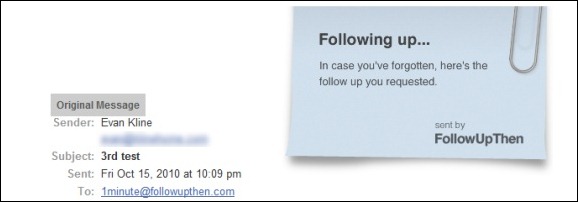
If you want to set a reminder for yourself, you could do it the hard way by manually adding a reminder to your calendar.  You could also do it the easy way, by using FollowUpThen.  FollowUpThen is a service that allows you to schedule follow-up reminders by simply adding a special email address to the TO:,CC:, or BCC: line of an email message.  This makes it particularly handy as a tool for getting reminders to follow-up with your email recipient, but it also can be used to set normal reminders.

The best way to illustrate how to use FollowUpThen is with an example.  If I email a question to Bobby, and I want to receive a reminder in one day to follow-up with him, I would send an email to Bobby’s address, and add 1day@followupthen to the TO:, CC:, or BCC: line.  In one day, I would then receive a reminder, consisting of my original message along with a “following up . . .” note.  Bobby would also get that reminder, if I used the CC: option when sending the message.

The timing of the reminder can be set with several options.  You can set the reminder by time elapsed (1minute, 3hours, 2days, etc., all followed by @followupthen.com) and day of the week (tuesday@followupthen.com).  You can also set reminders using some natural language words (tomorrow@followupthen.com, nextmonth@followupthen.com, etc.), and by using specific dates or times (mar30@followupthen.com, 9amTomorrow@followupthen.com).  You can even set up recurring reminders, such as everyweds@followupthen.com.  To see a list of all of your reminders, along with links to cancel reminders, send an email to pending@followupthen.com.

For messages sent to followupthen.com using a CC:, both you and the recipient will receive a reminder if your reciepient has not responded by the scheduled time.  In order for the reminder to be canceled, your recipient must use “reply to all” so that the reply is also sent to FollowUpThen.  If you send your email using BCC:, then only you will receive a followup, regardless of any reply by your recipient.  If you just use the “TO:” field, then you will get a reminder after the time interval that you specify.

A service like FollowUpThen does raise some privacy issues, as a third party is receiving your email message.  FollowUpThen claims that it doesn’t share your information with third parties, and that it automatically deletes your email contents, and your recipient’s address, once the follow-up has been sent

For a service that is similar to FollowUpThen, check out FollowUp.cc.  FollowUp.cc has additional features, like a web interface with a calendar, and a clickable link in your reminder email to postpone a reminder.

FollowUpThen [via Cybernetnews]


Are You Reading E-Books Yet? You Will Be.

ebooks full

The Association of American Publishers has released some startling statistics, showing the hockey stick growth of e-book sales.  E-book sales for the period of January through August 2010 totaled $263 million, compared with $89.8 million for the same period last year.  That’s an increase of 193%.  By comparison, total book sales (presumably print and electronic) tracked by the AAP were up 3.4 percent from the prior year.  E-books now comprise 9.03% of total book sales, compared with 3.31% last year.

It’s pretty easy to speculate as to two of the reasons for this dramatic growth of electronic book sales: the success of the iPad, and the maturation and low price of the Kindle.  It isn’t too difficult to imagine a world in which e-books eventually eclipse their dead tree brethren.

Many people still prefer holding a physical book in their hands, however, and some people like to collect books.  Could you see yourself making the switch to e-books?  Or are you already there?

AAP Reports Publisher Book Sales for August [via ReadWroteWeb]

Photo by John Blyberg


Improve WordPress Site Performance and Look Cool by Loading Images On Demand

Improve WordPress Site Performance by Loading Images on Demand | 40Tech

Have you ever gone onto an image-heavy site and marveled at how fast it loads; at how the images just “fade in” as you scroll down the page? Cool, yes? While it may seem, to the average Joe/Josephine, that this nice little bell and or whistle is the result of a fancy and expensive tool created just for big sites like Mashable —  it’s actually just a little jQuery script. It doesn’t take too much to install, either, especially if you have a WordPress site. In fact, there are at least two plugins for WordPress that make it extremely simple for you to do too.

1. jQuery Image Lazy Loader

No configuration required, this plugin is quite literally plug and play. All you have to do is install the plugin and activate it and every page on your site will be treated to faster load times and the awesome that is images that fade in on demand. The bandwidth you will save isn’t hard on your pocketbook, either.

2. Lazy Loader

Lazy Loader does exactly the same thing as jQuery Image Lazy Loader, but it gives you configuration options. For example, you can choose to only use the plugin on pages or posts, or even specific pages and posts, or by category. You can also choose a jQuery effect other than fade-in, a placeholder image, and more. This plugin is not available in the WordPress repository, so you have to download it from the source.

What experiences have you had with Lazy Loader scripts or plugins?

How to Improve Your Site’s Performance By Loading Your Images On Demand [MakeTechEasier]