Menu Close

Archives (page 142 of 199)

Check Your Windows Apps For Updates in One Fell Swoop

FileHippo App Updater

One nice feature of Ubuntu, a slick Linux build, is the way that it handles application updates with a unified app.  For a similar experience in Windows, try out FileHippo Update Checker.  Once you install it, you can direct FileHippo Update Checker to scan your system, and return a list of apps on your system that need an update.  It runs in seconds, and requires the Microsoft .NET Framework 2.0 (which it will download for you, if you don’t have it).

Update Checker isn’t quite as slick as Ubuntu’s solution, as it downloads each update separately, and requires you to install them.  Ubuntu does this in a unified manner, with downloads and installs occurring right in the update app.  Still, Update Checker can save you considerable time, as you won’t have to open multiple apps or check multiple sites for updates.  Update Checker’s site does warn that it doesn’t check ALL apps, which is understandable considering the nearly endless number of Windows apps out there.

When I decided to hunt for a unified app updater, I did check out a couple of other alternatives, SUMo and Update Notifier.  I scratched Update Notifier off of my list, as, best I can tell, its database doesn’t seem to be up to date.  It told me that all the apps on my system were up to date, when they were not.  I didn’t get past the installation screen of SUMo, as I noticed that it asked to install a “marketing research” app during the installation process.  You can decline to install this app, but if you’re not paying attention, it would be easy to end up with some spyware on your system.

For these reasons, FileHippo’s app was the winner for me.  If you know of any other solutions, let us know in the comments.

FileHippo Update Checker


Spray-on Solar Power, Printers That Make Buildings & Generating Power While We Walk

Spray-on Solar Power, Printers That Make Buildings & Generating Power While We Walk | 40Tech

Green tech isn’t waiting on the sidelines while the rest of the tech world progresses. Innovations are happening daily as scientists and visionaries search for ways to tap cleaner, sustainable energy sources. Some of the things that are coming out of those big, green-focused brains are nothing short of amazing, and the folks over at Inhabitat.com have put together a list of inspiring examples. Check out the highlights below:

  • Remember when solar panels were big, ugly… panels? Well, now there is a transparent nano-particle spray that can generate energy across the surface area of an entire building — or the top of a car, or most anything else.
  • Freaked out at the cost of building materials? There’s a 3D printer in development that can print entire stone buildings out of sand — at less cost and with less waste than Portland cement.
  • What do you think about floor titles that convert the kinetic energy you expend walking into useable energy? Wouldn’t that be a neat way to power a subway system? What about mini-generators in the soles of your shoes? You know, to charge your cell phone or power some blinky lights while you run?

Me? I think this all sounds very, very cool. My one concern would be the energy needs and waste that would result from mass production of this kind of tech. After all, if you kill 10 fish in a pond just to catch one with a “humane” hook — next season will be rather slow, yes?  (* /metaphorical-wisdom *)

What do you think about these green tech advancements?

6 Inspiring Examples of Groundbreaking Green Technology [Inhabitat.com]


Do We Really Need 3D-Enabled Cell Phones?

Do We Really Need 3D-Enabled Cell Phones? | 40Tech

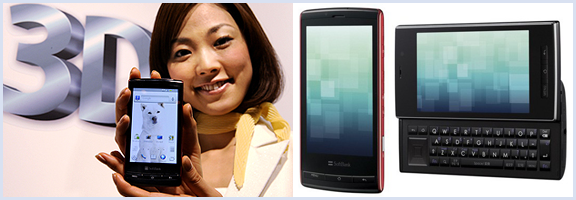
I may be one of the few left on the planet that is underwhelmed (and often annoyed) by the 3D-everything craze. I understand that it is the current reality of the video and gaming world, and I admit that 3D-TV tech is pretty cool, but I really don’t need all of my media to pop out of the screen at me. Plus, it hurts my sensitive, near-35 year old eyes — and I don’t like to wear the glasses. That said, it appears that Sharp is attempting to address at least the latter part of my whining with the advent of their new 3D cell phones.

You heard me right, 3D cell phones. The Galapagos 003SH and 005SH are the latest iteration of the Android handset, and sport the nifty, no glasses, 3D-screen tech that is reported to be used in the upcoming Nintendo 3DS.

The tech itself is both innovative and awesome, there is no question of that. It uses a parallax barrier system that specifies where it directs light (to the left or right eye) via a series of vertical slits. This creates a sense of depth and allows for a 3D environment on an otherwise normal LCD screen — again, without special glasses. By all reports, the effect is stunning, and Engadget reports that there are already some mobile games publishers on board (Capcom will be bringing Mega Man, Resident Evil, and Ghosts ‘n Goblins to the new devices).

Like I said, this is some pretty cool tech — but is it necessary? PDA screens are already hard on the eyes. Do we really need to add another layer that will have people staring even harder at their screens? Is it even necessary to have 3D gaming on a cell phone — or anywhere? I mean, it’s not like its an interactive hologram or anything like that — though that is getting closer, too.

What do you think about the latest innovation in mobile and 3D technology? For? Against? Happily indifferent? Tell us why in the comments?


Some Must-Have Toys to Combat Office Crazies

Rubber Band Gatling Gun | 40Tech

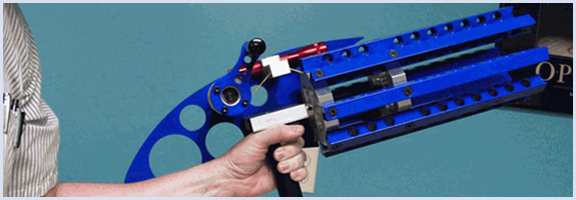
If you spend a lot of time at the office, you know that there are times when the fidgets and the soul rending cry of approaching crazy become one and the same. To alleviate that pressure, My Life Scoop has offered up a list of 10 awesome office toys that include everything from a portable iPhone projector, to mini-golf, to the Rubber Band Gatling Gun.

Not all of these toys are tech, but… who cares? There’s a Gatling gun that shoots 100 rubber bands, man! There’s a Marshmallow Blaster too! If you want to be a stickler, however — after all, you probably come to 40Tech to read about tech stuff that involves some sort of digital readout, remote control, or some such — then check out the electric tech highlights below:

MiLi iPhone Projector – This is a quick and easy way to project your iPhone’s videos on any surface. The display is up to 70″ wide, too.

Finger Drums – A full kit on the mini for those times you’re in your office and just need to rock out.

USB RC Mini Car – That’s right, it’s a remote control car… What? You can control the thing with your computer! How’s that for fun? I suggest checking out the range, and then adding a tiny wireless webcam and audio broadcast device for freaking out co-workers.

What do you use to keep from freaking out at work?

10 Must-Have Office Toys [My Life Scoop]


Cook Up a Killer Domain Name with Bust A Name

bustaname domain name generator

Finding the perfect domain name for your site can be challenge.  With a gazillion sites out there, the obvious choices are all taken.  Bust a Name can help you come up with something clever, when your brain fails you.

To use Bust A Name, you input words into what Bust A Name calls a “word combiner.”  You will then be presented with a list of available domains made up of combinations of the words that you input.  You also can organize your words into groups, so that only certain words are combined.  For example, when I started 40Tech back in 2009, I put “40” and “forty” in one group, and several geek-related words (tech, geek, etc.) in another group.  That ensured that I wouldn’t get results like 40forty.com.

bustaname domain name creator

Bust A Name also allows you to save the domains that you like for review, and to save your session to return to it later.  If you want to buy a domain, you can select the registrar from a dropdown list, and go right to the registrar’s site.

What tools do you use when you need to cook up a domain name?

Bust A Name