
Menu Close

Archives (page 140 of 199)

How to Search By Tag in Evernote for iPhone

How to Search By Tag in Evernote for iPhone | 40Tech

For long-time Evernote for iPhone users, searching your notes by tag is probably not an issue. However, the email I received last night from one of our own Grown-up Geeks made me realize that new users to the iPhone version of Evernote might be in for a bit of frustration. In light of this, I decided to put together a quick how-to post based on the email response I sent our reader. Check it out below.

In order to browse by tag in Evernote for iPhone, you just need to follow these steps:

Open Evernote and tap Notes from the bottom menu

IMG_1751


Tap the search bar up top (where it says Search Notes)
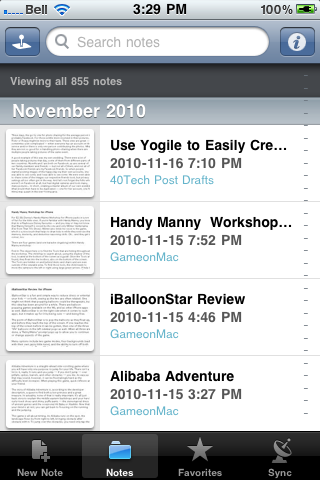
IMG_1752


As the search bar is activated, it will expand and just below it you see “Advanced search” — tap that

IMG_1753


In the next screen, you will see the Tags button — tap it

Note: You can add several other search filters from this screen, as well!

IMG_1754


Tap the tag you want to sort by

Once selected the tag will have a checkmark. To search within multiple tag, select more than one.

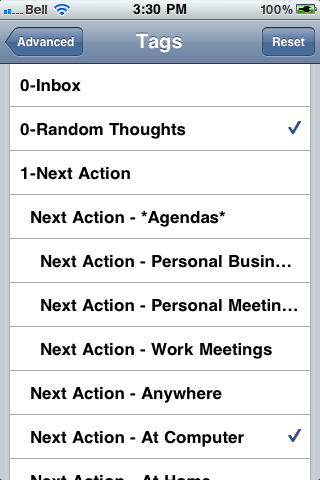
IMG_1755 IMG_1756


Tap “Advanced” in the top left corner, to go back to the advanced menu

You will be able to see a list of the tags and other search criteria you chose here.
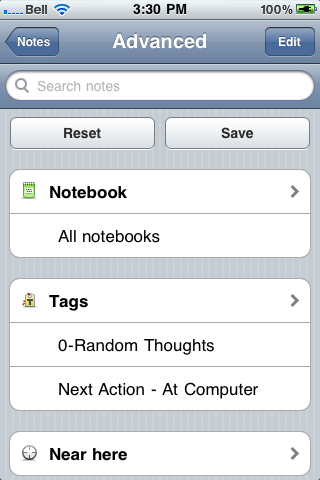
IMG_1757


Tap “Notes” in the top left corner, to go back to the notes list

Your notes will now be sorted by the selected tags — to get back to general note view, tap the “All notes” button.
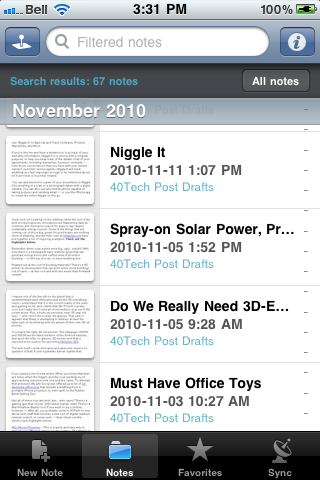
IMG_1758


Hopefully, this post will help some iPhone Evernote newbies out. If you’re reading this and it seems too convoluted to you — and you haven’t bought an iPhone yet — you might want to consider Evernote for Android. The new version puts tags right upfront – and there are a few other Android-only features that kick the iPhone’s Evernote squarely in the pants.

Evernote 2.0 for Android Screenshot

Have other Evernote questions? Post them in the comments, and we’ll do our best to answer them.

Use Yogile to Easily Create Group Photo Albums

Use Yogile to Easily Create Group Photo Albums | 40Tech

These days, the go-to site for photo sharing for the average person is probably Facebook. For those a little more involved in their pictures, Flickr or Picasa might be more to their taste. These sites are great — if sometimes a bit complicated — when everyone has an account on the service and/or there is only one person contributing the photos. What they are not so good for is handling photo-sharing when there are multiple people taking pictures of the same event.

A good example of this was my own wedding. There were a lot of people taking pictures that day, some of them from different parts of two countries. My wife and I are both on Facebook, as are several of our family members and friends — but not all of them, and not all of her Facebook friends are my Facebook friends. So when people started posting images of the happy day via their own accounts, she was able to see some, and I was able to see some. We were even able to share some of the images our respective friends took, but privacy settings all too often got in the way. And let’s not forget the folks who weren’t on Facebook at all, but had digital cameras and took many, many pictures… In short, creating a master album of our own wedding (that would then have to be duplicated — one for her account, one for mine) was a pain in the ever-loving arse.

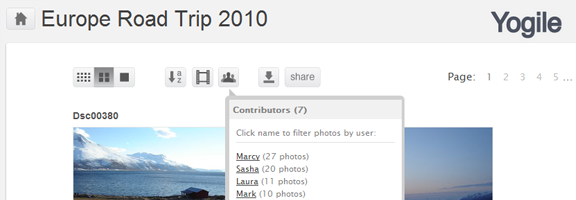
Yogile offers a dead-simple solution to this kind of problem. All you need is the one account, and to pass around an album’s email address to everyone involved. Photos can then be sent in to that album as email attachments. It’s that easy — and you can also upload photos via the website, if need be. Send a link to the photo album to whomever you want to view the files, add a password if you want, or set the entire thing as public and go to. Twitter, Facebook and email sharing of an album’s link are also possible.

Yogile Easy Photo Sharing for Groups | 40Tech

Yogile isn’t complicated by an extensive feature-set, and doesn’t require everyone to register (unless they want to comment). It costs nothing up to 100 MB/month, and can go unlimited for $24.95/year. You can even download an entire album in a handy zip file.

Like I said… easy.

What do you use to corral and share event photos?

Easily Create and Share Photo Albums with Yogile [Digitizd]


How W3 Total Cache Speeds Up Your WordPress Site (Plus the Novice’s Guide to Minify Settings)

W3 Total Cache

If you run a website, content may be king, but speed is the cook that keeps the king fed.  Recently, we talked about WhichLoadsFaster, a site that compares loading times of two or more websites.  How do you improve your site’s chances of being the site that loads faster?One of the best tools for speeding up sites, and one that we use here at 40Tech, is W3 Total Cache, a caching plugin.  W3 Total Cache not only speeds up your site, but it can also save you bandwidth.

First, though, let’s look at how WordPress works without a caching plugin.  Normally, when someone visits your site, WordPress has to build everything on the page.  It does that by processing code, making calls to your database, and outputting the final content that your visitors see in their browsers.  Caching strips down this process.  The general idea behind caching is that much of this process will (ideally) happen once – the first time someone visits the page.  The page is saved at the time of that visit, and the prebuilt version of the page is then displayed to subsequent visitors, for a predetermined period of time.

W3 Total Cache is one of the more advanced caching plugins, so it can be daunting.  There are several ways that it can cache your site (all of which we’re using here at 40Tech).  The caching options are Page Cache, Minfy, Database Cache, Object Cache, and Browser Cache.  You can also set up a CDN (Content Distribution Network).

Most of the settings don’t require any effort at all if you have a typical shared hosting solution.  I went with the default settings for almost all of the settings, and they worked without any trouble.  The two exceptions to this, and the two that are the most interesting from a geek perspective, are Minify, and the CDN options.

Using a CDN is a way to distribute some of your site images and other files on servers closer to your users.  This not only speeds up your site, but also saves you bandwidth.  40Tech uses Amazon’s S3 and Cloudfront, which has a global network and is so cheap it is almost free.  All that I had to do was input my Amazon S3 settings on the plugin’s CDN settings page, let the plugin walk me through getting the initial files uploaded, and I was good to go.

How I Set Up the Minify Features

W3 Total Cache’s Minify feature decreases the size and number of CSS and JS files by combining them into one file.  You have to configure this, though, which might make your head explode at first glance.

If you take your time and do it in steps, though, it isn’t so hard.  I did it by clicking on the Help Wizard button on the minify page, and just going through trial and error.  I checked the box next to a few scripts at a time, testing out the site to make sure that I didn’t break anything.  Fortunately, W3 Total Cache allows you to preview any changes before deploying them to the site (by clicking the “Preview” button near the top of the plugin settings page).  So, if a minfied item messed up the site, I tried it in a different location, and ultimately removed it from the minified settings if it just wouldn’t work.  It took time, and eventually I had identified each piece that could be minified.  This might not be the ideal way to do it, but for a novice, it works.  When you’re done, don’t forget to click the “Deploy” button to have the changes go live on your site.

Are you a site owner?  What ways have you found to be speed up your site?


Slingbox Player For iPad is Almost Here, At Last

slingplayer for ipad

If you’re a regular visitor to 40Tech, you may remember that we’re fans of the Slingbox.  SlingPlayer for the iPhone works surprisingly well, allowing you to watch content from your home TV wherever you have a 3G or WiFi connection on your iPhone.  You can also watch via the web, and there are apps for many other mobile clients.   Unfortunately, the only option on the iPad was to run the iPhone app in compatible mode, so you didn’t get the benefit of the iPad’s higher resolution.  That’s about to change.

Last week, Sling Media announced that the iPad app is about to launch.  The app will cost $30, like the other mobile Slingbox apps.  The important fact to note (and one that was actually announced in October), is that the app will only work with the Slingox PRO-HD and the Slingbox Solo.  According to Sling, legacy Slingboxes don’t have the hardware capability to stream at the iPad’s higher resolution.

Are you like me, and pretty psyched about this news?

iPad Slingbox Player “Almost Here” [Zatz Not Funny!]


Why the New Facebook Mail Will Be Dead On Arrival (For Many of Us)

facebook mail blocked

TechCrunch is reporting that Facebook will be unveiling a full-fledged webmail client tomorrow, to take on the likes of Gmail.  Before you dismiss it as yet another unsubstantiated TechCrunch rumor, the New York Times also reported similar facts.  If the story turns out to be true, Facebook could have a formidable email service, given the size of Facebook’s user base.  Technology publications seem to be overlooking an Achilles’ heel that could make Facebook mail a no-go for many users.

What is that Achilles’ heel?  Rightly or wrongly, Facebook is blocked by many corporations in mainstream America.  Would you use an email service that you couldn’t access if you really needed to, except for on your smartphone?  Yes, if the service has a POP3 or IMAP component, you could use another email client, but then what’s the point?  That makes it no different than any other email service that you could port to an external service.

CNN, in an article by Mashable founder Pete Cashmore, is the only site that I’ve seen mention this problem.  Understandably, the tech press sometimes is out of touch with the average user.  While Facebook and Twitter may be an essential part of business to those in the tech sector, and even to many other businesses, much of America hasn’t caught on to that yet.  Whether those businesses should be more social media savvy is another debate, but the fact remains that many users wouldn’t be able to benefit from Facebook mail for much of their day.

To be fair, we don’t know exactly what Facebook will announce tomorrow.  Perhaps Facebook will announce a service so revolutionary or compelling that mainstream corporate America will allow Facebook onto its networks.  How likely is that?  If it happens, do you have any interest in a Facebook email service?