Menu Close

Archives (page 128 of 199)

Follow Up Poll: What One Freemium Service Is Most Worth Paying For?

Best Freemium Service poll.jpg

We asked, and you answered. We recently asked what freemium services had earned your cash, and you answered in force, suggesting many services for which you have paid. We mentioned at the time that if we got enough answers, we’d run a poll to assess the popularity of each service. So here we go – below you’ll see a poll that asks you to pick the one service that is most worth paying for. Cast your vote, and we’ll report back with the results.

The poll closes on Saturday, February 5, at 9 p.m. Eastern time.

Image by Ho John Lee.


Isn’t Tech Great? Here Comes the Self-Pouring Beer

self pouring beer

Every now and then an innovation comes along that can change the world. If you thought flying cars were cool, or that phones that can translate languages on the fly were cutting edge, you haven’t see anything yet. A Washington state startup company has invented the “Bottom’s Up Draft Beer Dispensing System.” While such an invention might not be “tech” in the way that we normally think of it, we can’t pass up a chance to write about this one. Read more


How Have You Tweaked, Personalized, Customized, or Hacked Your iOS Device?

hacked iphone

Last week, we asked you how you’ve tweaked your Android device, to make it all your own. Now, it is time for iOS. If you have an iPhone, iPad, or iPod Touch, let us known in the comments how you’ve tweaked your device. Admittedly, that can be a bit harder to do on iOS than on Android, but we have some pretty clever readers.

Read more


[Sponsored Post] Blackberry Torch Review

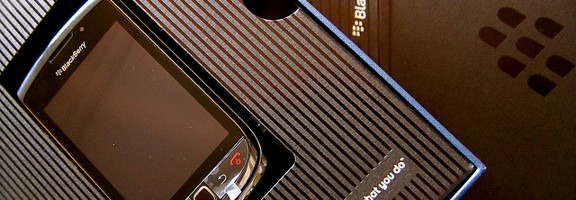
blackberry torch

This is a sponsored post written by the sponsor, Dial-A-Phone.  Please click here for more information on sponsored posts on 40Tech.

The Blackberry Torch is a sincere attempt on behalf of RIM here to break away from the closed “business user” market and enter the mainstream with a phone that expresses all the personality of a Blackberry, with the usability that is favorable to the mainstream smart phone consumer.

The phone is unsurprisingly weighty at 161g as it is, after all, a Blackberry. The solid chassis measuring 111x62x14.6mm houses a 3.2” screen that caters for even the most demanding of users. The external design and weight have characteristics that are common with most Blackberry phones and it is obvious that the company has stuck with what it knows works as far as this area is concerned.

It is upon closer inspection of the interface and software that the user really comes to understand Blackberry’s conceptual development. The inclusion of the old QWERTY keyboard, also common to Blackberry design, and the touch screen capability is the first aspect to draw the users attention and brings the handset in line with other mainstream competitors.

With an operating system similar to that of the HTC Desire, the Torch isn’t a weak contender in the smart phone market. The 624MHz processor on the Blackberry OS 6.0 system would satisfy any user running social media apps, viewing videos and listening to music.

Like the Nokia N8, the Blackberry Torch is a break through phone designed, as a hand set that will draw RIM into the mainstream market, so for that reason it is understandable that some of the operating features do not quite meet the spec of the market leaders. However, this phone offers a real step in the right direction for Blackberry technology and design, and offers plenty of new features that would keep any Blackberry lover happy.

It will be interesting to see how Blackberry react to the popularity of this handset and how that will sway their design decisions in the future.

Find out more about the Blackberry Torch online at Dial-A-Phone where you can read the latest review highlighting all of its fantastic features.

Photo by Enrique Dans


Google App Inventor – Make Your Own Android Apps Easily

app inventor header

Today, 40Tech is pleased to present a guest post by Tim Millett.


Google, which has received a deluge of apps for its own devices, has obviously decided to do some lateral thinking, and its App Inventor is a sort of assembly process for apps. This is the sort of thing where you can ask your IT Support to create a business app for you, for example.


App Inventor basics

Google hasn’t missed any tricks with App Inventor. Anyone can make his or her own apps. Google has included a tutorial, which is so simple it’s like LEGO. You literally upload your app elements, set up your app and download it onto your phone, pad or computer. Simple as that. It’s a very good idea for those who really need or want their own special apps, and a money saver, too, when you’re thinking about commercial apps.


Benefits for consumers

As a matter of fact, making your own apps is actually a very good idea for consumers. Commercial apps tend to be very generalized, and some, let’s face it, are less than dazzling. Some apps, in fact, are almost 1995 level technology. The graphics may be slightly better or worse, but they’re not too impressive by any standards.

Consumers who know how to make their own apps have more choices. Google App Inventor is so easy to use that even basic trial and error will only take up a few minutes. It’s also a good way of experimenting with what’s possible.

For example:

What apps would you like to have on your phone?

· Organizer

· Appointment book

· Cash book

· Invoice

· Professional electronic data

· File sharing

Well, if you want them, you can get them. You can see how useful this sort of technology really is. An all-in-one “office” isn’t impossible, either. Many business IT support app concepts are actually based on a series of task-specific operations, and the software isn’t particularly complex.

google app inventor


Apps evolution and Google App Inventor

Google App Inventor is likely to be a groundbreaker in many ways. Several thousand apps come onstream every day. The world is awash with apps, from brilliant to gruesome, and the world’s major platform operators, particularly computer and phone makers, are swamped. It could take a year just to check out all the apps currently available for an iPad, for example.

DIY apps are definitely a better option for the basic things. That’s a true indicator, because the normal track record for technology is that today’s advanced technology is tomorrow’s standard open source freebie. Given that mobile technology is now part of the infrastructure of society, App Inventor is likely to be the start of a revolution.

Give Google App Inventor a shot. See what you can do, and then check out what you need. You will definitely find that you can save yourself a lot of time roaming the net looking for apps, to start with. You may also find that you can make a better app than the stuff on the market.


Author Bio: Tim Millett is an Australian freelance writer and journalist. He writes extensively in Australia, Canada, Europe, and the US. He’s published more than 500 articles about various topics including IT Support and Business IT Support.