For all the talk about “new media,” it appears that old media still powers the online trends of today. Last month, HP released the results of a study that showed that user activity and number of followers on Twitter do not contribute strongly to trend creation and its propagation. Instead, mainstream media play a role in most trending topics, and act as a feeder of these trends.
We’ve all watched music on YouTube, whether it was someone performing, someone teaching, or someone just goofing around. The site has so much content on it that sorting through it all would be more than a full time job. Kutiman had a vision, though — a vision that took multiple unrelated videos, distilled them into perfectly matching clips, and mixed them all together to create entirely new tracks. It’s amazing! A little insane, too… But the body of work that he has put out since 2009 may literally smash your mind into little pieces if you think about it too hard.
Check out the video below — it is the original ThruYou track. Below that, I’ve embedded ThruYou-03: I’m New, which is equally awesome, and below that, the most recent offering, a jazzy number called My Favorite Color. Dig it, Cats — and hit up the ThruYou site or the Kutiman YouTube channel for more!
One of my biggest beefs with Evernote has always been the lack of an efficient way to share notes and notebooks. In fact, the lack of convenient sharing features was one of the reasons I considered a move to Springpad. Notebook sharing was a step in the right direction, and has been available in the web app for a while now, and even appeared in the Mac beta back in December. Unfortunately, Evernote’s excellent Windows desktop version has been sadly lacking — a source of niggling frustration for many users. It appears that that is about to change!
If you want to the ability to access and update shared Evernote notebooks right from your Windows desktop app, all you have to do is click on the tools button, select options, and then check the little empty check-box under the General tab that says “Update to pre-release version when available.” Once that’s done, just click ok and then head over to the Help menu button and select “Check for updates.” Follow the prompts and upgrade Evernote.
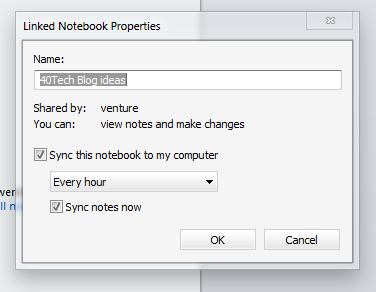
Once you are upgraded (current pre-release version is 4.3.0.4167), you will see that your Notebooks area with have two buttons: Account and Shared. Selecting the Shared tab will show you your shared notebooks, but you will probably not find any information in them. To fix that, simply click on the notebook and the properties window will pop up. Once there, adjust your sync time-frame, make sure that “Sync notes now” is selected, and click OK to update your local Evernote database with the shared notes! Do this for each shared notebook that you want to be able to access locally.
If you want to start sharing notebooks — or modify permissions, or stop sharing — click the Manage Sharing button. The Notebook Sharing page inside the desktop application is easy to look at, and easy to navigate.
Evernote note sharing is nearly complete! The only things left to do would be to add this new Notebook Sharing functionality to the Evernote mobile and tablet apps — and hopefully, one day, offer up a way to share individual notes by more than just email.
How excited are you by Evernote for Windows’ new Notebook Sharing feature? Will you update to the pre-release?
Springpad, one of our the favourite memory management platforms on 40Tech, launched a major update to its Android app yesterday. The update includes a new widget set for easier capture and customizable homescreen access, more ways to sort, filter, and view your notes, and the ability to save information directly from other Android apps. If you’re an Android user you’ll definitely want to check this out — especially if you’re interested in using Springpad for GTD (getting things done). See below for details!
UPDATE: 40Tech reader and regular commenter Daniel Gold has just put up a video post documenting the Springpad Android update. Check it out below, and don’t forget to visit his blog or his Evernote and Springpad e-Books[affiliate link] for more awesome!
Enhanced Sorting Options
Springpad’s new sorting options address several user requests, such as the ability to hide completed tasks, passed alarms, and passed events from any view (including All My Stuff). Users can also now sort by Due Date, Type, or Tag from any view. On the Springpad blog, Katin assures web app and iOS users that these features are on the way for them as well.
Awesome New Widgets
Springpad’s new customizable list and capture widgets will make the lives of both the general user and the power user much easier. The list widget can be configured to show you a list of your most important saved items. This is a fantastic way to have quick access to incomplete tasks, flagged items, recent alerts, favourite bookmarks, or whatever it is that you need to keep on hand.
The small and large capture widgets can now be configured to feature your favourite Quick Add options. If you are big on voice memos or barcode scans, or if you need fast access to the photo capture or text add features of Springpad, you can set up the widgets to be on hand for quick access to exactly what you need.
Share Content From Other Apps
If you were ever in the Yelp app and thought “Gee, I wish I could save this restaurant info right into my Springpad,” — now you can. This is a fantastic feature, as it makes saving the things you want to remember just a little more universal, and has the added benefit of Springpad enhancing that information with potential deals, coupons, and other pertinent information.
Aside from adding cross-app sharing, and these other fancy features, Springpad’s Android app also includes multiple bug-fixes. Check it out on the Android Market, or Amazon’s new Android Appstore.
While the iPad has all the bells and whistles, I actually prefer reading on my Kindle instead of on my iPad. If you feel the same, and wish that there were a way to send individual web articles to your Kindle, check out the Send to Kindle extension for Google’s Chrome browser.



![Evernote Pre-release Enables Notebook Sharing from Desktop [Windows] | 40Tech](https://www.40tech.com/wp-content/uploads/2011/03/image8.png "Evernote Pre-release Enables Notebook Sharing from Desktop [Windows] | 40Tech")