
Mobile Safari has it’s good points, but there are several places where it leaves a lot to be desired. There are speed issues when loading, the lack of any real multitasking (resulting in windows constantly reloading when you exit the app and return), no background tab or window loading, etc., etc., etc. To compound these issues, the last few iPad versions of Safari (including the current one) are unstable at the best of times, their regular crashes making browsing a chore.
There are several Safari alternatives for iOS, all if them trying to overcome the shortcomings of the stock iPhone and iPad browser. The best of the lot, however, considering features, usability, and price, is Atomic Web Browser.
Atomic Web Browser has been around since December of 2009 and while it has floated back and forth between $0.99 and $1.99, it has held steady at $0.99 for nearly a year. It also has a Lite version which has nearly all of the same features, but for $0.99, getting niceties like the ability to set a homepage isn’t a bad deal. Anyone who’s read my work on 40Tech before knows that’s high praise, too. It takes a lot to get me to shell out money if I don’t have to, and I’ve found it to be completely worth my while so far.
Features
It used to be that Atomic and other mobile Safari alternatives were sought after for real tabbed browsing and the ability to switch User Agents and view mobile pages as if they were served on a full-sized computer. Those are minor features these days, and Atomic has become useful for so much more. Here are the highlights (go here for the full list):
- Load tabs in background
- True multitasking
- Add JavaScript as bookmarks
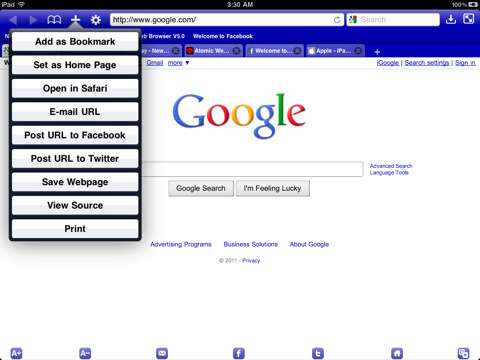
- Share links on Facebook and Twitter
- Configurable swipe and tap gestures
- Save pages for offline viewing
- Download manager with Dropbox, iTunes and email support
- Import/Export bookmarks
- Jump to top/bottom of web pages
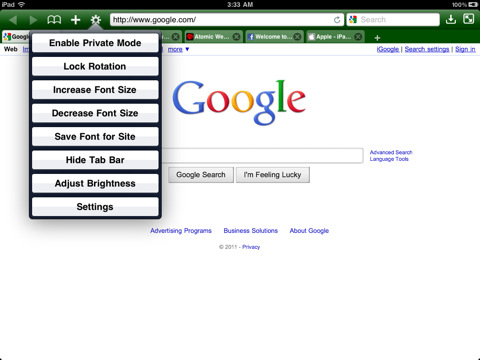
- Change and lock font-size for specific sites
- Full-screen browsing with configurable buttons
- Launch homepage, last session, or last viewed
- Bookmarklet that sends pages to Atomic Web Browser from Safari
There are a ton of other features as well, such as setting the colour of the browser, ad block, private mode, air print, web compression (for faster browsing), search engine plugins, on-page search, view page source code, and more.
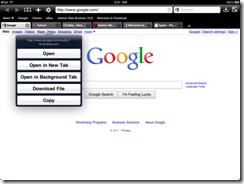
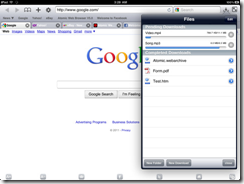
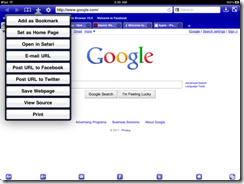
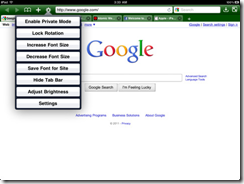
There are a few other browsers that compare with Atomic, the closest in both price and features being Mercury Browser, which I have been using on my iPhone for the past while. Mercury Browser is almost identical in features and has a few interesting possibilities like a library of common bookmarklets that can be installed (which is a bit buggy), a bookmarks springboard, and speed-dial-like dashboard for your favourite sites.
Mercury Browser’s extra features are great, and combine well with an interesting and pretty interface to make for fantastic browser, but I find that Atomic is easier to navigate. The Atomic Web Browser’s look and feel is more minimalist and straightforward in its approach, and for me — and more importantly, my wife — that translates into a better overall experience. Both have free and very functional Lite versions, though, so you should give them a try to see what suits you better.
Your turn:
What’s your favourite browser for iOS?



Father’s Day Tech-and-Stuff: Gimme!
Ladies and gentlemen, it is upon us once again! You know what I mean… that one day a year when those of us who are fathers are shown the respect we so richly deserve — and are showered with gifts and free dinners. Well, gifts, anyway.
Sure, the gifts are often things like ties and aftershave and the like, but at 40Tech, we believe in the power of dreams! We believe that if we can imagine it – and most especially: if we can geek on it – that it just might become a reality some day. That may be nothing more than pie in the sky, and possibly even farcical – but we care not! This is a tech-blog dammit! And for our Father’s Day we demand (see: dream about/hope for) TECH!!!
So what really cool gadget do you hope you get this Father’s Day? Not a daddy? *eyes you* Well then tell us what cool little tech thingy you’re getting for your dad, instead!
Here’s my list:
The Millennium Falcon
Yeah, yeah, I know that it’s not real – but a guy can dream, right? In the meantime, I’ll take the toys. I miss the full-sized Falcon I had back in the day – and not just for the crazy amount it’s worth these days…
Battalion 101 X8100-U3 Gaming Laptop
This little (OK, so not so little) beauty will play most any game you can think of, and will do it in style.
A Real Life Transformer
I don’t know what’s really going on here, but I want one. It doesn’t really transform into anything, that I can tell – but it sings! It’s a crooner, in fact. And… I want one!!
Let’s be clear: I don’t actually expect to get any of these things. Nor do I expect to get the more accessible iPad2 or anything other than a nice hug and possibly a home made card from my cute little girl – and I will love and cherish those much simpler things until the end of days and beyond.
But a guy can dream, dammit!
Your turn!