Menu Close

Category: Sponsored Post (page 4 of 4)

[Sponsored Post] Guide to mobile broadband

broadbandgenie

This is a sponsored post written by the sponsor, Broadband Genie.  Please click here for more information on sponsored posts on 40Tech.

Guide to mobile broadband

We’re all on the lookout for a bargain during these recessionary times and the good news about that is when it comes to mobile broadband there’s never been a better time to buy. Cheap mobile broadband deals are more plentiful now than they have ever been, and this is down to a combination of the need to keep prices low and a lot of competition in the marketplace.

If you head along to the free mobile broadband comparison website Broadband Genie, you’ll instantly see a whole array of different mobile broadband deals that are tailored to suit all kinds of users. So it doesn’t matter if you’re a lightweight casual internet user or a 24/7 heavyweight type, there will be a cheap mobile broadband deal to suit your pocket.


Where to start?

By using a mobile broadband comparison website to check what’s available, it means you can pick through important criteria that you’ll need to consider in a matter of mere moments. There are essentially two different options you can choose from, with pay-as-you-go being handy for people who don’t want to sign up for anything.

A contract deal is the other route to take, and this means signing on the dotted line for a fixed period of time, although you generally get a bit more flexibility when it comes to the terms and conditions of a deal.

So, for example, if you want to access and download quite a lot of online content, then you’ll want to look out for mobile broadband packages that offer more freedom and less limitations in the terms and conditions. There are always lots of different deals available anyway, but when you’re searching be sure to check out what else comes as part of the deal, such as a free dongle.


Kit you need

You’ll need a reasonable laptop or netbook to get the best out of a mobile broadband contract, but it’s also worth thinking about the free laptop deals that many mobile providers offer. These generally only come with longer-term contracts, but at the end of it you get to keep the machine.

Lookout too for dongle deals, which are the small plastic USB devices that plug into an available port and allow you to receive the mobile broadband signal. These also come in a whole array of different configurations and you can even get some, called MI-Fi devices, that allow a few users with the right permissions to tap into the same mobile broadband signal.


Mobile broadband deals

With so much competition around you’ll also find that mobile broadband providers are keen to get your custom with other freebies thrown in for good measure. Take a look through the comparison tables within the Broadband Genie site to see what else is being given away when you sign up to one of the packages.

If you’re signing up anyway then this is a great way to add extra value to an offer or package that you’re interested in. Be sure to check out the terms and conditions of any package though, to ensure that it doesn’t have restrictions on usage, although bear in mind that no matter what the package, there will always be some limitations on the amount of data that you can upload and download over a period of time.

It’s also a god idea to check the coverage levels of any packages that you like the look of, so that you can be sure that they’ll work reasonably well, no matter if you’re using the mobile broadband connection at home or while you’re out and about.


[Sponsored Post] LOVEFiLM – Online Movies and DVD Rentals for European Viewers

LOVEFiLM

This is a sponsored post written by the sponsor, LOVEFiLM.  Please click here for more information on sponsored posts on 40Tech.

One of the most alluring reasons for watching movies online is the freedom it offers. Watching movies online allows film fans to watch what they want, when they want. Another bonus is the fact that all this is possible from anywhere with an active internet connection. This could be at a friend’s house, on a train, in an airport, on holiday, in Wi-Fi hotspots and of course, in the comfort of your own home.

Read more


[Sponsored Post] Blackberry 6

blackberry 6 full

This is a sponsored post written by the sponsor, Phones 4u.co.uk.  Please click here for more information on sponsored posts on 40Tech.

One of the biggest reasons for the excitement surrounding the release of the Blackberry Torch, not including its battle with the iPhone 4 and the Samsung Galaxy for the title of best smart phone, is the upgrade of the Blackberry operating system that came along with the handset’s release. The Blackberry 6 operating system was somewhat of a gamble for Research in Motion as they attempted to keep the familiar feel of previous operating systems to please regular Blackberry owners and also introduce a raft of new features to bring in new customers. The result was an interesting one and here are some of the changes made.


New home screen

At first the new interface looks very similar in essence to previous versions of the operating system but it actually holds a few integral differences. The usual grid of icons is there but the ability to scroll from left to right and add new icons to your homes screen makes Blackberry’s new offering more like other smart phone operating systems such as iOS4 and Android.


New notification bar

Rather than just having a red flashing light to indicate notifications as Blackberries have utilised in the past, a new notification bar at the top of the screen has been included. Give this a tap and specific notifications will be highlighted, without the need to open the right application. This is something that was a constant concern for Blackberry users and has seemingly been resolved.


Context sensitive action menus

Now users can click and hold the trackpad to activate a series of menus specifically related to where you are on the phone.


New Webkit Browser

This is something that Blackberry users have been waiting for a long time. Now users can surf the web whenever they want without the long loading times that have blighted some of RIM’s previous Blackberry handsets. The inclusion of multi tab browsing is also a welcome addition as you can now go off on a tangent in your web browsing! The new browser also utilises full HTML 5 and CSS support.

Check out Phones 4u.co.uk for the best mobile phone deals available on the web. Compare the latest handsets online now!


[Sponsored Post] Sony Ericsson Satio

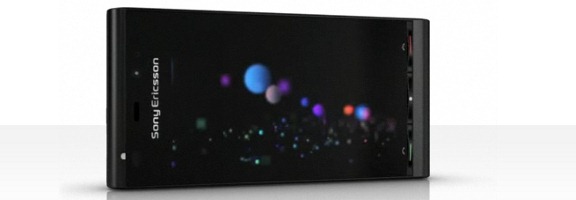
Sony Ericson Satio

This is a sponsored post written by the sponsor, Dial A Phone.  Please click here for more information on sponsored posts on 40Tech.

The Sony Ericsson Satio was originally named the Idou and comes in the shape of a 3G Smartphone with an assortment of high tech call and multimedia assets.

The handset is both easy to carry and handle as it offers a compact and ergonomically designed casing.  The casing is both contemporary and stylish in design and comes in a sophisticated black finish.

The handset housed an ample sized screen, which is touch sensitive and 3.5-inches in size.  The screen displays a total of sixteen colors and offers a high-resolution display.  The screen can also be viewed in a wide screen mode; this is especially useful when viewing various webpages and images.

The phone’s built in features are accessed by simply tapping the touch sensitive screen that supports a beautiful user interface.

The Sony Ericsson Satio is extremely lightweight and slim in appearance and measures just 15mm deep by 54mm wide and is 111mm tall, meaning it is the perfect sized phone to slip in a back pocket and also fits neatly into the users hand.

This model comes with an impressive expandable memory card, allowing the user to acquire more memory if needed.  The Sony Ericsson also supports a MicroSD memory card.

The Sony Ericsson 3G Smartphone has similar features to that of the Sony Ericsson XPERIA X1 and is an extremely popular touch screen handset.

If you’re looking for some great mobile phone deals on the web then check out the cheap mobile phones available at Dial A Phone. You can browse all of the different packages available on different handsets so take a look now!


Looking for a reliable free hosting plan? [Sponsored Post]

This is a sponsored post.  Please click here for more information on sponsored posts on 40Tech.

doteasy

When it comes to free web hosting, although free, there are still a lot of things you might want to look at before diving in. If you end up with the wrong hosting provider, you might not just get a simple headache but worst, a severe migraine. Unfortunately, issues such as downtimes, annoying ads or hidden charges are a bit common with free hosting.

So, are free web hosting plans never enough? Well, not really. It just depends on what kind of website you are trying to create. As a matter of fact, there are a lot of great deals lying around the net if you just know where to look. One of the few reliable web hosting providers that offers free hosting is Doteasy.com. But aside from the free and affordable hosting packages they provide, they also offer domain name registration services as well. They have been around the hosting and domain name registration business since 2000 and are trusted by over 160,000 domain owners. Read more