
 Using bookmarklets has become a staple item for me in internet browsing — I use everything from Readability2Evernote, to a multitude of sharing and tracking tools, each with its own nifty difference from the other. My only qualm has been the way they clutter up my toolbar. No longer! I have now installed the bookmarklet to end all bookmarklets. Quix — as they say it "Your bookmarklets on steroids". Quix does everything. It comes with most things you might need already built in and even leaves you the ability to add your own. Want to search IMDB, for example? Click Quix, type IMDB and your search term and hit enter. That easy. I fully expect that one day I will ask it to make me dinner… and it will. At the very least it will point me to a really good recipe with just a couple of keystrokes and then allow me to quickly share it with the world at large.
Category: Organization (page 5 of 5)
 Over on our Posterous site, we recently addressed one use case for reQall, a personal reminder service that allows you to capture information using voice or text. In that post, we explained how to get information into Evernote using reQall’s voice capturing and transcription features. There are other ways, though, to use reQall to stay organized. Here are a few ways that I use reQall in my life.
 I’ve talked about Evernote quite a bit here. Next to Firefox, it may be my most used application. One of the strengths of Evernote is that it is available on several different platforms, such as Windows, Mac, portable USB, iPhone, Blackberry, Palm Pre, and via the web. A quick visit to the Evernote forums, though, reveals that many people feel that one of the chinks in Evernote’s armor is the Windows client. That will change, with a new Windows version in the pipeline.
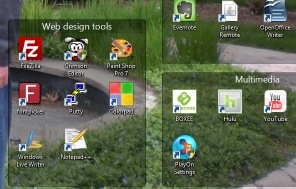 Windows only: Fences is a program, free for personal use, that helps you organize your Windows desktop. I don’t know about you, but I have problem with organization when it comes to computers. When I install an application, I often install the startup icon for that application on my desktop. When I download files, I usually download them to my desktop, thinking that if they are on my desktop, I won’t forget to clean them up later. That’s the plan at least. The reality is that after time, this results in a desktop filled with many application icons, downloaded files, and other debris that makes my desktop a virtual mess.