

Setting up a new or reformated computer can be a real pain in the neck. Part of the difficulty comes from having to download and install numerous programs. Tech and Life has a nice overview of three sites that make that process easier, by allowing you bundle programs for download and installation. The sites are Ninite, AllMyApps, and Smart Installer Pack. For example, you could decide to download Skype, Firefox, Pidgin, and Open Office in one take. Head on over to Tech and Life for a look at the three services, including a tally of the number of apps available with each service.
Speed up a Windows install or reinstall with a software installer [Tech and Life]
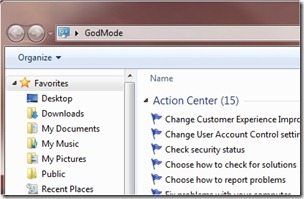 We tech geeks love to discover hidden features in our tech toys. And we love it even more those hidden features are actually useful. An Easter egg that has been making the rounds among Windows 7 users is Windows 7 "God Mode." At its simplest level, what Windows 7 God Mode does is simple – it puts a myriad of configuration options at your fingertips, in one list. Beyond that, users have discovered additional "god modes" that open up more Windows 7 configuration options. Read on for more on God Mode.
 Earlier, we discussed
  Unlike Bobby, the other writer here at 40Tech, I wasn’t brave enough to install the Windows 7 Release Candidate or Beta. As a result, I’ve only been using
  Due to the crap that was the Vista operating system (at least without 4 GB of ram and a few tricks up your sleeve), many people have skipped the OS altogether and stuck with XP. Many of those same people, however, are excited to try out the much vaunted