Menu Close

Category: iOS (page 22 of 35)

Gmail Has a New Look — And Almost Has An Official iPhone App

Gmail Has a New Look -- And Almost Has An Official iPhone App | 40Tech

In keeping with their Big Push, Google released a new version of Gmail with a major facelift, as well as released — and then pulled — their long-awaited native Gmail app for iOS.

The new Gmail look, as is to be expected, has a few minor annoyances to accompany some great new features, and the app is actually very cool, but was pulled due to a notification system problem.

Check out the feature-list for both below.


New Gmail Web App
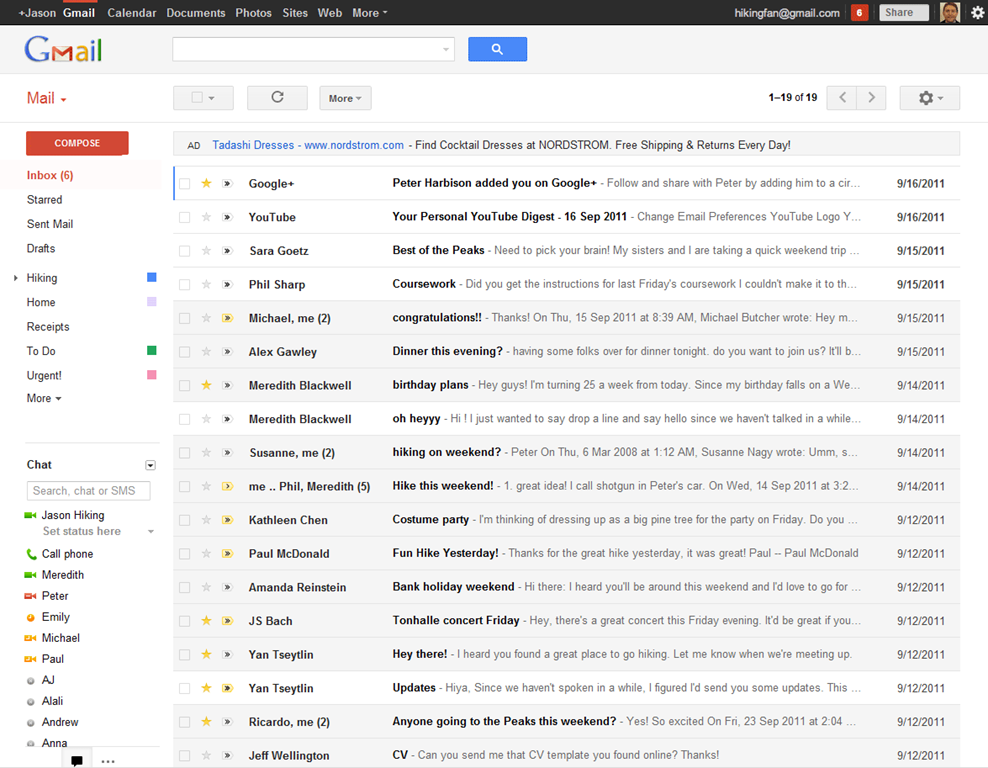
Gmail's New Look

The new web app has a look and feel that fits in with Google’s updated branding. It’s “cleaner, more modern” and is very similar to the preview theme that the Gmail team released a while back. I’ve been using that theme for a few months and I love it, but I’m not terribly fond of the dynamic “Display Density” feature.

Display Density allows you to control the default amount of whitespace for each email message in your inbox (Comfortable, Cozy, or Compact), but whill actually change dynamically depending on the size of your browser window. This may seem like a good idea, but if you use Minimal Wall’s guidelines for window sizes, it displays as Compact, no matter what, which clashes with your zen by slapping you about with tiny little squished up emails. Google should add a feature that allows you to force the display of your favourite Density, no matter the size of your window.
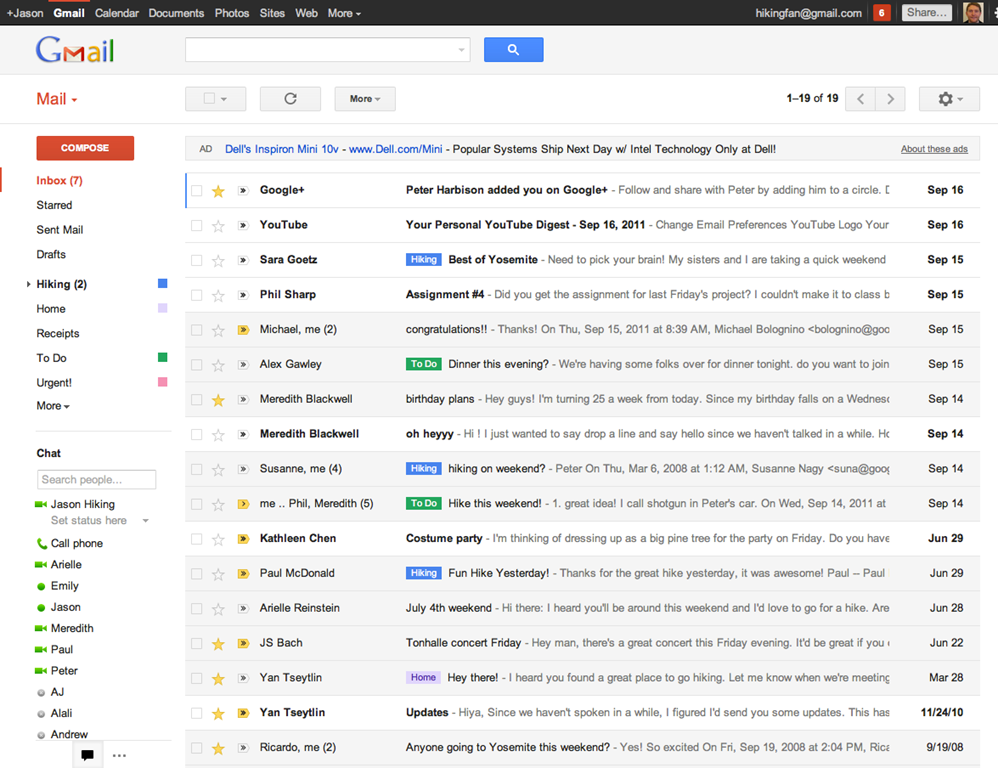
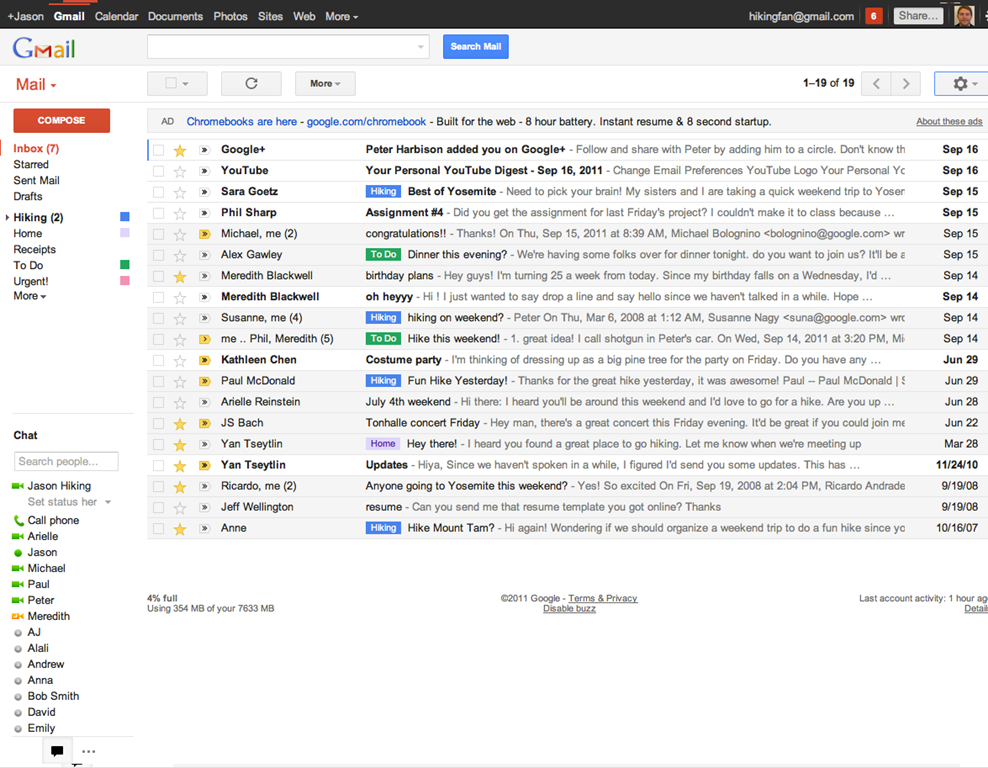
New Gmail Comfortable Setting    New Gmail Compact Setting

What is awesome about the new Gmail is the sweet new toolbar, the much-improved search dialogue — I always hated the in-field search commands — new themes, and the improved look of threaded conversations. I also like the additional control settings, the ability to drag the size of the chat window, and the awesome little buttons in the sidebar that can make the chat, gadgets, and other annoying sidebar items vanish until you want them.

Give the new Gmail a try, and let us know what you think. If you don’t love it, you can always revert back — at least for now. Check out the video for details on the upgrade:


Native Gmail App for iOS

Once Google gets a handle on the notifications errors (apparently just a silly little mistake on their part, so it shouldn’t be long), the new iOS app will probably kill the iOS mail app for me. I only use the thing because I hate waiting for Safari to load, and the new app looks like it will finally allow me to do what I’ve always wanted to from my iPhone and iPad: reply to emails with the email address that they were sent to.

This is a huge deal for me, because I use a multitude of different email addresses for different things, and they all come through Gmail. I don’t necessarily want to answer my 40Tech email or my work email with my main email address, which I’ve had forever, but might not always come off with the… professionalism… I need.

Unfortunately, you still can’t compose new email in the app and choose what email you want to send from. Baby steps, though, I suppose — and it’s still better than the iOS emai app.

The new Gmail for iOS app is nearly a full-featured Gmail experience. There is universal search, auto-complete from both Gmail contacts and iPhone addressbook, attachment upload (which is basically photos, of course), threaded conversations, priority inbox, easy archiving, labelling, starring, deleting, and spam reporting.
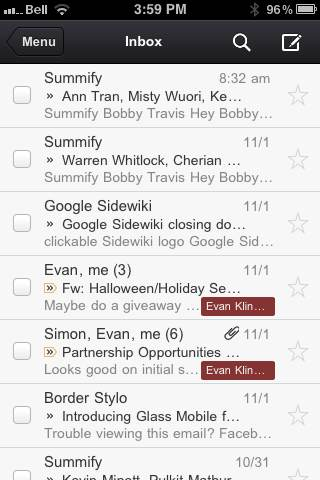
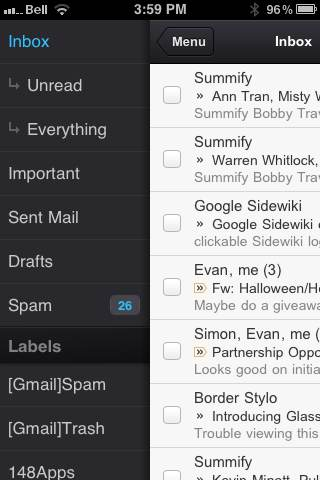
New Gmail App for iOS | 40Tech       New Native Gmail App for iOS | 40Tech

On iPhone/iPod Touch, the Gmail app gets out of its own way, focusing on the content, with a nice expandable sidebar to sort through your labels. On the iPad, you get the standard two-paned view, which makes for easy viewing and navigating on the larger screen.

The only other things to note are that, at the moment, the app doesn’t have offline support, and doesn’t do multiple Gmail accounts, and that swipe gestures — while good for the most part — sometimes feel a bit awkward.

What are your thoughts on the new look for Gmail? And when you get a chance to check it out, tell us what you think of the iOS app, as well! 


Side By Side iPhone Photo Comparison, From the Original to the 4S

IPhone photo comparison

I’ve been an Android user since late last year, and have never looked back. At the time, my iPhone was starting to feel like a very simple toy, with too many limitations. Restrictions caused by sandboxing, the inability to share files between apps, and Apple dictating what apps I couldn’t install – all that finally pushed me over to the Android camp, and I’ve had no regrets. Until now. Siri, right? That might be the first guess – that Siri has me longing for the new iPhone 4S. Nope. While it would be nice, the real draw of the 4S to me are all the reports about its fantastic camera. Now, thanks to Lisa Bettany, we can view side by side photos to see just how much better the iPhone 4S camera is than previous iPhone cameras.

Read more


App of the Week: Track and Sync Your Baby’s Feedings, Diaper Changes, and More With Baby Connect [Android, iPad, iPhone]

Baby connect iphone ipad ios android web

As most of you will probably agree, 40 isn’t so old. In fact, nowadays 40 isn’t too old to raise a newborn. That’s what is going on in my household right now, as we raise a baby that is just a couple of weeks old. When Baby 40Tech was born, my wife and I knew that it was important to keep track of the baby’s feedings, diapers, and more. Naturally, I looked to tech for help with that. Read more


The Big iCloud Disappointment for Mac Users

ICloud does not sync Pages documents on the Mac

Consider this post to be a gripe. The gripe is about iCloud, the Apple voodoo that will keep all of your documents, photographs, and music magically in sync between your iOS and OS X devices. Just turn it on and it works, without any further effort on your part. Edit a document on your iPad, and there it is waiting for you when you pick up your Mac. Except that it doesn’t quite work that way if you’re a Mac user.

Read more


Get 50GB in Your Box.net Account Just for Logging In to the Mobile App

Get 50GB in Your Box.net Account Just for Logging in to the Mobile App | 40Tech

We give cloud storage a lot of love here. And why not? Having access to, and the ability to share, your files wherever you are is peachy keen — and convenient too. It’s a competitive world, though, and the main contenders — Dropbox, Box.net, and SugarSync — have been battling it out via pricing, free storage offerings, and promotions to ensure they get a solid chunk of the target market that is you. The latest play has come from Box.net — and it’s a doozie: 50GB of free storage just for logging in to their iPhone, iPad, or iPod Touch app.

Before you ask, there’s no catch. You don’t have to sell the idea to your friends, you don’t have to buy anything after so many days of use, and you don’t have to give them your first-born child. All you have to do is log in and the 50GB is yours! The promotion started October 12th, 2011 and runs until December 2nd, 2011 (50 days). Just make sure you have the most recent version of the iOS app, and away you go.

For those who take advantage of the promotion, Box.net has also increased the maximum file-size upload to 100MB — it’s usually 25MB for free accounts. That doesn’t beat out Dropbox, for me, but there’s a lot you can do with 50GB of 100MB files, and Box has cool collaboration features that most of the competitor services don’t match. The only other thing to watch for is the 10GB bandwidth limit.

If you’re already paying for an account with Box.net, don’t fret. You can get the 50GB, too, if you downgrade to a free account. You lose out on the more advanced security and collaboration features and the like, as well as your 1GB+ upload limit, but you will still be able to share your files quickly and easily.

If you’re on Android, you might be feeling a bit of “What the hell! Can I haz…???” For Android users in general, at the moment it appears you’re out of luck. However, if you have a Sony Tablet S — which uses Android — there’s a similar promotion running. BlackBerry Playbook and HP TouchPad users are on as well. But don’t get too upset, Android Army (or those with other devices), according to the Box.net blog, they have some more promotions up their sleeves just for you guys.

What will you do with your 50GB of free storage?