Menu Close

Category: iPhone (page 9 of 19)

A Short Memoriam to Steve Jobs

A Short Memoriam to Steve Jobs | 40Tech

Steve Jobs was an innovator, a forward thinker, and an incredible entrepreneur. He took no prisoners in the battle with his competition and wasn’t afraid to make fun of them, belittle them, or otherwise express his opinion. He used that persona to help create a sense of elitism and superior quality around Apple products that catapulted the brand to wild success – a success only strengthened by the fact that the quality of Apple products often was superior.

Steve Jobs used all of his forceful personality to do what forceful personalities should do: change the world. Love him or hate him, without Steve Jobs the world as we know it would be a very different place. The man is responsible, on some level, for the computer, tablet, or smartphone you’re reading this on, for the mouse that you use to navigate your PC, and for changing the face of the music industry. And that’s just for starters.

I’m not going to bore you by reiterating what thousands of other blogs have already said. I just wanted to take a moment to express my respect for the man who helped define how I spend my life. He was no angel, and he might well have been a little crazy — but as he himself said:

Here’s to the crazy ones, the misfits, the rebels, the troublemakers, the round pegs in the square holes… the ones who see things differently — they’re not fond of rules… You can quote them, disagree with them, glorify or vilify them, but the only thing you can’t do is ignore them because they change things… they push the human race forward, and while some may see them as the crazy ones, we see genius, because the ones who are crazy enough to think that they can change the world, are the ones who do.

Rest in peace, Steve. You did big things.


Springpad Mobile Clipper is the (Near) Seamless Content Clipper You’ve Been Waiting For

Springpad Mobile Clipper is the (Near) Seamless Content Clipper You've Been Waiting For | 40Tech

It’s been a long time coming. Since I got myself an iPhone, and especially since the iPad, I’ve joined the ranks of the millions of users out there who have been waiting for a simple and easy way to clip web content on my mobile device. I’ve used Read It Later and Instapaper, I’ve copied things into email and sent them to Evernote, Springpad, Producteev, and myself. I’ve even used the desktop clipper bookmarklets with reasonable — if time-consuming — success. That’s all in the past now: Springpad has hooked up the mobile world with a new and improved web clipper that is near to seamless.

The new Springpad mobile clipper doesn’t have the fancy bells and whistles of the Chrome extension, of course, but the updated bookmarklet is straightforward and easy on the eyes, and it works just as well in Mobile Safari and Atomic Web Browser as it does on desktop browsers. I used to use the old Springpad bookmarklet, and sometimes the Evernote and Memonic ones as well, but more often than not, they would load or function slowly — if they loaded at all. I’m presented with or stumble across a plethora of juicy things I want to follow upon in any given day – and most of it happens while I’m not at my computer. Now I can grab a bookmark for later, organize it, and move on within seconds. No fuss, no later processing, and no clutter in my email inbox.


Clipping Content is Great on iPad, a Bit Neutered on iPhone

Clipping bits of content from an article or page is a bit of a problem, though, at least on the iPhone. When using the iPad, I had no issues at all. Select a bit of the text or an entire article, fire the clipper, and it appears in the bookmark’s description area, complete with formatting — unless you want to edit it, of course. That strips the HTML. On the iPhone, however, no amount of selecting or even copying text to the clipboard will get the content you want to clip to show up. All you will get is the description write-up. I’m not sure why this is, and it definitely limits the iPhone to a quick link-grabber as opposed to a full-fledged clipper.

If you really want to clip that bit of content or entire article for later reading while on the iPhone, you can copy the text and edit it into the description field by doing a select-all-and-paste maneuver. Once again, though, you will lose all formatting, including any links and images.

The iPhone issue aside, the clipper rocks for getting those bookmarks into Springpad and organized in your notebooks and tag structure. Notebooks are an easy drop down, and tags auto-complete as you type. You can also change the type of save you want it to be. Bookmark is the default, but you can change it to Business, Restaurant, Recipe, Product, and all the rest with just a few touches. Almost all the rest, that is — Note is missing, and so is Task. Not a huge loss, I suppose, unless you want to save a bookmark to a task or a note, which could happen. If you really need that functionality, you can always go into Springpad and add a reminder or a note directly to the bookmark.

Springpad Mobile Web Clipper for Mobile Safari in Atomic Web Browser | 40Tech   Springpad Mobile Safari Web Clipper | 40Tech

Selecting Post Type in Mobile Safari Web Clipper, Springpad | 40Tech   Tagging Bookmarks in Springpad Web Clipper for iPad, iPhone | 40Tech

image   image


Installation is Easy

Springpad has made it easy to install the bookmarklet to Mobile Safari. They provide step-by-step instructions in the Settings area of the most recent versions of their iPhone and iPad apps. If you use another browser, just follow the instructions and let Springpad load up Mobile Safari, as it will automatically add the JavaScript to your clipboard. After that, open up your browser of choice and add a bookmark, pasting the JavaScript into the URL field. There is no guarantee your browser will work, but I can tell you that Atomic Web Browser does just fine.

image


Springpad Has a Few More Tricks Up Their Sleeves

The new mobile clipper isn’t the only thing Springpad’s been up to lately. They also released a Quick Add bookmark for your home screen that makes it faster for you to load up the Springpad app to add a note, photo, or whatever else you choose. This is nice for those of us without widgets like those Android folks.

I also have received word from Springpad CEO, Jeff Janer, that they have some big moves in the works that will differentiate them even more from Evernote. Having a mobile clipper that consistently works and works well is a good start though. They just need to fix that pesky iPhone issue…

What are your thoughts on the Springpad Mobile Clipper?


iPhone 5 Thief Doesn’t Know Who He’s Messing With… Just Ask Conan [VIDEO]

iPhone 5 Thief Doesn't Know Who He’s Messing With... Just Ask Conan [VIDEO] | 40Tech

You might remember the whole “iPhone 4 prototype swiped in a bar” fiasco. You’re probably aware that history has recently repeated itself with the iPhone 5. What you might not know is what Apple is planning to do about it. Never fear, however! Conan O’Brien and the good folks at Team Coco have put together a commercial that shows exactly what fate awaits the intrepid thief — and it ain’t gonna be pretty.


If you were Apple, what sort of fun things would you have in store for the prototype thief? How about the dumbass who let it happen – again? Presuming that it’s not all some sort of weird publicity stunt, of course.

Source: The Next Web


Google+ for iPhone and Android Sharing — Too Little Too Late?

Google+ for iPhone and Android Sharing -- Too Little Too Late? | 40Tech

Though the initial excitement of Google+ has worn off, millions of users are still using the service and more people connect every day. For its part, Google has been working hard at bringing the preview social network closer to a production offering, adding social gaming without annoying people, verified accounts for prominent users and famous folk, and ironing out their sign-up rules (the heavily debated real name only policy). They have also been paying attention to their mobile apps, finally adding post sharing into the Android app. iOS users had to wait a bit, as is per usual, but the much awaited update is now available in the app store.

But is development coming along too slowly to keep up interest?

Personally, I’m a huge fan of Google+. There are a lot of innovative uses that are cropping up — cooking classes via hangout, blog replacement, collaborative writing groups; Evan and I are even putting together a hangout-based pen and paper roleplaying game, cementing our geek status once and for all. Google+ is also a fantastic place to meet and converse with new people, focusing on like interests over general broadcasting, which makes for better conversation and better relationships.

The problem is, I’ve started to notice that my streams are starting to degrade. People appear to be less active, less conversant, or generally gone and gone. This could be due to the end of the summer — people are getting busier as the school season and work focus heat up — and it could be part of the overall ebb and flow of a new product. It could also be that Google is taking too long to get their service off the ground and into the hands of the general public.

Gmail was in beta for years, and to the point that it was really more of a long-standing joke than anything else, but the Internet back then was, if you can believe it, less fickle. With the world takeover of social networking and subsequent obsession with real-time streams, the attention span of your average user is practically gnat-sized. And let’s not forget that, in order to get noticed in the massive amounts of information flowing through the digital-verse, bloggers and people in general tend to gravitate toward sweeping sentiments of “wow this is awesome” build-up and “it’s never gonna make it, and here’s why!!!” doom and gloom statements. And yes, I realize that it wouldn’t take a stretch if the imagination to lump this post in with them, no matter what I say t the contrary. The point is, it makes it really hard to accurately gauge if a service will live or die.

To top things off, Facebook hasn’t been sitting about with thumbs in nethers, either. They’ve been paying attention to what people like about G+ over Facebook and have been making changes to how their own streams work, attempting to make it easier to share with those you want to share with, and even (finally) updating their mobile apps for new sharing and privacy options.

I say again, I’m digging Google+ — but I dug Google Wave, too. I think that Google’s push to integrate Plus into their overall offerings will help keep things moving, but I have to wonder: if users as a whole notice their streams downgrading in quality and movement, will it start one of those slow spirals into web oblivion?

It’s been a few months now, what are your thoughts?


Evernote for iOS Update Brings Rich Text Support, Shared Notebooks, and Other Goodies

Evernote for iOS Update Brings Rich Text Support, Shared Notebooks, and Other Goodies | 40Tech

Last week, when it was still August (where the hell did the summer go?), Evernote released the mother of all iOS updates. There was a lot to it — a cool redesign, a lock feature for premium users — but the big deal was the inclusion of a rich text editor and the ability to access notes in shared notebooks.

The new features aren’t as robust as the desktop version of Evernote, of course, but are nonetheless dripping with the sort of awesome that makes you want to find your Irish roots and dance a merry jig.

Here are the highlights:

Rich Text Editor

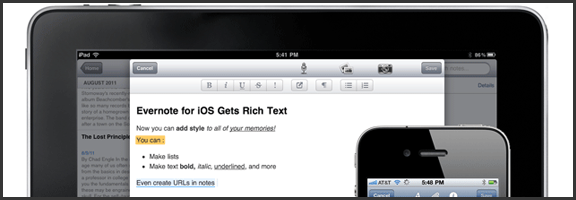
The new editor allows for basic bold, italics, underline, bullets and the like, as well as strike-through, header text, highlighting and linking. You can also edit notes that were already created with rich text, which is great, but don’t think the append prompt is gone for good. If the note has too much fancy in it, even the new editor may not like it. There is a new option, though, that saves at least a bit of headache: the ability to simplify the formatting to be workable in the iOS apps. This way, you only lose some of the formatting, instead of everything.

Evernote for iOS (iPhone, iPod Touch, iPad) Now Has a Rich Text Editor | From Evernote Blog

Note: Checkboxes are still not able to be created in Evernote for iOS. You can check them, but not make them.


Shared Notebooks

Tired of not being able to access a note or notebook that someone shared with you? Now that Evernote has added shared notebooks into iPhone, iPad, and iPod Touch, you can breathe easy. Note that I said access, however. You can only read them, not create new ones. Yet.


Another handy feature is the new ability to search within notes. Want to find a word or turn of phrase from your note? Now you can, quickly and easily. It’s no desktop search, but it’s definitely a good start.

This is only the tip of the update-iceberg. There’s a lot more going on under the hood and in the form of a new look and feel for Evernote’s iOS apps. If you haven’t updated yet, you should. Get the full list of new features here.

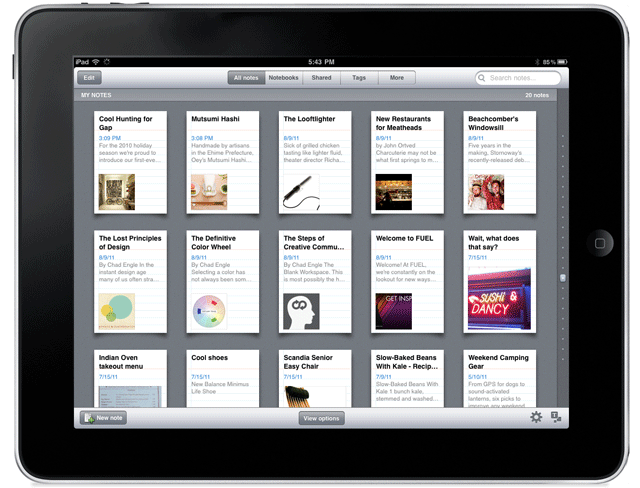
New Evenrote Design for iPad | From Evernote Blog

Thoughts on Evernote’s new iOS features? Head down to the comments!