Menu Close

Category: Hardware (page 4 of 5)

Techies Think 7 Inches of Samsung Will Work Just Fine

Samsung Galaxy Tab | 40Tech

The tech community seems to be almost overwhelmingly positive about the new Samsung Galaxy Tab. Some of that is because the tech community tends to love the openness of Android, and some of that is because the Tab is a shiny new toy — but much of it appears to be because Samsung’s new tablet is actually pretty cool.

Check out the video, below, from Stuff.tv. It’s one of many reviews and unboxings that I’ve come across that sings a balanced tune about the Tab’s goodness. Some highlights are as follows:

  • The smaller size of the Tab is a good thing, as it can fit in a (large) pocket and is easier to type on than an iPad (for people focused on thumb-typing).
  • Having Flash on a tablet is awesome and it appears to work pretty well, even on 3G.
  • Samsung and Carriers have pre-loaded “helpful” software (or bloatware) onto the device.
  • The interface, while infinitely more configurable, is not a slick as the iPad — but it does the job.
  • People will like it, no matter what Steve Jobs thinks.

My last two highlight points, above, were mentioned in every single positive review I read, watched, or skimmed, and though there are a few negative reviews out there, many of them come of as Apple fanboys doing what Apple fanboys love to do: trashing things that are not Apple. There are a some reasonable points to take away from the negative reviews, however, such as the difficulty that first time users of the Tab can have with finding the “on” button, and the fact that Android 2.2 was simply not built for tablets (just like Google said it wasn’t) and that leads to the occasional performance hiccup.

Overall, it seems that the Samsung Galaxy Tab will be a reasonable alternative to the iPad, even if it will never quite achieve the elitist notoriety of an Apple product. What do you think?

Samsung Galaxy Tab Video Review [Stuff.tv]

Do We Really Need 3D-Enabled Cell Phones?

Do We Really Need 3D-Enabled Cell Phones? | 40Tech

I may be one of the few left on the planet that is underwhelmed (and often annoyed) by the 3D-everything craze. I understand that it is the current reality of the video and gaming world, and I admit that 3D-TV tech is pretty cool, but I really don’t need all of my media to pop out of the screen at me. Plus, it hurts my sensitive, near-35 year old eyes — and I don’t like to wear the glasses. That said, it appears that Sharp is attempting to address at least the latter part of my whining with the advent of their new 3D cell phones.

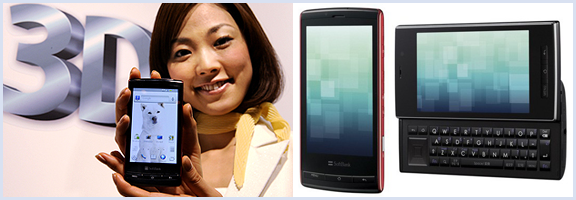
You heard me right, 3D cell phones. The Galapagos 003SH and 005SH are the latest iteration of the Android handset, and sport the nifty, no glasses, 3D-screen tech that is reported to be used in the upcoming Nintendo 3DS.

The tech itself is both innovative and awesome, there is no question of that. It uses a parallax barrier system that specifies where it directs light (to the left or right eye) via a series of vertical slits. This creates a sense of depth and allows for a 3D environment on an otherwise normal LCD screen — again, without special glasses. By all reports, the effect is stunning, and Engadget reports that there are already some mobile games publishers on board (Capcom will be bringing Mega Man, Resident Evil, and Ghosts ‘n Goblins to the new devices).

Like I said, this is some pretty cool tech — but is it necessary? PDA screens are already hard on the eyes. Do we really need to add another layer that will have people staring even harder at their screens? Is it even necessary to have 3D gaming on a cell phone — or anywhere? I mean, it’s not like its an interactive hologram or anything like that — though that is getting closer, too.

What do you think about the latest innovation in mobile and 3D technology? For? Against? Happily indifferent? Tell us why in the comments?


Analyze Your RAM For Free

Today, 40Tech is pleased to present a guest post by Keith from Computer Repair Calgary.

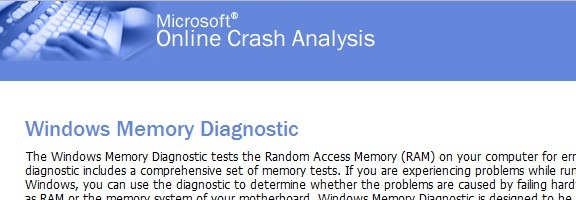
Microsoft memory test

The modern computer workstation is made up of a wide variety of parts. Unfortunately,
when any one of these parts runs into problems you, the computer user, are likely to feel
the negative consequences.


When RAM Goes Bad

RAM, the shorthand for random access memory, (a form of computer short term
memory), is no exception. When your RAM starts misbehaving you will notice certain
signals. What are the likely signals, you may be asking yourself? Well, bad random
access memory generally causes a computer to become somewhat unstable. In other
words, you may be working on a word document, or loading up a picture when suddenly
your PC suddenly quits the application or decides to restart entirely (often giving you
some kind of error). The biggest problem here is that your computer is not wise enough
to tell you exactly what is happening. It doesn’t come right out and say, you know what;
your memory is no good. Rather, it will typically give you an archaic error message
which is generally of little help. As a result, it is up to you, the computer user, to figure
out where the problem truly lies. Consequently, you have two choices. You can either
attempt to determine the problem yourself, or you can send your machine into your local
computer repair shop.

If your system is becoming increasingly erratic, one way you can test your computer’ s
RAM is through the use of a free Microsoft designed product known as Microsoft
Memory Diagnostic. As its name suggests, this particular application is solely designed to
diagnose your RAM. In layman’s terms, it will tell you if it believes that your memory is
good or bad (and in need of replacement).


Testing your RAM with Memory Diagnostic

So how does one go about using Microsoft Memory Diagnostic then? Luckily, the
procedure is fairly easy; especially if you take your time to work through it.

1) Head over to the Microsoft Memory Diagnostic webpage and download the program.
2) Run the program and choose to create a CD Image
3) Burn this CD Image onto a CD (you can find a wide range of free programs online
which allow you to burn a CD Image – also known as an ISO – onto a CD)
4) Put the CD into your CD drive
5) Reboot your computer and choose to boot from your CD (take a look on Google if you
are unsure how to boot from a CD – trust us, it’s not that hard once you take the time to
learn how).
6) Let Microsoft Memory Diagnostic run for at least 1 pass
7) If there are error messages at the bottom of the screen then some of your memory is
likely bad. If there are no error messages then there is a reasonable chance that everything
is ok.
8) Restart your computer when done.


That’s all there is to it!

Bio: Computer Repair Calgary is a computer repair blog hosted by Keith. On his site, he gives various computer tips and tricks, including how to test RAM.


eLegs Exoskeleton: Another Bit of Science Fiction Becomes Reality

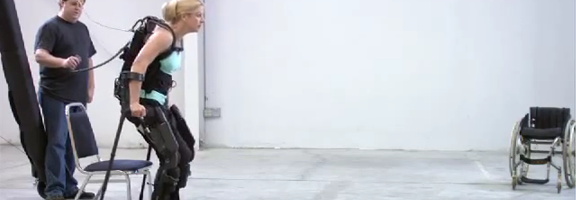
eLegs Bionic ExoSkeleton

I like it when science fiction tech waltzes its way into the “really real” — and that’s what eLegs is doing. Well, it may not be waltzing just yet, but it’s certainly going a long way to helping paraplegics start walking!

eLegs is based on the HULC exoskeleton built for the military by Berkeley Bionics and is heading into medical trials. At the moment, it is not complete upright mobile freedom, but it is a huge step forward and actually does help paraplegics to get out of their chairs and walk. The creators say that they are already working on a “home” version that will allow users to walk unassisted (outside of the robotic exoskeleton, of course).

This is a fantastic step forward for rehabilitation efforts and generally helping people — and while the irony of eLegs developing from a military contract doesn’t escape me, it is equally fantastic that something so positive came from the technology. The grin on the woman in the video below says more than enough to me…

Check out Make Magazine’s blog for more stories like this, and the one I posted on Wednesday. It’s worth your time.

Berkeley Bionics introduces eLEGS exoskeleton [Make Magazine]


Experience the TÖKEN: Multitouch Gone Awesome

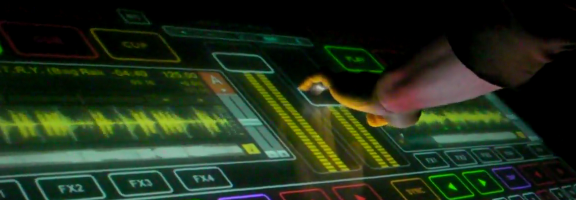
Token Experience Multitouch Music Technology

I’m a music nut. Are you a music nut? We’re all technology nuts, here — and when the two combine… well, let’s just say it makes me happy. This afternoon, my friend and fellow music/tech geek Eric — also known as my business partner — sent me something fantastic that I had to share with you. I want one! If you haven’t come across it already, allow me to introduce you to Töken, a “multitouch technology platform” that was made to bring live music performance to an entirely new level.

Töken was created by Rodrigo Campos Santiago of Chile. It’s a prototype; not for sale, not even in production, but just begging for an audience. I’m not kidding when I say I want one — and my mind boggles when I think what could happen if Timbaland got hold of one. Check out the video below for a sample, and visit the Vimeo site for more Töken and some other fun multitouch tech vids.

Awesome!

Töken Experience [TökenExperience]