Menu Close

Category: Google (page 6 of 21)

Bye Bye Google Buzz On November 14th 2011

Bye Bye Google Buzz On November 14th 2011 | 40Tech

Google Buzz is going the way of the dinosaur — or maybe the Dodo is a better analogy. Either way, as of November 14th, the hopeful attempt at getting in on some of that Twitter juice will simply fade away. Google’s on to bigger things now — like trying to get a piece of that Facebook pie, with some Twitter a la mode. Sounds nummy, right? Or maybe I’m just getting hungry…

Google officially announced the retirement of the Gmail-integrated Buzz on October 14th, but some of you may only now be getting the little pop-up notification in your Inbox. I got mine yesterday and I realized that, in a weird way, I’ll miss the service. It seemed like it had so much potential, at first. We even wrote about why we figured it wouldn’t flop – oh, wait… that was Wave. What can I say… we’re optimists. In any case, the integration of Buzz was handled badly, the “bubble up” experience was annoying (to say the least), and the UI design was the former and most unfortunate Google Ugly.

Thankfully, Google+ not only cannibalized some of the best that Buzz had to offer, but it also was designed with the understanding that minimalist can be pretty, too. The jury’s still out on whether or not Google’s latest social offering will see long-term development, but the Magic 8 Ball —  and my never-ending, aforementioned optimism — tells me that chances are good…

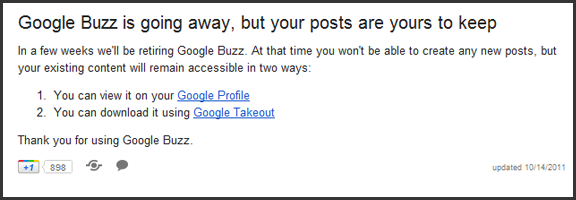
So, anyway… If you want to view or keep your Google Buzz content, you can still see it on your Google Profile, and you can download it via Google Takeout —  a very handy service, I might add.

On a final note, does anyone else find it funny that the “Google Buzz is going away…” post in the Big G’s Gmail Help pages can be actually shared on Buzz — and that there is a button to open up Sidewiki as well? Just me…?

Say your farewells to Buzz in the comments.


Worried That Google Is Spying on Your Searches? Then Screw Google With Scroogle

Scroogle

We once pondered whether Google was the devil. One of the issues that we raised was one of privacy. If you’re worried that Google is tracking your searches by cookie ID or by IP address, you have some options to thwart Google. One of those options is Scroogle.

Read more


If You Haven’t Heard — or Noticed the Huge Sign — Google+ is Open for Business and More Awesomer than Ever

If You Haven't Heard -- or Noticed the Huge Sign -- Google+ is Open for Business and More Awesomer than Ever | 40Tech

So let’s get the dust out of the air right away: I am fully aware that “awesomer” is not a word. I am also fully aware that all of the big tech blogs and probably everybody else with a post up today (or yesterday, by the time you read this) has already talked about this. I don’t care. This is 40Tech dammit! And I want to talk about it. With you.

So here it is: Google+ dropped a ton of new goodness for their social network today, opened it up to the public (bye bye preview, hello open beta!), and worked with wil.i.am of the Black Eyed Peas (who also loves the tech) to put together the first publicly broadcast on YouTube video Hangout. Big day — and those are barely the highlights.


Here’s the Big Sign — Come One Come All!

Google+ is Open to the Public, has a Big Sign to Prove it | 40Tech


Here’s Just a Few of the New Features

Search!

It’s finally here. You can search for whatever in the Google+ search box and get back relevant people, posts, and web content. You get the public stuff and the items that only you can see.

Hangouts on Your Mobile Device

Available for Android first, of course, with iOS on the docket soon. Full-fledged multi-person video chat while on the go.

Hangouts On Air

Webinars, video broadcasts to large audiences (with up to nine other people to team up with), and session recording for those who miss it. The broadcasts are limited for the moment, but anyone can watch.

Hangouts with More Awesome!

Screensharing, sketchpad, Google Docs sharing, and the ability to name your Hangouts so you can focus your topic. These are still under construction, According to the Google Blog, but you can try them out by clicking “Hangouts with extras” in the green room.

Messenger for Mobile (Formerly Huddle) — Also More Awesome.

You can now share photos in your mobile chats!

APIs

And let’s not forget that they’ve dropped their first API for developers to play with. Klout has already jumped on board, adding Google+ to their social scoring platform, and you know that others are going to start coming out of the woodwork too, especially as the API improves and allows for more integration possibilities — for example, they are going to be releasing some Hangout APIs soon…


Here’s the Bottom Line

I’m not saying that Google+ doesn’t still have its work cut out for it, especially with social networking overload already frustrating the hell out of your average, or even super-social-geek, user. The kid gloves are off though. The most widely used tool for finding information has made Google+ its focal point. Google is creating a platform to personalize search, and give you a permanent home on the web — you can search for new information, search for things your friends are talking about, easily find and share and talk about whatever interests you, do all of that with only the people you care to, play games by yourself or socially, easily upload and share pictures, hangout with people via chat or video from your computer or your mobile device, broadcast yourself for the hell of it or for conferences or webinars, handle (or even throw away) your email, and more more more for the simple and effective cost of free.

Facebook may have the people, at the moment, but Google+ isn’t going away. Remember when Gmail came out? It didn’t look like a very likely competitor to Hotmail or any other webmail service at the time. Look at it now — especially since the rise of Google Apps. Google hasn’t even launched the business aspect of Google+ yet. What do you think will happen then?

What are your thoughts on the new, fancy, public Google+?


Quickly Check a Site for Safety – And Malware History – With Google’s Safe Browsing Diagnostic Tool

Google safe browsing diagnostic tool

If it seems like we’ve been focusing on security lately, it’s because we have been. After we got hacked a few weeks ago, we took extra steps to lock down the site. From plugging the initial vulnerability and removing the intrusion, to running scanners to make sure the site was clean, to installing a WordPress plugin to notify us if any file on the site is changed, to turning on two-factor authentication in Gmail so site passwords couldn’t be comprised via email, we’ve been extra-cautious. Perhaps no site is secure when faced with a determined hacker, but you can ever be too safe. One more tool that you can use on your own site, or to check the malware status and history of other sites, is Google’s Safe Browsing Diagnostic Tool.

Read more


Master the Google+ Interface with these Great Tips

GooglePlus

Editor’s note: Today, 40Tech is pleased to present you with a guest post from Kevin Moor, of slow-computers.com.

Since launching the preview earlier this summer, Google+ has quickly gained users across the globe, reaching more that 25 million individuals within the first month of its availability. The service has been heralded as ushering in a new wave in social media, as web users begin to shift in the way they connect with those around them. While registration for the site is still by invitation only, the service run by the search engine powerhouse is poised to become a serious player in the crowded field of social networking. For new users try to get familiar with the Google+ interface, the following tips are a great way to stay on top of the game.


Send Private Messages by Way of Post

All of the updates users send to Google+ are called “posts.” Facebook users may be more familiar with the terms “status update,” “wall post,” and “notes.” Google+ groups all of those things together, allowing users to publish posts that can be shared with as many or as few people as desired.

One of the primary features of Google+ is the ability to create “circles.” Circles are designed to mimic interpersonal groups in the real world. For example, you might choose to add all of your colleagues to one circle, while all of your friends from your college days form another. Individuals can also be added to multiple circles, making it easy to keep the right people in the know.

To send a private message to a friend on Google+, you’ll simply need to to indicate that the message can only be shared with that person. Typing their name when you publish the post will make it viewable only to their eyes. You may also want to deactivate resharing once you’ve published the message, as this will prevent the post from being forwarded to other users.


Stay Updated Instantly via Chat

Users who are already familiar with Google Chat are sure to love the chat interface built into Google+. Google has worked to ensure that all of its products and services are incorporated together in its new social media offering. The chat function in Google+ is a great example of this harmony. Existing contacts from Gmail, Google Talk, and iGoogle are all included within the window of available individuals who can be contacted through the system.

Another great option chatting in Google+ makes available is the option to only allow certain circles to chat with you. If you have ever accidentally signed into a chat service, only to be bothered by individuals you weren’t interested in speaking with, you are certain to appreciate the simplicity of this feature. Easily define which circles should be made available for chatting and which you would prefer to avoid, and you’ll keep your chat interface free of unwanted distraction.


Learn to Navigate with Shortcuts

For an easier browsing experience, Google+ incorporates a variety of different shortcuts that make it easy to browse content published by friends and family. Some of the most important shortcuts include hitting the spacebar to scroll down your stream, using the letters J and K to move up or down one post, and using the combination of tab and enter to submit new comments. While these shortcuts may seem a little bit difficult to master, once you have learned the basics, you will be navigating Google+ like a pro in no time flat.


Keep Your Privacy In Check

Sharing information with specific circles is a great way to avoid sharing content that might be inappropriate for certain members of your entourage. Unfortunately, it can be difficult to keep track of which individuals you have granted specific privileges to for viewing your content. Instead of going back to look at the circles that a friend is part of, you can easily view your profile the way that contact sees is by typing the person’s name in the “View Profile As” box on your profile.


As users spend more time getting familiar with Google+, using the new social media client is certain to become second nature. The intuitive design is jampacked with great features that make it easy to see why technology analysts believe Google+ could one day rival the prominence of giants like Facebook and Twitter. In the meantime, by spending some time getting acquainted with Google+, users can avoid a steep learning curve in the future, should the service become the primary social media client of choice for web users.

This article is written by Kevin Moor who writes for slow-computers.com, a site reviewing and testing various slow computer issues.