Menu Close

Category: Gadgets (page 4 of 11)

What is On Your Holiday Gift List? Here Are Some Ideas

Presents under tree

‘Tis the season for giving, but also receiving. If you’re like me, then the holidays are always a time for getting a new gadget or two. With that in mind, what tech goodness do you have on your wish list? Any games, gadgets, or other geekiness? To give you some ideas, here is what I have on my list, in no particular order.

Read more


LapGuard Protects Your Tender Parts From Harmful Heat And WiFi Radiation

LapGuard Protects Your Tender Parts From Harmful Heat And WiFi Radiation | 40Tech

Contrary to the current arc of techno-loving crazy flying about the internet, the laptop is not dead, and tablets — though awesome — have not yet taken over the world. In fact, millions of people are using laptops right now. They’ve got them sitting on (surprise!) their laps, whirring away, blasting their tender parts with heat and WiFi radiation. Apparently, recent reports are saying that’s a bad thing; that it can mess with your baby-having potential. Having just had another cute little baby, I can’t really speak to that — but I have been following reports that WiFi radiation can be harmful, and it’s well-documented that heat is no friend to the business of making tiny humans.

Whether you believe in the dangers of WiFi radiation or not, I think we can all agree that comfort is a good thing. That’s one of the reasons the lap-desk was invented, and — heat and WiFi blocking powers notwithstanding — Digital Innovations’ LapGuard is one of the best I’ve come across.

In the interests of full disclosure, this is the part where I tell you that Digital Innovations sent me two LapGuards (a regular and a Portable one), with a request that I take a look at them and give a fair and honest review. We did the same thing a while back, when we looked at their SkipDr disc repair and cleaning kits. As then, the contents of this review are unbiased and contain only my real, ever-so-honest opinions.


Functionality

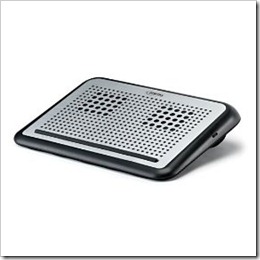
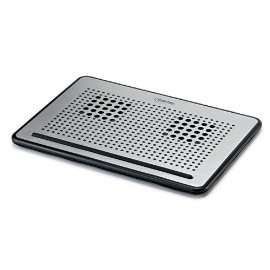
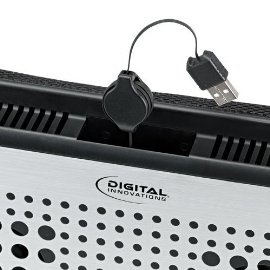
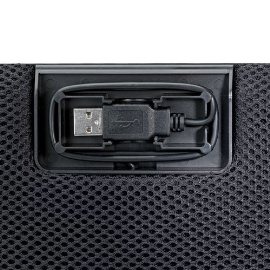
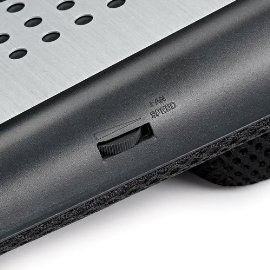
The LapGuard scores well on three fronts: it’s comfortable, it’s quiet, and it’s pretty. It also has some nice features. For example, the Portable LapGuard has a nice spot underneath to wrap up and lock away the USB power cable. This makes storing and packing the thing around much less annoying. The regular LapGuard, which is a bit bigger, also handles the USB cable well — but it’s power cable is retractable. To make things more fun, the regular LapGuard also has a handy fan-speed control dial for the dual fans that can help you conserve battery power while still keeping things chill.

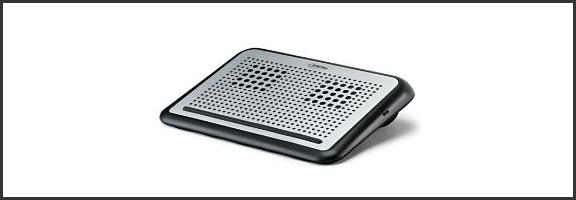
LapGuard Laptop Desk | Digital Innovations     Portable LapGuard Laptop Desk | Digital InnovationsLapGuard Lapdesk with Retractable USB Cable | Digital Innovations          Portable LapGuard Lapdesk with Hidden USB Cable | Digital Innovations

I’m not entirely sure why the Portable LapGuard doesn’t allow for variable fan-speed. It should be possible, considering that the only real difference between it and the regular LapGuard is that the regular one has an additional block of padding at the top that allows for some angled ergonomic comfort while working. Ergonomic comfort doesn’t slide into a backpack very well, though, hence the need for the Portable design.

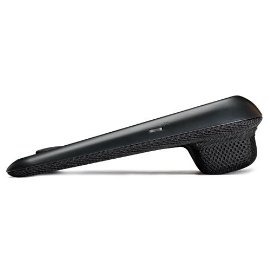
LapGuard Lapdesk Variable Fan-speed | Digital Innovations          LapGuard Lapdesk Side View | Digital Innovations

The fans on both models are, as I said, pretty quiet, and I found that they did a good job of pushing the heat away from me, and keeping my Toshiba cool. And that’s saying something — anyone who has a Toshiba laptop knows that heat can be a problem.


WiFi Radiation Shielding

To be perfectly honest, the WiFi radiation shielding seems a bit gimmicky to me. Sure, sure, Digital Innovations is applying patent-pending technology here – but I have no way of testing to see if it works, and depending on what you read and who you talk to, it’s not even proven that WiFi radiation is a problem. However, if it is an issue, I admit I’d rather err on the side of caution — and if it isn’t… well, the things look pretty and currently only cost $29.99 (Portable) and $37.49, respectively. I’ve been using the LapGuards pretty heavily the past few weeks and I’m more than comfortable with those prices just for the basic use and the look of them. Unfortunately, though, those are just sale prices. The LapGuard is regularly $49.99 and $39.99 (Portable). My cheapness (and my wife) might have trouble reconciling the purchase at the regular prices.


To Sum Up

Pros

  • Retractable (or otherwise hidden) USB power cables
  • Comfortable
  • Variable fan-speed (regular model)
  • Pretty


Cons

  • No way to be sure if the WiFi radiation blocking is working or even necessary
  • No variable fan-speed on the Portable LapGuard


Would I buy it?

Yes — for myself or as a gift. Only at the sale price, though.


What’s your favourite lap-desk?


A Rundown on the Top ‘Colorful’ E-readers in the Market

A Rundown on the Top 'Colorful' E-readers in the Market | 40Tech

Editor’s note: Today, 40Tech is pleased to present you with a guest post from Annabelle of Godot Media.

Pink seems to be the color on everyone’s minds, with men and women alike choosing fancy and cheap pink e-readers over the usual white, black or silver colored e-readers. Besides features and functionality, aesthetics is an important consideration for buyers of laptops, e-readers and other computing devices. Though not many brands have color options when it comes to e-book readers, there are a few manufacturers like Sony, Bookeen, Cool-er etcetera who do offer cheap e-readers in many colors including pink. For those who want to check reviews and compare deals on ‘pink readers’, here is some information on the different brands that have pink e-readers for sale.

Sony E-readers

Among the most popular electronic book reader brands, Sony has pink e-readers that are slim, light-weight and small enough to fit into your pocket easily. Available in rose-pink and silver color, this e-book reader has an easy to use touch-screen, a glare-free screen that enables hours of stress free reading, 12 built-in dictionaries, abundant memory space and long battery life that can keep you reading for almost 2 weeks with a single charge.

Bookeen E-readers

You can buy cheap pink e-readers from Bookeen, which is a less known French company offering eBook readers to users around the world. The e-readers offered by this company are available in seven different colors, including pink, black and white. Compatible with Linux operating system, Bookeen e-readers are available in grayscale, with a 5” screen that also enables daylight reading, a USB drive, G-sensor motion detector and a battery that can run for almost 2 weeks after charging it.

Cool-er

Cool-er is the brand name for an eBook reader by the UK based company called Interead. Marketed as the iPod of the E-reader world, this small, light-weighted pink e-reader is available in eight different shades including hot pink and cool pink. The cool-er is compatible with windows and MAC operating systems, can store up to 4000 eBooks with expandable memory, and supports many formats of electronic books including FB2 and RTF. The added benefit of a cool-er is that you can share e-books with up to five people for free.

Kobo E-readers

The Canadian based manufacturer Kobo Inc., may not have an exact pink e-reader computer but offers a closer shade of pink – the porcelain or pearlized lilac. Available only with grayscale display, this e-reader has Wi-Fi connectivity, expandable memory, long battery life and a built-in dictionary.

Other brands

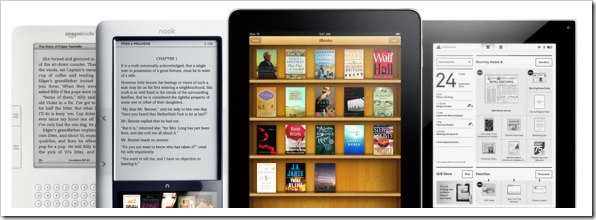
Besides buying cheap pink e-readers from the above mentioned brands, the cheapest way to get a pink e-reader is by converting your existing black, white or silver colored e-reader to pink with the help of e-reader accessories. For the Amazon Kindle that is available mostly in black or graphite white, you can find silicon and leather cases in various shades of pink, while Barnes and Noble offers a ‘grapefruit pink’ silicon frame to make its ‘Nook’ even more attractive.

Although the original pink e-reader brands are a bit highly priced in comparison to the white or black models, you can get the best prices on pink e-readers from the many exciting deals and offers that are available in the market.

Author bio: Annabelle is a senior technology writer with content writing service firm Godot Media (Twitter Godot Media). She has interests ranging from latest gadgets to following web technologies and trends. She has also ghost written several eBooks as a part of the eBook writing service team at Godot Media.


Nexus S and Android in Space

Nexus S and Android in Space | 40Tech

Back in October, I wrote a short post about a father-son DIY project that sent an iPhone into the upper stratosphere. In December, the geeks at Google did the same thing, but with more of a mind toward data (and cool picture) collecting. Well, NASA one-upped them all by taking not one, but two Android Nexus S smartphones into orbit with the final space shuttle mission. They weren’t used to phone home or anything quite so cliché (but cool!) — nope, these little robot-bearing phones were actually used to control other, more sophisticated robots: SPHERE satellites.

SPHERES (Synchronized Position Hold, Engage, Reorient, Experimental Satellites) are small, “volleyball-sized” robots that are used to capture video footage and record sensor data. Normally, the astronauts do this manually, but with the satellites and their fancy Android-powered phone-brains, these things can be controlled from the ground — via WiFi.

According to the Google blog, NASA decided that Android was perfect for them due to its configurable open source nature, as well as the handy app that some Google engineers built for logging sensor data (you can download the app yourself from the Android Market). Apparently, the multiple sensors and low-powered/high performance processor of the Nexus S was also a selling point.

Google’s been making a lot of big moves this past year, what with Plus, the redesign, the Chromebook, Chrome Web Store, and the purchase of a major cell-phone company (Motorola Mobility). Why shouldn’t they get some representation in space too? It only makes sense. And it’s only a matter of time until either Google or Apple carve their logo into the face of the moon for all to see. Am I right or am I right?

Android in Spaaaace Part 2 [Google Blog]


Eyeborg: So This Guy Replaces His Eye With a Wireless Web Cam… [Random Tech Video]

Rob Spence, Eyeborg: Endoscopic, Wireless Web Cam in Prosthetic Eye   40Tech

It may sound like a joke — but it’s not. If you’ve been poking about on YouTube or TechCrunch today, you may have already seen this: an interview (and partial commercial for the new Deus Ex) with Rob Spence, a man who has successfully created a prosthetic eye for himself that is actually an endoscope turned wireless video camera. It doesn’t plug into his brain or anything (we’re a while away from that yet), only outputting to a handheld LCD receiver/viewer, but hey — that’s still good enough for a decent bit of spy-tech, right? At the very least, it makes for a good “neeeeeeat” or “oh-ye-gods-that’s-gross” story.

Check out the video, below. Yep, video — and you do get to see him install and remove the eye, so if you’re squeamish… well, you’ve been warned.

http://www.youtube.com/watch?v=MTlFgtjLLCE&feature=player_embedded


So who wants one?