
 Many of you use more than one computer. You probably have a computer at home and one at work, and you may even have a laptop as well. Some of you probably even have a few computers in different rooms in your home. Keeping track of logins, passwords, bookmarks, and other information between your computers can be a real pain in the neck. Fortunately, there are some online tools to help you keep all of this information in sync. Here are five of them.
Category: Evernote (page 9 of 9)
I’ve talked about Evernote a few times here already.  At the risk of suffocating you with another post about it, I want to call some attention to a time-saving tip from Elldove over in the Evernote official forums. Elldove posted some javascript for a bookmarklet that combines the Readability bookmarklet and the Evernote web clipper bookmarklet into one bookmarklet.
Readability is a tool, in the form of a bookmarklet, that removes the clutter around what you’re reading and presents a page in a format that is easy to read. Here is a before and after look at a page formatted with the Readability bookmarklet (images have been resized to fit the page):
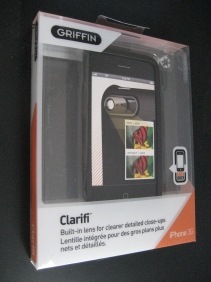 I previously have professed my love for Evernote as a way to unclutter my life. One of the nice features of Evernote is its cross-platform support. I use Evernote on my iPhone to take photographs of notes, business cards, and even wine labels. The iPhone isn’t ideal for this, as its camera doesn’t have autofocus, and is not designed to take clear photographs of text at close range. To address this, I purchased the Griffin Clarifi iPhone case. Read on for my take on the Clarifi, using the Griffin Elan iPhone case as a point of reference.
What makes the Clarifi different from other cases is the lens on the rear, that slides over the iPhone camera lens. The Clarifi lens acts as a magnifying lens of sorts, making most text much more legible. The lens slides with the touch of a finger to cover or uncover the iPhone lens. I had read other reviews that complained that the lens would slide on its own, but I haven’t experienced that problem. There is plenty of friction, at least on mine, that prevents the lens from sliding until I want to slide it. Here is an example of the same text taken first with the Clarifi lens in place (top), and then without it (bottom):
 I find that the older I get, the more cluttered my mind becomes. You don’t have to be 40+ to be cluttered and disorganized in today’s fast-paced world, but until recently it seemed like my brain was becoming more scattered with each passing year. My desks at work and home looked like I was farming Post-it® notes, with notes everywhere filled with ideas, reminders, and lists. I would have bills and receipts in a stack, waiting to be filed. My filing cabinet looked like something out of a horror flick. Needless to say, my wife was less than thrilled with what this did to her well-planned decor. How to tame this mess? Evernote to the rescue. Read on for more on how Evernote can help you “unclutter” your mind and your life.
 Many of you have spouses who love tech just as much as you do. That’s not always the case, though. Some of you are in a relationship with a somone who just doesn’t understand your fascination with shiny toys. It doesn’t have to be that way, as there are some tech items that even non-tech geeks can love. Read on after the break for five of them.