Menu Close

Category: Cloud (page 10 of 32)

The Top Five Web Apps I Use the Most — What Are Yours?

The Top Five Web Apps I Use the Most -- What Are Yours? | 40Tech

The more I work on the computer, the more I realize that Google is probably right about the Cloud being our future. In fact, other than Photoshop and friends, the occasional game, and the desktop version of Evernote, I pretty much live in Web App Land. Outside of the obvious like Facebook, Twitter (plus related apps), and Gmail, there are approximately 30 web apps that I use or visit on a semi-regular basis — and that’s not including the Chrome extensions that are direct links to yet other web apps.

Here are the five that I use the most:


Producteev, Springpad, and Evernote

Okay, so I’m actually cheating a little bit and making my first web app a combination of three. If you’ve read 40Tech before, and especially if you’ve read me, you already know that these three apps are a huge part of my personal productivity system. I had to include them in my list, but I didn’t want them to take up more than half of it! Besides, all three are practically indispensable to me: Evernote for writing and quick ideas, Springpad for bookmarking and research, and Producteev for GTD task management and overall organization. I could do (and have done) all of those things with each one of those apps, but decided to play to their strengths and combine them for the best results.

Feedly

This is another app I’ve covered before. Feedly is probably the best RSS/Google Reader client that I have ever used. The visual presentation of all of my feeds in a magazine format that learns what I like is utterly fantastic. I love it!

Netflix

I don’t get a lot of time to watch TV or movies, but when I do sneak some in, I usually wind up on Netflix. The streaming movie and TV show catalogue is not nearly as well-stocked up here in Canada, but there is still a lot of great content, especially for $8/month.

Mint

Since Mint.com merged with Intuit and finally started offering its finance management awesome in Canada, it has lived in my browser. There’s still a lot of work I need to do with it to get the most out of the array of tools and resources it offers, but Mint is definitely a web app that is here to stay for me.

Dropbox

Dropbox is my main cloud storage service. I also use SugarSync, Box.net, iDrive Backup, MiMedia, and a few others, but Dropbox is the most developed — or at least the most supported by other services. I use it to backup files, to get them on to my iPhone and iPad easily, and to share files with friends, family, and business colleagues. That’s hard to beat.


There are, as I mentioned, a multitude of other apps that I use, and there are even a few that are threatening the hold of some of my current list. I’ll be reviewing those few soon, so stay tuned!

Now it’s your turn: what are your top five web apps?


Find Updates, Files, Connections Quickly: Search Your Personal Cloud with Greplin

Greplin: Find Updates, Files, Connections Quickly: Search Your Personal Cloud | 40Tech

With all of the information, files and, well… stuff we have stored online, it can be a bit complicated to sift through it all when you need to go back and find something. Greplin makes that sort of search a whole lot easier. It indexes several of your online accounts, not the least of which are Facebook, Dropbox, and Gmail, and works like your own personal Google.

Greplin Using the Twitter Search Filter | 40Tech

Greplin has been around since the latter part of 2010, and entered public beta in February of this year. Since then, they have been adding more and more services, and have even developed a Chrome extension that plugs them right into your Gmail — for a search experience that is arguably better than Google’s built in functionality.

Greplin is free to use for the most part, indexing up to 10GB worth of data from services like Twitter, Gmail, and other personal Google services like Gcal, Docs and Contacts, as well as Facebook, LinkedIn, and Dropbox. If you want to index accounts like Evernote, Google Apps, and business-related services like Basecamp and Salesforce, however, you will need a premium subscription — which is only $4.99 per month ($49.99/year). There are also a few services that are unlockable via recommendations to friends, such as Tumblr, Google Reader, and Del.icio.us.

Greplin Indexes, Searches Gmail, Facebook, Twitter, Dropbox, and More | 40Tech

If you have a need to search through your online files and life in general, it doesn’t get better than Greplin. The interface is fantastic, the instant search feature saves time, and it actually performs better and faster than Google even in the search giant’s own services. The Chrome extension is a nice touch, as well, as it also plugs into the Omnibar, allowing you to search your data by simply typing the letter g, followed by a space and your search term.

Check it out here.

Want to help me unlock the unlockables? Get Greplin via this link.

What do you think of Greplin?


Timer Tab Turns Your Browser Into a Simple and Beautiful Timer, Alarm Clock, and Stopwatch

Timer Tab Turns Your Browser Into a Simple and Beautiful Timer, Alarm Clock, and Stopwatch | 40Tech

Chrome’s Web Store houses all manner of apps — but they don’t have to be complex to be effective. Timer Tab is really nothing more than a simple countdown timer, alarm, and stopwatch built into a web page (accessible in any browser, including mobile Safari) — but the integration it enjoys with Google Chrome makes it incredibly useful. Time is a commodity that we’re all a little short on, and Timer Tab helps you manage it simply and easily.

The interface of Timer Tab is a minimalist’s dream. It’s uncluttered, functional, and oddly pretty as it basks in its own emptiness. The functionality speaks for itself: enter a time to count down, or an alarm time, and press the start button. The stopwatch doesn’t require any entry at all, just a press of the button, followed by a click on the pause/resume button as needed. Even the options are simple — there are only three, and you get to them by rolling the mouse over the the “more” link on the bottom of the page.

Timer Browser StopwatchTimer Tab Browser Alarm Clock

Timer Tab’s Chrome integrations allow for two important functions: desktop notifications and the flashing of the mini-version of the time that hangs out in the title area of the browser tab. This is a fantastic way to make sure your attention is brought to the alarm you set, and is especially helpful if you are trying to keep track of how much time you spend doing something on your computer, or to remind yourself to take a break. Notifications can be enabled or disabled with a single click in the options area, and if you want to, you can add a link to an image or a YouTube video as your alarm.

Theoretically, you should be able to add a YouTube video at a particular time index by adding something like &t=2m18s to the end of the link. Unfortunately, I haven’t been able to get that to work properly. If you have better luck, let me know!

Timer Tab is a simple, effective, and completely free/good looking way to keep track of time sensitivities when you are in the browser or just on the computer — which is often for so many of us these days. I recommend using it with any browser, but install it in Chrome to get the most out of it.

Timer Tab was created by Romuald Brillout, who also made Time Tab (a minimalist clock and calendar app), dooity.com (a light and simple list manager), and inboxn.com (a light hub for social communications).

What do you think of Timer Tab?


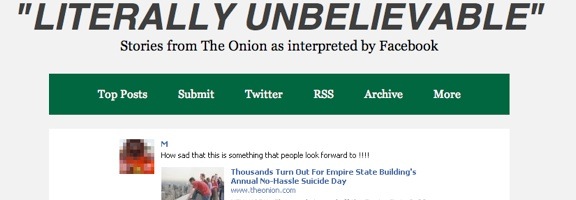
The Next Damn You Auto Correct? Status Updates From Users Who Think Onion Articles Are True

onion believed.jpg

Just about everybody I know has gotten a laugh out of Damn You Auto Correct, the website that collects embarrassing iPhone messages, thanks to goofy and unintended automatic corrections by the iOS engine. If that is your cup of tea, then you might enjoy Literally Unbelievable, a site that collects Facebook updates from users who think articles from the Onion are true.

Read more


Now THIS Is Cool – An Online Museum With You As the Star

museum of me.jpg

Every now and then, a web site comes along that defies categorization, but is amazingly cool nonetheless. One such site made the rounds lately, spreading virally. The site is by Intel, and takes the content of your Facebook account, and puts it together in one mind-blowing online “museum.” I was late to the game, only recently visiting the site. If you haven’t paid the site a visit yet, check it out.

Read more