Menu Close

Category: Apple (page 32 of 38)

How to Search By Tag in Evernote for iPhone

How to Search By Tag in Evernote for iPhone | 40Tech

For long-time Evernote for iPhone users, searching your notes by tag is probably not an issue. However, the email I received last night from one of our own Grown-up Geeks made me realize that new users to the iPhone version of Evernote might be in for a bit of frustration. In light of this, I decided to put together a quick how-to post based on the email response I sent our reader. Check it out below.

In order to browse by tag in Evernote for iPhone, you just need to follow these steps:

Open Evernote and tap Notes from the bottom menu

IMG_1751


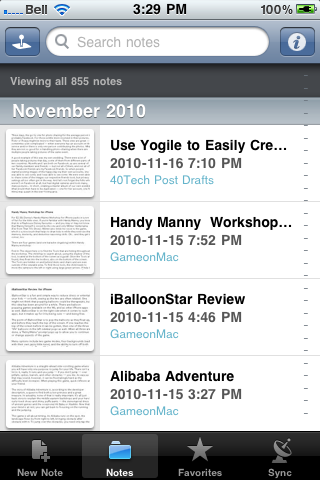
Tap the search bar up top (where it says Search Notes)
IMG_1752


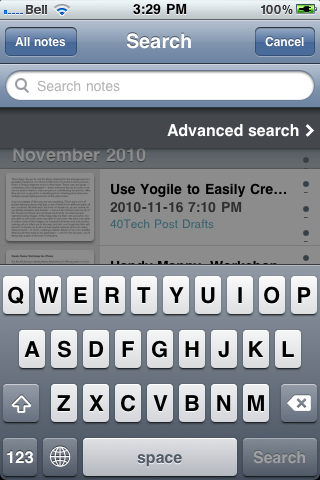
As the search bar is activated, it will expand and just below it you see “Advanced search” — tap that
IMG_1753


In the next screen, you will see the Tags button — tap it

Note: You can add several other search filters from this screen, as well!

IMG_1754


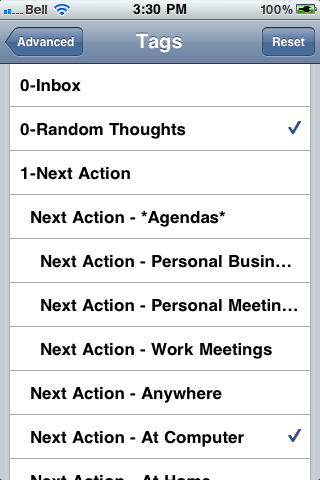
Tap the tag you want to sort by

Once selected the tag will have a checkmark. To search within multiple tag, select more than one.

IMG_1755 IMG_1756


Tap “Advanced” in the top left corner, to go back to the advanced menu

You will be able to see a list of the tags and other search criteria you chose here.
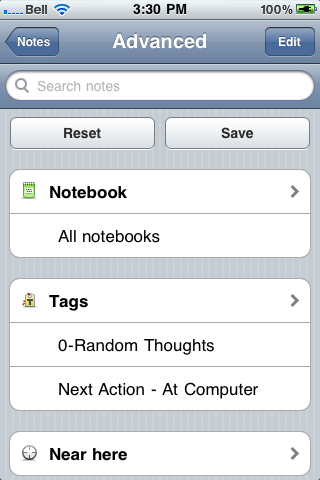
IMG_1757


Tap “Notes” in the top left corner, to go back to the notes list

Your notes will now be sorted by the selected tags — to get back to general note view, tap the “All notes” button.
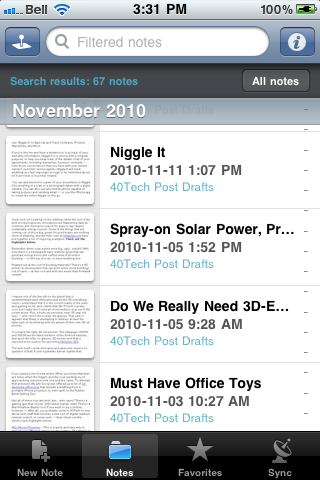
IMG_1758


Hopefully, this post will help some iPhone Evernote newbies out. If you’re reading this and it seems too convoluted to you — and you haven’t bought an iPhone yet — you might want to consider Evernote for Android. The new version puts tags right upfront – and there are a few other Android-only features that kick the iPhone’s Evernote squarely in the pants.

Evernote 2.0 for Android Screenshot

Have other Evernote questions? Post them in the comments, and we’ll do our best to answer them.


Slingbox Player For iPad is Almost Here, At Last

slingplayer for ipad

If you’re a regular visitor to 40Tech, you may remember that we’re fans of the Slingbox.  SlingPlayer for the iPhone works surprisingly well, allowing you to watch content from your home TV wherever you have a 3G or WiFi connection on your iPhone.  You can also watch via the web, and there are apps for many other mobile clients.   Unfortunately, the only option on the iPad was to run the iPhone app in compatible mode, so you didn’t get the benefit of the iPad’s higher resolution.  That’s about to change.

Last week, Sling Media announced that the iPad app is about to launch.  The app will cost $30, like the other mobile Slingbox apps.  The important fact to note (and one that was actually announced in October), is that the app will only work with the Slingox PRO-HD and the Slingbox Solo.  According to Sling, legacy Slingboxes don’t have the hardware capability to stream at the iPad’s higher resolution.

Are you like me, and pretty psyched about this news?

iPad Slingbox Player “Almost Here” [Zatz Not Funny!]


Get Creative Date Ideas with DateBank

Get Creative Date Ideas with DateBank for iPhone | 40Tech

Whether you are single and dating or have been married for years, it is always a challenge to come up with interesting date ideas. Sometimes “dinner and a movie” just isn’t enough, you know? Thankfully, some folks up in Canada — in the Greater Vancouver area, just like l’il ol’ me — have taken the time to create an iPhone app that helps solve that problem.

DateBank is a simple, slot-machine style app. There is a slot for Style, one for Budget, and one fore Time of day. Select from a range of style entries like Playful, Chatty, Artsy and, Outdoorsy, pick a price range and a time of day, hit “Show Results” and voila! A list of interesting date options will appear, each with a fun description and some tips on how to take it up a notch. If you’re unsure of what to select from the slots, there is an option for that, as well, along with some tips, a ranking/sharing element, and the ability to submit your own ideas for inclusion.

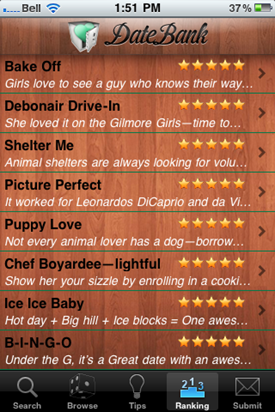
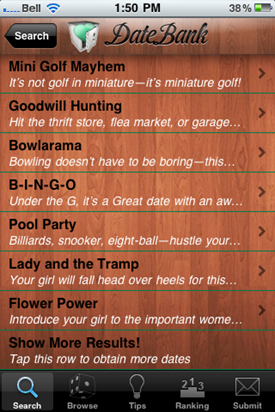
Here are a few results from a search for Playful/$20-60/Afternoon, as well as the top-ranked dates on the app, currently:

Some Date Ideas form DateBank for iPhone | 40TechTop-Ranked Date Ideas from DateBank for iPhone | 40Tech

DateBank costs $0.99 and is a fun and useful app. There are a few things I hope to see in the near future, however, such as a local component (which ought to work well with the suggestions area), and the “shake for a random idea” function to start working. Other mobile apps and a web app for the mobile-impaired would also be useful, as would a social element that allows people to give a brief description of how the date went.

In fact, I think it would be very cool if some of you grown up geeks out there were to try DateBank and let us know how it worked out for you! I’ll show you mine, if you show me yours…


My iPhone Just Killed My FRS – Hello HeyTell

My iPhone Just Killed My FRS -- Hello HeyTell

I used to love my FRS. I didn’t have to pay for anything; I could talk to people a fair distance away — and it always reminded me of playing with walkie talkies as a kid. Good times. Well, those days are gone. The iPhone/Android app HeyTell has put the proverbial smackdown on my FRS use — when it comes to other HeyTell users, anyway.

Read more


FREE: Stream Music and Movies from Computer to iPhone, iPad, iPod Touch – and Access Files Too – with ZumoCast

ZumoCast Streams Music, Movies, Files from Computer to iDevice

If you want an easy way to stream media from your home computer to your iPhone, iPod Touch, or iPad, and want it to be free, you’re going to want to check out ZumoCast. It appeared in the app store on September 8th, and it has been awesome ever since! Read more