
One of the tools included with all Mac versions of DEVONthink is the Sorter. The DEVONthink Sorter is an optional tool that hangs out at the side of your screen. You can drag files to it, and send them off to preconfigured locations within DEVONthink. I liked the functionality of the Sorter, but didn’t like it always hanging out at the edge of my screen, so I came up with an alternative that resides in my Mac’s menu bar.
Category: Apple (page 10 of 38)
I recently enjoyed using Gmail shortcuts in MailMate, and wanted to bring those same shortcuts to the default Mail app on macOS.1 GMailinator, the only Mail plugin I could find to do so, hasn’t been updated in four years, so I didn’t bother installing it. Instead, I started looking for another way, and I think I’ve found it.
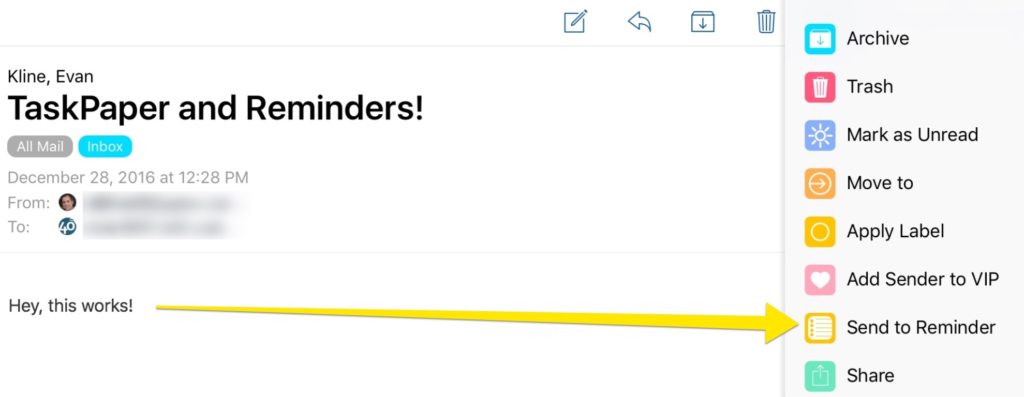
I’m currently trying out TaskPaper as my task manager of choice, after almost five years with OmniFocus. More on that in the future, but for now don’t read too much into this – OmniFocus is a great app, and if it works for you, I don’t recommend switching.
TaskPaper has many strengths (again, more on that in the future), but one weakness is its lack of integration with third party apps when it comes to capturing tasks. On iOS, for example, native TaskPaper integration isn’t built into any email apps. There is a thread in the TaskPaper forums that points to a workflow, using the iOS Workflow app, to get Airmail email links into TaskPaper. I couldn’t get that working, though.
Instead, I stumbled upon a thread with instructions on how to get items from the Reminders app into TaskPaper (scroll down in the thread for the script). I set the JavaScript in that thread up on my Mac, and have Keyboard Maestro run the script every 10 minutes. That script slurps anything that appears in a designated list in Reminders into TaskPaper. Of course, for this to work, you’ll need to make sure you have Reminders syncing between your Mac and your iOS device.
Suddenly, TaskPaper is WAY more functional for me. I can use any iOS or Mac app that supports Reminders to get tasks into TaskPaper. One of those is Airmail, and the task contains a link back to the mail message.
More to come on how I’m using this Reminders integration to open up all sorts of possibilities with TaskPaper.
There’s a new sheriff in town when it comes to my online backups, and that’s Arq Backup. For several years, I’ve been using Crashplan for all the Macs in my house. It was hard to beat the price of the Crashplan family plan, but my subscription expires in the next few months, and it doesn’t look like I’ll be renewing it. Instead, I’m switching to a combination of Arq Backup and Amazon Cloud Drive.

The MacTrack Legal conference, formerly known as Milofest, takes place at Disney’s Yacht and Beach Club in Orlando, Florida from October 6 to 8. If you’re a lawyer who uses a Mac or other Apple devices, this is the best conference of the year. I attended last year, and the sessions were fantastic. While the conference is tech-focused, there are other practical and substantive topics as well.
Beyond the sessions, though, the conference is worth attending just to mix with other Mac lawyers. I have yet to attend a conference with a friendlier group of people from all over the country. It’s a bonus that much of the banter among attendees covers Macs, other tech topics, and practice-related matters.
I’m going to attend and speak at the conference again this year (my bio isn’t on the site yet, but I’ll be there). My topic will be “Workflows and Tools for Mobile Lawyers.” I’ll also be part of “The Ultimate Gear Off” panel with Katie Floyd (Mac Power Users Podcast), Brett Burney, and Mark Metzger.
I hope to see some of you there. Come early or stay late, and take in Disney.
More info: MacTrack Legal