Menu Close

Category: Android (page 6 of 11)

Has Your App Store Made You Its B!#&h?

Has Your App Store Made You Its B!#&h? | 40Tech

So I’ve had an iPhone for over a year now, a smartphone for at least three, and an iPad since December. I went through my initial app insanity a while back, unable to resist the call of the thousands upon thousands of different apps out there — a feeling that was only amplified by my innate geeky curiousity, and the fact that I write for a tech blog. Hell, I’ve even done about a hundred or so freelance reviews of iOS games in the past year, with all of the purchases reimbursed — talk about having an addiction enabled!

Well, I’m all done with that now. I’m no slave to my devices! Really! I’m not!! Okay, so I might be… but maybe you are too?

Has Your App Store Made You Its B!#&h? | 40Tech

I’ve taken stock of the apps that I own, and the ones that have taken up long-term residence on my devices, and I have come to the conclusion that I actually use less than 10% of my library on anything even approaching a regular basis. The rest just sit there, mooching off the storage space on my iPhone and iPad, hanging out in their folders and doing nothing all day. They should get a job or something. Seriously. They should get a job or get out — but they play off my weaknesses, you see. Every time I go in to delete them, I get bombarded with reasons that justify their existences, often using phrases like “just in case” and “but this app is just so cool!”

It’s all lies, though, and I keep falling for it. The only apps I regularly use are Evernote, Springpad, my RSS readers (MobileRSS, Zite, Flipboard), iBooks and Stanza, Facebook/Friendly, Twitter, Producteev, and Card Shark Solitaire (the free version). Of course, I use the stock apps like Mail, Safari, and the like, and I also occasionally use the Google app and Google Maps, but that is a pretty good snapshot of my average usage. I still seem to be unable to let go of the others, though… go figure.

How about you? How many of your apps do you actually use on average? What are they? And do you also suffer from app hangers-on? Have the app stores made us their bitches? Let me know!
Text Messaging for Super Spies

image

Are you a spy, engaged in nefarious business dealings, or an extreme fan of privacy? Maybe you just really liked Mission Impossible or Inspector Gadget? If so, you will probably get a kick out of self-destructing text messages. That’s right, messages where you get to add your own little “time-bomb” that deletes the possibly offending or incriminating text off both your own phone, and that of the receiving party. Never get caught sexting by your significant other again.* Don’t leave a trail of incriminating evidence behind!* Etc. Etc. Etc… You get it, I’m sure.

Read on for more details, opinions, and the meaning of the little *’s.

ba-Bomb image by LKaestner

I understand the need for privacy in personal and business communications. I don’t have a problem with that and I support it wholeheartedly. It just seems to me that the marketing around TigerText and TigerText Pro, the mobile app that gives you the power of the self-destructing message, skirts the sleazy. Oh, they never out and out say “hide your potentially incriminating communications” or “never get caught.” They are very careful about that, in fact, focusing more on privacy protection and the fact that they are a free text and picture messaging service. However, something about the overall tone of their message tickles my increasingly cynical ear — especially when they bandy about quotes from some of their reviewers, like the New York Post, that state “TigerText eliminates the possibility of damaging evidence being left behind.” Maybe it’s just me, but broadcasting that statement as a part of your marketing seems to target a specific audience need.

I suppose, fundamentally, that I have some sort of righteous moral issue with the fact that the need exists in the first place. Somewhere, deep in my airy-fairy soul, there is a little voice whispering, “why can’t we all just be honest and nice, and stuff.” I recognize that the little voice is sadly naive and am actually much more practical in my view of human nature, but the tiny little fellow is persistent and closely related to the last resident (and black sheep) of Pandora’s Box. It also believes in the possibility of unicorns, dragons, and other romantic notions, so take from that what you will.

In any case, TigerText is a good service for getting around texting and picture messaging costs on your smartphone. It works over WiFi, and so can work in poor service areas, and is a fast, easy to use app available for all major smartphone platforms. You can only communicate with other TigerText users, however, so in many ways it is more like an instant messaging service that allows you to add a timed-delete function to your messages.

TigerText is free for personal use, and TigerText pro — the enterprise version — has some nifty features like email notifications and the like. It also has branches that are specific to those needing HIPAA (healthcare and insurance) and SOX (Sarbanes-Oxley Act – national securities investment protections) compliance in their communications. If you want to try it out, go to your smartphone’s app store, or head to this link for personal, and this one for enterprise.

* Notes

A word to the wise: as TigerText themselves point out, this is by no means a bulletproof method of not getting caught. Send sensitive information to others at your own risk — anyone can take a picture of a smartphone screen, either with another camera or the press of a button or two. How much you really trust the person you are sending the message to had best be at the forefront of your mind.

Oh, and also: 40Tech by no means condones cheating on your spouse, conducting nefarious dealings, yadda yadda.

What do you think of TigerText? What would you use it for?


CalenGoo for Android – Funny Name, Great Calendar

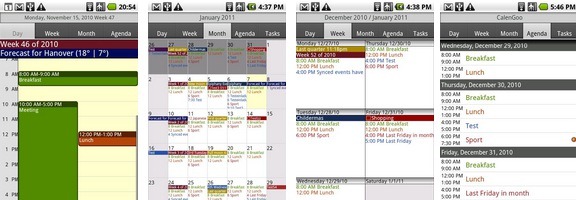
CalenGoo for Android

One of the strengths of Android is its open app ecosystem. No approval by Google is required for a developer to get an app into the Android Market. That also creates a problem, though, in that it sometimes can be difficult to find the good apps. Such was the case when I went hunting for a calendar app. AnCal, Gemini, Business Calendar Beta, Pocket Informant, Pure Calendar, CalWidget, iRT Calendar, Agenda Widget. Those are just a few of the calendars available for Android. Some of those are great, and warrant a look, but none of them jumped out at me as the perfect calendar for my needs. After sorting through several, I found one that was – CalenGoo.

Read more


Springpad Android Update Adds New Widgets, Save From Apps Feature, & More

Springpad Android Update Adds New Widgets, Save From Apps Feature | 40Tech

Springpad, one of our the favourite memory management platforms on 40Tech, launched a major update to its Android app yesterday. The update includes a new widget set for easier capture and customizable homescreen access, more ways to sort, filter, and view your notes, and the ability to save information directly from other Android apps. If you’re an Android user you’ll definitely want to check this out — especially if you’re interested in using Springpad for GTD (getting things done). See below for details!

UPDATE: 40Tech reader and regular commenter Daniel Gold has just put up a video post documenting the Springpad Android update. Check it out below, and don’t forget to visit his blog or his Evernote and Springpad e-Books [affiliate link] for more awesome!

Enhanced Sorting Options

Springpad’s new sorting options address several user requests, such as the ability to hide completed tasks, passed alarms, and passed events from any view (including All My Stuff). Users can also now sort by Due Date, Type, or Tag from any view. On the Springpad blog, Katin assures web app and iOS users that these features are on the way for them as well.

Awesome New Widgets

Springpad’s new customizable list and capture widgets will make the lives of both the general user and the power user much easier. The list widget can be configured to show you a list of your most important saved items. This is a fantastic way to have quick access to incomplete tasks, flagged items, recent alerts, favourite bookmarks, or whatever it is that you need to keep on hand.

Springpad Android Widget Configuration | From Springpad Blog Springpad Android Configurable List Widget | From Springpad Blog

The small and large capture widgets can now be configured to feature your favourite Quick Add options. If you are big on voice memos or barcode scans, or if you need fast access to the photo capture or text add features of Springpad, you can set up the widgets to be on hand for quick access to exactly what you need.

Share Content From Other Apps

If you were ever in the Yelp app and thought “Gee, I wish I could save this restaurant info right into my Springpad,” — now you can. This is a fantastic feature, as it makes saving the things you want to remember just a little more universal, and has the added benefit of Springpad enhancing that information with potential deals, coupons, and other pertinent information.

Aside from adding cross-app sharing, and these other fancy features, Springpad’s Android app also includes multiple bug-fixes. Check it out on the Android Market, or Amazon’s new Android Appstore.

Dan’s Video Review


Not an Android user? Head to Springpadit.com or hit this iTunes link. Also available on the Chrome Web Store.


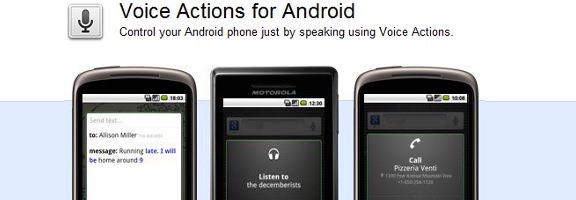
Get Things Done With Your Voice, Using Voice Actions For Android

voice actions android

One of the great features that came with the 2.2 (Froyo) update to the Android operating system was Voice Actions. With Voice Actions, you can control many of your phone’s features, such as navigation, the playing of music, and text messaging. Let’s take a look at some of the Voice Actions that you can use. Read more