Menu Close

Author: Bobby Travis (page 7 of 51)

Bobby isn't 40-something, but is a strong supporter of the Grown-up Geek kind. He's a loving husband and father first, but is also a freelance writer, productivity nut, operatically trained singer, and (not-so) closet geek.

Check out his random thoughts, wackiness, and Instagram pics on Tumblr, Twitter, or Google+-- or just head over to bobby-travis.com.

The Death of Email — At Least Internally — At A Large Multi-national Company

The Death of Email -- At Least Internally -- At A Large Multi-national Company | 40Tech

People have been talking about the death of email for a while now. Every time there’s a new, communications-focused technology, most notably Google Wave — and we all know how that went — email eulogies pop up all over the internet. It seems likely to me that email is here to stay, at least for a while longer, but if other companies follow the example of Atos, a 74,000 employee French tech company spanning 42 countries, email may actually begin its prophesied decline.

Atos has banned email. At least, they’ve banned it internally. That’s right, those 74,000 employees can no longer send each other minutiae-filled email chains that may or may not ever get fully read. They will no longer be able to forward jokes and silly messages throughout the company or the office. They will no longer be able to send on-line emails to avoid the potential perspiration of actually getting up from their desk and walking over to their friend and asking in person. I say good riddance.

Atos announced the no-email policy in February of 2011, but have now officially implemented it. CEO Thierry Breton, who was also the French finance minister from 2005-2007, said that employee emails are only 10 percent useful, and are 18 percent spam — which seems about right to me, considering the emails I’ve received in companies I’ve worked for. All to often, the emails would be useless time-wasters — especially the ones that involved questions from co-workers that didn’t actually read the email in the first place.

Atos isn’t leaving their employees without a digital option for communication, though. They are using tools such as the Atos Wiki and their Office Communicator chat program to allow employees to collaborate on documents and projects, as well as chat, video  conference, and share applications and files.

I think the Atos approach is the only way for a company to successfully achieve adoption of internal social media tools and, so far, the only possible negative fallout I can see would be dependent on the tools they use and how user-friendly they are.  They seem to be doing okay in that department, however, as Atos has reported to ABC News that employee response “has been positive with strong take up of alternative tools.”

What do you think of the Atos no-email policy? Is it the beginning of a massive “kill email” movement? Will it lead to better outside-company communications as well? Discuss in the comments.

Tech Firm Implements Employee ‘Zero Email’ Policy [ABC News on Yahoo.com]


LapGuard Protects Your Tender Parts From Harmful Heat And WiFi Radiation

LapGuard Protects Your Tender Parts From Harmful Heat And WiFi Radiation | 40Tech

Contrary to the current arc of techno-loving crazy flying about the internet, the laptop is not dead, and tablets — though awesome — have not yet taken over the world. In fact, millions of people are using laptops right now. They’ve got them sitting on (surprise!) their laps, whirring away, blasting their tender parts with heat and WiFi radiation. Apparently, recent reports are saying that’s a bad thing; that it can mess with your baby-having potential. Having just had another cute little baby, I can’t really speak to that — but I have been following reports that WiFi radiation can be harmful, and it’s well-documented that heat is no friend to the business of making tiny humans.

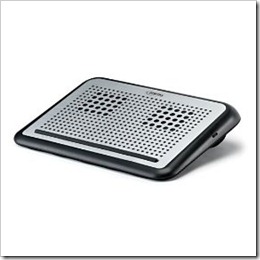
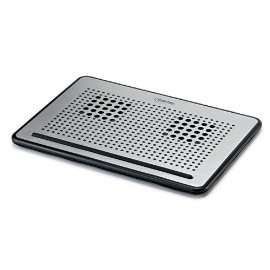
Whether you believe in the dangers of WiFi radiation or not, I think we can all agree that comfort is a good thing. That’s one of the reasons the lap-desk was invented, and — heat and WiFi blocking powers notwithstanding — Digital Innovations’ LapGuard is one of the best I’ve come across.

In the interests of full disclosure, this is the part where I tell you that Digital Innovations sent me two LapGuards (a regular and a Portable one), with a request that I take a look at them and give a fair and honest review. We did the same thing a while back, when we looked at their SkipDr disc repair and cleaning kits. As then, the contents of this review are unbiased and contain only my real, ever-so-honest opinions.


Functionality

The LapGuard scores well on three fronts: it’s comfortable, it’s quiet, and it’s pretty. It also has some nice features. For example, the Portable LapGuard has a nice spot underneath to wrap up and lock away the USB power cable. This makes storing and packing the thing around much less annoying. The regular LapGuard, which is a bit bigger, also handles the USB cable well — but it’s power cable is retractable. To make things more fun, the regular LapGuard also has a handy fan-speed control dial for the dual fans that can help you conserve battery power while still keeping things chill.

LapGuard Laptop Desk | Digital Innovations     Portable LapGuard Laptop Desk | Digital InnovationsLapGuard Lapdesk with Retractable USB Cable | Digital Innovations          Portable LapGuard Lapdesk with Hidden USB Cable | Digital Innovations

I’m not entirely sure why the Portable LapGuard doesn’t allow for variable fan-speed. It should be possible, considering that the only real difference between it and the regular LapGuard is that the regular one has an additional block of padding at the top that allows for some angled ergonomic comfort while working. Ergonomic comfort doesn’t slide into a backpack very well, though, hence the need for the Portable design.

LapGuard Lapdesk Variable Fan-speed | Digital Innovations          LapGuard Lapdesk Side View | Digital Innovations

The fans on both models are, as I said, pretty quiet, and I found that they did a good job of pushing the heat away from me, and keeping my Toshiba cool. And that’s saying something — anyone who has a Toshiba laptop knows that heat can be a problem.


WiFi Radiation Shielding

To be perfectly honest, the WiFi radiation shielding seems a bit gimmicky to me. Sure, sure, Digital Innovations is applying patent-pending technology here – but I have no way of testing to see if it works, and depending on what you read and who you talk to, it’s not even proven that WiFi radiation is a problem. However, if it is an issue, I admit I’d rather err on the side of caution — and if it isn’t… well, the things look pretty and currently only cost $29.99 (Portable) and $37.49, respectively. I’ve been using the LapGuards pretty heavily the past few weeks and I’m more than comfortable with those prices just for the basic use and the look of them. Unfortunately, though, those are just sale prices. The LapGuard is regularly $49.99 and $39.99 (Portable). My cheapness (and my wife) might have trouble reconciling the purchase at the regular prices.


To Sum Up

Pros

  • Retractable (or otherwise hidden) USB power cables
  • Comfortable
  • Variable fan-speed (regular model)
  • Pretty


Cons

  • No way to be sure if the WiFi radiation blocking is working or even necessary
  • No variable fan-speed on the Portable LapGuard


Would I buy it?

Yes — for myself or as a gift. Only at the sale price, though.


What’s your favourite lap-desk?


Google Wave’s Swan Song Has a Few More Notes In It

Google Wave's Swan Song Has a Few More Notes In It | 40Tech

Yeah, yeah, I know. Google Wave is dead and gone, right? Not quite. We already talked about the potential of Apache Wave, and mentioned that the Google original is still available to those who care to squeeze every ounce they can from the innovative flop. Today, though, Google circulated an email to Wavers containing the end dates and Wave’s last gasp.

Wave was originally supposed to only be maintained to the end of 2010. For reasons of their own, however (likely to court potential future developers like Apache), Google let that date blow by with the waves still… waving. The final shutdown date is now, officially, January 31, 2012.

As of that date, Google Wave will become read only. Exporting waves (individually) to PDF will still be possible up until April 30, 2012. After that, the service goes down for good.

If you love your Wave and want to keep using it for your projects, you can keep going with the open source forks, most notably Apache Wave and Walkaround. Walkaround has an experimental feature that allows — or at least attempts — to import all of your waves from Google Wave. This will stop working on April 30, as well, so if you want to take advantage of it, do it before then.

Personally, I want to see more of Wave’s features integrated into Google+ and Google Docs, especially the potential for third-party addons. I don’t see Google opening that up anytime soon, as it could take Plus down paths they aren’t ready for, but who knows? Maybe down the line, eh?

What do you think?


Kickass Undelete: Portable Recovery Awesome for Permanently Deleted Files [Windows]

Kickass Undelete: Portable Recovery Awesome for Permanently Deleted Files | 40Tech

Computers are a constant source of fun and potential ulcer-creating stress. This is especially true — at least in the latter respect — when we find ourselves needing that oh-so-important file that we just deleted from the Recycle Bin. Or lost in a crash. Or from any other of the number of creative ways Windows can eat your work. There are several data recovery tools out there, and they come in varying degrees of complication and quality. If you are looking for something simple, though — something that you can take with you, and even use on a flash drive — check out Kickass Undelete.

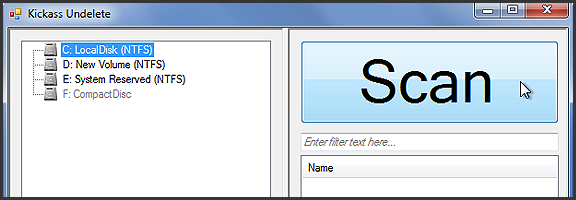
Kickass Undelete is more than just a fun name. It’s portable, it’s pretty effective, and it’s big-button easy. All you need to do is select the drive you want to scan for deleted files, hit the ginormous Scan button, wait a tick, and then sort through the list of deleted files for the one you’re looking for. To help you along, Kickass Undelete allows you to sort by Name, Type, Size, and Last Modified date. Select the files you want to restore, then hit the also-sizable Restore Files button, and you’re all good!

Kickass Undelete is free and open source. Download it here.

Easily Recover Permanently Deleted Files With Kickass Undelete [AddictiveTips]


Hotspot Shield VPN Officially on iOS — Secure Browsing, Bandwidth Compression, Access Blocked Sites/Services

Hotspot Shield Now Officially on iOS -- Say Hello to HTTPS, Bandwidth Compression, Out-of-US Netflix, Pandora | 40Tech

When we first told you about Hotspot Shield, it was to use the free Virtual Private Network to bypass blocked media, as well as increase your browsing security. Over a year later, we posted a tutorial on how to use the VPN to watch US Netflix outside of United States, using your iOS devices. Unfortunately, the Hotspot Shield sign up process for iOS was broken soonafter, and their customer service team didn’t have a lot to say about it. Now we know why: Anchorfree, the creators of Hotspot Shield have released an iPhone app that makes all of the steps go away, and even solves a few of the problems.

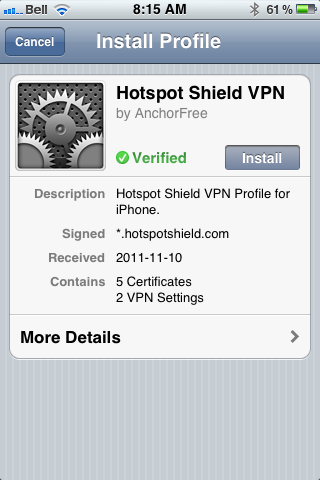
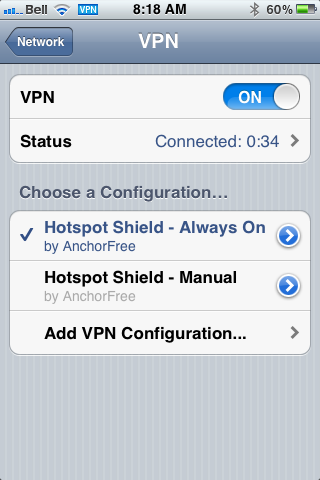
The new Hotspot Shield app will have you up and running with a couple of touches, installing two VPN configurations on your iPhone or iPad. The second one is for manual use — you turn it on when you need it, and leave it off when you don’t. The default configuration, though, is Always On, which handily accomplishes two things: it allows you to automatically have the VPN’s data compression and additional security in place whether you are on WiFi or mobile broadband, and it also fixes potential annoyances by automatically re-establishing the VPN’s connection when it drops (which is still a regular occurrence).

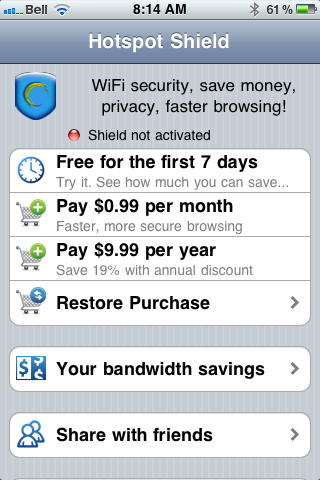
In testing, I found that the VPN is more stable on iOS than it was previously, and that using it was practically painless. I also discovered, very quickly, that the free-ness of Hotspot Shield — at least for mobile — is a thing of the past. In comparison to other VPNs, though, especially services that are as effective, the price is still more than worthwhile. You can use the VPN free for a week, after that, it’ll cost you $0.99/month or $9.99/year. You can also use a purchase code the app provides you to activate up to five personal devices that are connected to the same iTunes account. If the incredibly attractive price is to much for you, and you already have an old Hotspot Shield VPN installed on your iOS device, it should still work, at least for now — mine does, anyway.

Hotspot Shield VPN for iOS, iPhone, iPad, iPod Touch | 40TechHotspot Shield VPN App for iPhone, iPad, iPod Touch | 40TechHotspot Shield VPN App for iOS | 40Tech

Some other fun features of the app are the abilities to track your bandwidth savings and to control your compression level. You can turn it off completely for WiFi, or turn it up to maximum to save bandwidth on images and the like. This will downgrade image quality, of course, but how much is your data worth to you?

All in all, I recommend it to pretty much everyone on iOS with even a passing interest in security (or in using Hulu, Netflix, Pandora, etc., outside of the US). You can never be too careful with your data, and HotSpot Shield does a decent job of protecting you. According to ReadWriteWeb, it was even used during the revolutions of the Arab Spring to allow “users to skirt detection of officials that may have been monitoring mobile internet activity.” Handy, that…

If you do decide to use Hotspot Shield for iOS, do keep a couple of things in mind:

  1. The terms of service are very explicit about the VPN being for personal use only. Don’t use it for business or they may cut you off.
  2. Using a VPN to access a US-only service outside of the US may be considered breach of that service’s terms of use. You may want to double-check that before going ahead to make sure you don’t have any issues — especially if you pay for said service.

What do you think of Hotspot Shield for iOS? Do you plan to use it to increase your browsing security? Let us know in the comments!