Menu Close

Author: Bobby Travis (page 26 of 51)

Bobby isn't 40-something, but is a strong supporter of the Grown-up Geek kind. He's a loving husband and father first, but is also a freelance writer, productivity nut, operatically trained singer, and (not-so) closet geek.

Check out his random thoughts, wackiness, and Instagram pics on Tumblr, Twitter, or Google+-- or just head over to bobby-travis.com.

Meet Rockmelt, Your New Social Browser

RockMelt | Social Browser for Google Chrome

Okay, so hands up if you’ve heard of RockMelt.

If you are one of the people who put up your hand — stop that. This is text and I can’t see you. Know, however, that you are quite possibly more connected and in tune with the techieverse than your now shame-faced tech-writer. Somehow, for reasons unknown to all but the almighty Goog itself, my keenly developed tech senses missed this wonder entirely! But, that’s all behind me, now. I’ve seen the light, got an invite, and have been playing with the world’s latest, greatest — and Google Chrome based — social browser for several days now.

Here’s what I’ve discovered:

RockMelt does for Chrome what Flock did for Firefox, but where I found Flock a bit overwhelming in its attempt to integrate social elements into the browser, RockMelt has what feels like it might be just the right mix. One almost has to wonder why Google didn’t think to do this in the first place. If they had integrated Sidewiki and Google Buzz in with the configurable social elements that RockMelt has brought into play, making them a part of the Chrome browser (and by extension, the OS) itself, both of those tools might have seen a much stronger and longer term user base.

In any case, RockMelt, which is still in beta, has a lot of good going for it. There are still a few hiccups, as is to be expected, but even so, the social Chrome is pretty appealing. This is a good thing — it means that Netscape founder Marc Andreesen’s money has been well spent.


Key Features of RockMelt

Collapsible Sidebars

Rockmelt Chrome-Based Social Browser | 40Tech

The primary difference between RockMelt and Chrome, aside from the fact that you have to log into Facebook to use the browser, is the left and right sidebars. Both are collapsible, about a centimetre in width and contain pretty buttons, often full of people’s faces. On the left, is the Facebook chat column, which shows you which of your Facebook friends are online, allows you to view their latest activity with a hover or a click, chat with them, send them a message, or post on their wall. You can also set up a favourites list in this column, and switch between it and the general tab with a single click.

All of this Facebooking takes place just below a miniature of your own profile picture (top left), which, when clicked, allows you to toggle your Facebook Chat availability, as well as update your social network status — including multiple Twitter accounts, if you decide to add them.

On the right edge of the page, you really get to dig in and configure RockMelt to suit both your browsing and social networking needs. Facebook and Twitter buttons give you access to both of those services, showing your feeds in real time. You can interact with items in the feeds as you would expect to be able to, liking, commenting, retweeting, etc. In Twitter, you can access all of your lists and your @messages, but I didn’t see anything for saved searches or DM’s. Also, if you have a lot of lists, you currently are not able to scroll to the ones that get cut off at the bottom of the page. The Facebook button gives access to people in both your main and custom profile lists, and your profile button right below it gives access to your notifications, photos and wall. I found the limited nature of the Facebook access — no pages, message centre, groups, or places — a bit surprising, but it will likely improve as the browser gets closer to official launch.

RockMelt Facebook Integration in Google Chrome | 40Tech

The right sidebar also serves two other important functions, it has a few other already integrated networks, like YouTube, and it allows you to add custom feeds so you can keep track of your favourite websites — it even makes suggestions based on the sites you visit most — and it is the home of your Chrome extensions. I like the way RockMelt handles extensions much better than the way Google does it. For one, I can decide on optimal placement of my extensions — and they will stay that way. Google’s insistence in making things rearrange themselves based on their perceptions of my usage has always driven me crazy. I also like the fact that the sidebar is collapsible, and it doesn’t shrink the size of the URL bar. Finally, If I am not using an extension that often, but don’t want to uninstall or disable it, it is simple to just remove it from the column/dock.

The main problem with RockMelt at the moment, especially if you have a lot of Facebook friends in your favourites, or a lot of extensions, is that the sidebars don’t scroll. Any more than 15 items, total, in either sidebar, and the ones furthest down can not be accessed. Also, the floating window that appears when most extension buttons are clicked is a fixed width element. This causes a problem with some extensions that are too wide for RockMelt. Hopefully these are things that will be rectified in a near-future update.

RockMelt also shares most other major features of Google Chrome, such as the new web apps area and browser synchronization. The apps are not as thoroughly integrated as they are with Chrome, being little more than just shortcuts, and browser sync is only available between other RockMelt implementations. It was a little bit annoying having to search out and re-add all of my apps and extensions, but wasn’t that difficult.

Social Sharing

Sharing what you find while surfing in RockMelt is an extremely easy process. There is a giant button to the immediate right of the URL bar, and it allows for Facebook and Twitter sharing with ridiculous ease. I wish there were a send by email button, though, then I could drop the Shareaholic extension; free up some space. Speaking of email, there is what looks like an email button on the top right of the browser. Don’t be fooled. It is not for your email at all. It is really just a suggestion list of who to send your invites to. I find this choice on RockMelt’s part to be kind of confusing.

Conclusions

RockMelt is a fantastic spin on the Google Chrome browser, packing in most of Chrome’s features and all of its speed. The collapsible social features are a fantastic addition, considering you spend most of your internet time in the browser, and most people spend most browser time on a social network or two. It just makes sense, you know? There are still a few odd issues like the lack of sidebar scrolling, and the fact that, at least for me, embedded flash videos show up as blank spaces, but these issues are the sort of thing you expect in a beta test. RockMelt still has time to make things perfect, and I think it very likely that I will keep using it as it matures.

http://www.youtube.com/watch?v=bAPKPhoTqFY&feature=player_embedded

Tell us what you think of RockMelt.


Digital Paper is a Reality with the Upcoming NoteSlate Tablet

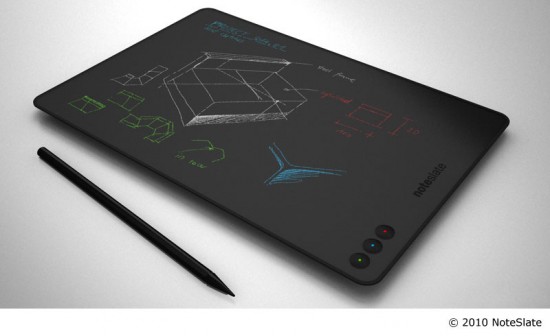
If you’ve always wanted to be done with pen and paper in favor of a comparable digital solution, or are just a fan of nifty one-trick gadgets, then you are going to want to put aside $100 this June for the NoteSlate. NoteSlate is a high tech gadget with low tech dreams; an E-Ink tablet with the sole purpose of doing its best to emulate a notepad — or, more likely, one of those personal chalkboards that is its namesake.

It’s actually a very cool idea. The tablet’s 13-inch screen and stylus combo make for easy note scrawling, diagram drawing, and other scribbles, and the single purpose aspect makes for a comparatively low-priced solution for the pen and paper crowd that want an upgrade that fits their work habits.

The specs of the NoteSlate are intriguing, as a few of them fly directly in the face of the MORE POWER mantra of most of today’s devices. Check out some of the highlights below:

  • 750×1080 pixel display that outputs at 100ppi
  • 1bit colour
  • No antialiasing — they claim this is their best feature
  • Optional WiFi (it’s free to add it in, apparently)
  • No web browsing (though there is some sort of sharing client)

It does have some of the more standard things you might expect from a modern tablet, however, such as its slick look and extremely light weight, a mini-USB port, SD card slot that supports up to 32GB, and mp3/PDF/OCR capability (another free upgrade). It also bears mentioning that the hardware and software are both open source, and that you can get a few different single-colour models, and even a four-colour model to suit your personal tastes.

NoteSlate_color Digital Handwriting Tablet

It is unclear how well the NoteSlate will do in the burgeoning tablet market, but it definitely does speak to a niche of more hands-on, note takers, especially those with a more minimalist bent.

What do you think of the NoteSlate?


Fend Off Tracking Cookies, Keep Functionality With Disconnect [Google Chrome]

Cookies. We have a love hate relationship with them. They track what we do and report all kinds of information back to the site that generated them — and to third parties as well, in many cases. But they also often provide a better user experience, keeping track of our preferences and removing small annoyances like having to sign in to a website every single time we open it up. Unfortunately, as is the case with most things on the internet regarding your privacy and security, the only completely effective way to protect yourself is to simply turn the potential problem off. The only problem with this course of action is that turning off cookies also has the effect of making a huge part of the web practically unusable.

So what to do about it? Well, if you use Google Chrome, try out Disconnect.

Disconnect, which was created by a former Google employee, is a Google Chrome Extension that helps you to keep your personal data safe while still maintaining the ability to work effectively with sites like Gmail, Facebook, Twitter, and others. You may run into a few issues now and again, but overall, the experience is fairly seamless. All you need to do is install the Disconnect extension in your Google Chrome browser, make sure the extension is turned on, then watch as the tally of daily attempted intrusions upon your privacy climbs. The basic functionality, and much of the more advanced uses, of the webapps should work without problems, helping you to do what you like, and search for what you like, without passing along any personally identifiable data. If you have need to unblock a service, say to do something like play Facebook games, it’s a simple matter of a click on the extension’s dropdown menu (which includes Facebook, Twitter, Digg, Yahoo, and Google).

Disconnect Extension for Google Chrome in Action

Disconnect is open source software. Download it for Google Chrome here.

Disconnect for Chrome Disables Third-Party Tracking While Keeping Webapps Operational [Lifehacker]


Springpad Gets Even Better — Again

image

Less than two months after our last update on Springpad — one of our hottest topics on 40Tech — the tool to save and organize pretty much anything has sent out another press release full of updated goodness. Goodness to the tune of more than 250,000 new users in the month of January alone, 4 million new bookmarks via the Delicious bookmark importer, new saved-search filters, delete and archive support, and an overhaul to what was already one of the better Google Chrome extensions out there.

From the press release:

Faster Ways to Get Organized with Springpad on the Web

  • New Filters: Springpad structures the data you save to make it easy for you to search and filter through your items. Search through your recipes or restaurants by cuisine; filter your movies by actor or genre. Once you’ve created your filters, you can easily save them to make the next search faster than ever.
  • Delete and Archive Support: Springpad now has a “trash” button on the home screen so you can quickly recover an item you may have archived or inadvertently deleted.

Enhanced Springpad Extension

Springpad’s upgraded Chrome Browser Extension makes it fast and easy to add a note, create a task or look up something without leaving the site you’re browsing. When you use the extension to clip content, the new item is automatically categorized (recipe, movie, restaurant, book, etc.) and you can create or select a notebook for more efficient organization. To install the extension, click here.

Springpad has been moving in leaps and bounds lately, and its progress is impressive. If you’re looking for a tool to help you organize your life on the web, you should check it out. You can get a feel for the product here, check out their massive overhaul update here (with promo video, if you don’t feel like reading), and get all kinds of tips on how best to use Springpad from the Springpad Blog.

How are you liking the new Springpad?

Springpad Ends Record-Breaking Month with Over 250,000 New Subscribers [CEO Jeff Janer’s Springpad]


Sony NGP (PSP2) Will Blast You Right Out of Your Socks

Sony NGP (PSP2) Will Blast You Right Out of Your Socks | 40Tech

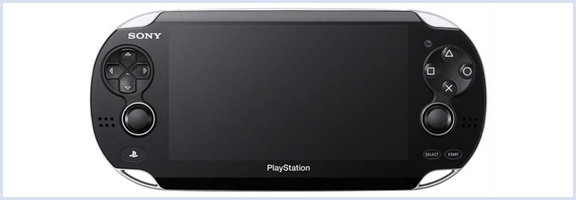
If you haven’t already heard about Sony’s PSP 2, codenamed Next Generation Portable (NGP), then you are in for a treat! The NGP features power enough to rival the Playstation 3 — and that’s not just fluffy marketing-speak. The specs of this little beast are off the charts.

Read on for a rundown of what’s included, and a NGP gameplay video of Uncharted.


The Sony PSP2 (NGP) includes the following:

  • Quad-core ARM Cortex A9 processor
  • Power VR SGX534MP4+ GPU (also apparently quad-core)
  • Multi-touch capacitive OLED screen (5in, 960×544 pixel)
  • Multi-touch capacitive rear touchpad
  • Dual analogue sticks
  • 6-Axis motion sensing system (gyroscope/accelerometer — and a compass too)
  • Front and rear cameras
  • WiFi, Bluetooth, 3G and GPS
  • New, vertically paging interface
  • Fancy new media storage system for games (which are downloadable, only)

And all of the other stuff you expect from a PSP.

Sony obviously plans to swing hard for the mobile gaming system title. Some people have already pointed out that they skipped the 3D craze here, but that doesn’t mean that they aren’t planning another model with 3D capability. In fact, it is highly possible that there will be multiple versions of the NGP available at different price points when it launches later this year (that’s what I said… later this year). A wifi-only version has been mentioned, for example, and it is likely that there will be other features that might be considered premium and affect the overall price point.

On that, Sony is still being rather hush-hush about how much this little beauty will cost, saying only that “It’s not going to be $599,” and that they “will shoot for an affordable price that’s appropriate for the handheld gaming space.” (Engadget)

PSOne games will be available for download on the PSP2, and downloaded PSP titles will be playable as well — seems you’re out of luck if you have a lot of UMD games, though. Either way, my white, Darth Vader emblazoned PSP 2000 is probably going up for sale, and soon!

Uncharted Gameplay Video – PSP2 (NGP)

http://www.youtube.com/watch?v=wIx9h02Armo


Yummy, yes?