Menu Close

Author: Bobby Travis (page 13 of 51)

Bobby isn't 40-something, but is a strong supporter of the Grown-up Geek kind. He's a loving husband and father first, but is also a freelance writer, productivity nut, operatically trained singer, and (not-so) closet geek.

Check out his random thoughts, wackiness, and Instagram pics on Tumblr, Twitter, or Google+-- or just head over to bobby-travis.com.

App of the Week: Localscope [iPhone]

image

It’s a given fact that smartphones have made it easier to get around. You’ve got your maps applications, search engines, business directories, even apps that are strictly for finding the nearest bathroom. Life is good — but Localscope makes it even better.

Localscope is one of the most comprehensive local search apps I’ve come across. Some apps of this type, especially outside of the United States, have a tendency to miss the bank, gas station, or Starbucks just down the street (hard to blame them on that last — Starbucks has a tendency to sprout spontaneously on vacant corners). Localscope attempts to solve the missing business problem by integrating several hyperlocal search engines — Google, Bing, Foursquare, Twitter, and Wikimapia — into their app, all nicely tied together with a slick interface.

A tap of the little monitor button in the top left opens a dialogue that allows you to change views between list, map and augmented reality views (augmented reality allows you to use your phone’s camera to visually search the surrounding area). But the different views and search engines aren’t where the ultimate power of Localscope lies. It’s what the app lets you do with the information it finds. Tap on  or swipe a listing and you are able to interact with the information there with just a tap or two. You can tap to call the business, view their website, open the Google Maps applicatios, set it as your current location, share via SMS, email, Facebook, or Twitter — and even add the business directly to your Contacts list. This is extremely handy!

localscope

You can conduct your own searches in Localscope (which are automatically saved), or you can jump in to one of the many pre-defined searches like Restaurant, Bank, Shopping, Parking, Taxi, etc. You can also use the “Browse all nearby” button to get a good snapshot of the entire neighbourhood.

The only problem with Localscope is that it’s one of those apps that spends a lot of time telling you that there is compass interference. Not to worry, though, you can easily turn off the notifications in the settings (touch the little i-for-information icon in the app). Other than that, Localscope is one of the best apps for finding local businesses that I’ve seen. You can purchase Localscope in multiple languages for $1.99 on the App Store. Highly recommended!

What’s your favourite way to find local businesses online?


Summify Cuts Through the Chatter, Helps You Get The Real Goods From Your Social Streams

Summify Cuts through the Chatter, Helps You Get The Real Goods From Your Social Streams | 40Tech

Summify has been acquired by Twitter and will be shutting down. See this post for more detail.

I’d like to take a moment to step away from the general worship and awe of Google+, and circle back (hehe) to our old friend Twitter. Actually, I plan to talk about Summify, and how it can take the often-overwhelming amount of information that is travelling through your Twitter stream at any given time, and sort it into a “highlight reel” that can be shared as a whole and as individual posts. It’s easy, it’s effective, and maybe just a little bit brilliant — and I have no doubt it will save you time and make your online reading much less hectic.

Multiple Accounts

Summify isn’t just about Twitter, either. Sure, it can connect to as many Twitter accounts as you like, but it also connects with Facebook and Google Reader. In fact, the more accounts you add, the better your summary will be.

Control

You get to decide how often you get a summary, how many stories it contains, when it gets delivered to you, how it gets delivered, who gets to look at it, and whether or not it gets published to your accounts. For example: my Summify is set up to deliver a new summary of 10 stories, twice per day (at 8:30am and 8:30pm), to my email inbox. Others can view it, and I automatically publish a link to the summary on my main Twitter and Facebook accounts. I could have allowed Summify to send me a Twitter DM notification as well, but between email and the recently released iPhone app, I’m covered.

summify-1 Summify-2

summify-2a summify-3

When you select a link in Summify (from email or your main summary), the article opens up with a handy toolbar on top (which you can close, if you want) that allows you to share the post on one or all of your connected networks. You can also see the avatars of the people who shared the article with you in the centre of the toolbar, and hover over them to view the originating tweet and click through to their account.
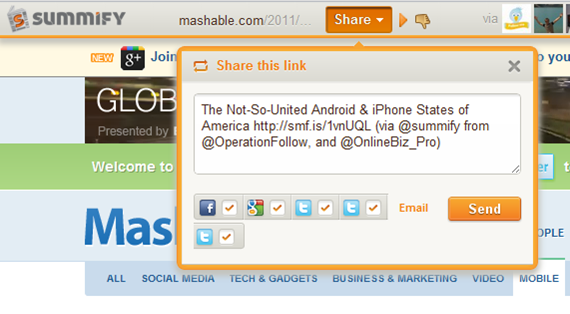
summify-5

If you don’t like the article and think it shouldn’t have been in your summary, you can click the little thumbs-down button to add it to your Filters list. This is a nice and easy way to weed out spammers and other annoying sites that occasionally sneak through. In fact, when you are in the Summify web app, itself, you can thumb an offending article down right then and there, without ever opening it. You can also filter by contributor, allowing you to block specific people from contributing to your summary. All you have to do is hover over one of the avatars below any given article, and then move your mouse over the little “x” that appears in the top right, and click it. This, and the thumbs-down functionality aren’t available in the email, of course, but they are also missing from the iPhone app; something that I hope changes, soon. Thankfully, though, Summify is smart enough that it gets it right about 98% of the time. And the iPhone app is pretty, and so is easily forgiven.

summify-4

People-Friendly Messages

When Summify sends out a summary message it takes great care to do two things: 1) It mentions some of the people who provided you with the information in the first place; which makes for nice Twitter etiquette. 2) It varies the messages so they aren’t always the same boring words with a new link. As an example, take a look below at three recent tweets (not clickable) that Summify sent out on my behalf.

tweet1tweet2tweet3

It should also be noted that mentions are automatically included in share of single posts, as well, and that you can edit the content of single-post shares before posting.

Easy, Good Looking, and Smart

Take the section-title anyway you like, but understand that it’s true, and it’s awesome! The apps (and even the emails) are easy on the eyes and easier to work with, and the service is smart enough to not only consistently deliver articles that you like, but it also will list out several other stories from websites that post multiple posts. This makes sure that you get all the highlights from Mashable and other large sites without having to visit them directly or open up another app.

I’ve been using Summify for a month or two now, and I’ve lost count of the number of hours I’ve saved by not scanning through the muck that is sometimes Twitter, and by not chasing down every shiny post in my 49 or so RSS feeds. Summify helps keep things clear and easy to manage, and has even kept me relevant on Twitter while I play with Google +. Speaking of Google +, I’m hoping that we’ll see it integrated into Summify soon (they already have the +1 button). Even better, Summify should be integrated into the Sparks feature! Now, that would be sweet! * pokes Google *

Note: For those interested, Summify is located right here in my (rarely) sunny home-city of Vancouver, and they have had the benefit of advising from the CEO of another little local social app called HootSuite. Maybe you’ve heard of it? :D

Give Summify a try and tell us what you think!

UPDATE: Summify has recently updated its look (pretty much the day after this post went up). It was pretty before, but now it’s awesome! It also includes Instapaper integration.


Summify-new.


Credit Card Sized Tech Tells You if You Have HIV in 15 Minutes, for $1

Credit Card Sized Tech Tells You if You Have HIV in 15 Minutes, for $1 | 40Tech

This is one time when downscaling technology isn’t a cliché. None of that “cell phone implanted in your tooth” malarkey– the mChip is serious business. Serious, potentially game (and life) changing business.

Once upon a time, getting tested for HIV involved a trip to the doctor, a bit of blood-letting, and a rather tense wait. It was months, at first, then weeks, then days, and eventually it worked its way down to minutes. That’s all fine and dandy if you live in a developed country, but if you happen to live in Africa, where HIV is running rampant, then visiting your local doctor’s office could involve something of a trek. A trek you may not be able to afford or, due to fear of results, lack of time, or whatever other reason, may not be inclined to make.

Researchers at Columbia University have found a way to help.

Using nanoparticles and microfluidics, they have taken an entire laboratory and miniaturized it in the mChip. All it takes is a drop of blood and a cheap optical sensor and the chip gives results in 15 minutes that are plain as day and require no interpretation. It can test for HIV and/or syphilis and has a 100% detection rate. There is a 4-6% chance of a false positive, as well, but that is the same margin in a traditional lab test. A false positive may be scary, but it beats the hell out of a false negative.

The best part about the mChip is the price. It only costs $1, which is amazing for a new piece of technology meant to help people. Or maybe I’m just a wee bit cynical… Either way, the price is fantastic.

The mChip also has the potential to be instantly actionable. If the user has a digital medical file, the mChip can reportedly use cellphone or satellite technology to interface with medical files and include the new record.

This is a fantastic step forward in the fight against HIV in undeveloped countries, but it’s possible technology like this will find its way into your local Wal-Mart pharmacy at some point. It would only make sense, wouldn’t it? And dating could get just a bit safer — if a bit awkward: “Just put a drop of your blood here, please. If all goes well, we can get started in about 15 minutes.”

Side Note: There is also an mChip that diagnoses prostate cancer that has been approved for use in Europe.

What are your thoughts on the mChip?


(via engadget, DVICE, FastCompany, Nature Medicine)


You’ve Heard the Hype, Now You’ve Tried it for Yourself – Tell Us How You Really Feel About Google+

You’ve Heard the Hype, Now You’ve Tried it for Yourself – Tell Us How You Really Feel About Google+ | 40Tech

Google+ is sexy. People have been raving about it for a month now. A whole entire month! That’s like… years in today’s tech world. Time-on-planet notwithstanding, over 25 million users have signed up, with no real signs of slowing, and the more people who jump in, the more you hear about how cool Google+ is, how Google got it right (finally!), and how people — even high-profile types — are intent on abandoning Facebook and Twitter.

While it is a little early, in my opinion, to make such brash and sweeping movements in the ever-tenuous social media space, Google+ appears to address many frustrations held by users of the current major social networks. This is the same thing that happened when Facebook slapped around and eventually sat on MySpace and Friendster. The main difference here is, due to the widespread adoption of social media into every day life (thanks to Facebook and Twitter), it’s all happening at lightning speed.

But is it real? Is it sustainable? What do you think about it?

Me? I’m definitely enjoying Google+. I like the feel of it. I like the ease in which I can decide who to communicate with, and how easy it is to find new information that I enjoy reading about. Mostly, though, I like that the users are, as a whole, so much more engaged. I don’t know if it is the way Google+ doesn’t force false friendships down your throat, or if it’s because you can actually express yourself without space limitations. Maybe it’s just because Google+ is new and shiny. Either way, I find myself talking with old contacts and meeting new people who ask me questions, answer questions, and otherwise generally converse in a way that feels much closer to blog or forum conversations. It’s nice.

It’s also worth noting that both Facebook and Twitter felt like that for me, once upon a time, before I was inundated by games requests or forced to sift through real people vs those who only viewed me as another leg up in the follow-game. Google+, as it grows, will probably experience similar challenges, which may lead me to once again consider only communicating by phone, in person, via email, blog comments, or (heaven forbid!) snail mail.

What about you? Now that you’ve had a chance to try out Google+, what do you like about it? How do you feel it compares to Facebook and Twitter — does it make you think of dropping them or campaigning to get your family and close friends on board with the new and shiny? Maybe you think that it’s all a bunch of over-inflated hype… just one more example of the media-fed bubbles that have a habit of unexpectedly bursting?

Whichever way you’re leaning, let us know in the comments.


Scientists Just A’Wanna Have Fun [Random Tech Videos]

Scientists Just A'Wanna Have Fun [Random Tech Videos] | 40Tech

Ok, look — I don’t know if these are real scientists or what, but a bunch of song and musical-style parody videos where the subject is crazy science concepts and gear that even I (in my extreme geekiness) know almost nothing about, well… let’s just say I was too busy giggling to find out. And that was one hell of a run-on sentence – but hey! It’s another long weekend up here in Canada, and when I get a long weekend post, I like to loosen up the reigns a bit.

Seriously, though, if you want something that will boggle your brain, and maybe make you laugh to the point where your loved ones and co-workers look at you funny (not talking about myself here… really!), then you need to take a look at these!

Here are three of the videos for your viewing pleasure! And here’s a link to the entire 11 video playlist put together by BioWorld Today.

A Little GTCA and DNA to the Tune of YMCA


Monitor Cell Impedance with Motley Crue (I know…)

http://www.youtube.com/watch?v=HVnTUN1Fn1g&feature=view_all&list=PL880AF6B6904C868D&index=1


Boy Band Pipetting Madness


And last, but not least:

Building Blocks of Cell Biology Done to the Black Eyed Peas – in LEGO Animation!


Thoughts? Giggles? Sardonic Messages?