Menu Close

Author: Bobby Travis (page 11 of 51)

Bobby isn't 40-something, but is a strong supporter of the Grown-up Geek kind. He's a loving husband and father first, but is also a freelance writer, productivity nut, operatically trained singer, and (not-so) closet geek.

Check out his random thoughts, wackiness, and Instagram pics on Tumblr, Twitter, or Google+-- or just head over to bobby-travis.com.

Netflix, Starz Battle Ends with Netflix Down Disney and Sony Content on February 28, 2012

Netflix, Starz Battle Ends with Netflix Down Disney and Sony Content on February 28, 2012 | 40Tech

Recently, Netflix angered a large amount of its US subscriber-base by announcing changes to its pricing model. It used to be that, if you wanted to do the Neflix videos-by-mail thing and stream content as well, it would only cost you an extra couple of bucks per month. Now (as of two days ago, in fact), if you want both, you need to pay double — $7.99 for each service. While the Netflix move may be understandable, and part of a potentially larger plan to phase out physical delivery altogether, the customer backlash was also unsurprising — and significant.

To make matters worse for Netflix, on the very day that the new pricing came into effect, Starz, the distributor of Sony and Disney content decided not to renew their contract with Netflix. This is probably going to hurt Netflix customer relationships even more, but believe it or not, it happened as a result of Netflix attempting to preserve their pricing model, and, presumably, to keep their customers from imploding.

Netflix has been doing well, business-wise, of late. They opened up content streaming in Canada — which I use all the time, even though we don’t get the coolest content up this way — and they have plans for world internet-streaming domination that could be very viable. Unfortunately, their content and entire business is dependent on their relationship with content license owners. Starz Entertainment apparently insisted that Netflix put their content behind an additional pay-wall, making customers pay more to access it. Netflix offered them in excess of $300 million per year for the content, but that wasn’t good enough for Big Media, who initially asked for more than 10 times what Netflix paid them in 2008, according to the Wall Street Journal.

In a press release, Starz cited the usual spiel regarding “protecting the premium nature” of their brand and “preserving the appropriate pricing” of their “exclusive and valuable content.” The bottom line here, however, is that Starz holds all of the cards here. Disney and Sony content is good content. It is sought after. In a statement to Business Insider, Netflix CEO Reed Hastings maintains that it only marks 8% of their overall audience views, and that the content would have likely gone down to 5-6% of domestic views by Q1 2012 anyway, but as we all know, it takes less than 8% of pissed off people who perceive that they’ve lost something they felt they paid for to make 80%-sized noise about it.

One also has to wonder if other Big Media groups will follow Starz lead. To many of them, Netflix is likely more of an experiment that they tolerate to see if it will pay out big in the long run. Now that the dollars are coming in, naturally, they are going to want a bigger cut — one that makes them feel more like they are returning to their original business model that made them a money hand over fist — you know, before the advent of broadband and the explosion of extremely easy content piracy.

Speaking of piracy… it has been proven that consumers, by and large, are willing to pay a subscription price for content. If they weren’t, Netflix would never work; neither would Hulu Plus, Rdio, Sirius, pay-to-play MMORPGs, or any of the other premium-based multimedia providers out there. However, those prices need to be reflective of the general feel of pricing online — pricing that Apple was the baseline for with iTunes and apps taking over the online world as we know it. That is to say, the pricing needs to be low-ish. If all of the major license holders start clamouring “premium subscriptions for our content or else,” Netflix and their sizeable customer base will be threatened. When a media consuming customer base is threatened, they jump ship — and they have a tendency to land in a submarine that stealths its way into a dialect punctuated with “yo ho ho’s” and the occasional “Aaargh!” Not to beat the pirate metaphor to death or anything…

So what do you think of Starz demands for a Netflix pay-wall for their content? What about their decision to pull out? Should Netflix have given in?

Nexus S and Android in Space

Nexus S and Android in Space | 40Tech

Back in October, I wrote a short post about a father-son DIY project that sent an iPhone into the upper stratosphere. In December, the geeks at Google did the same thing, but with more of a mind toward data (and cool picture) collecting. Well, NASA one-upped them all by taking not one, but two Android Nexus S smartphones into orbit with the final space shuttle mission. They weren’t used to phone home or anything quite so cliché (but cool!) — nope, these little robot-bearing phones were actually used to control other, more sophisticated robots: SPHERE satellites.

SPHERES (Synchronized Position Hold, Engage, Reorient, Experimental Satellites) are small, “volleyball-sized” robots that are used to capture video footage and record sensor data. Normally, the astronauts do this manually, but with the satellites and their fancy Android-powered phone-brains, these things can be controlled from the ground — via WiFi.

According to the Google blog, NASA decided that Android was perfect for them due to its configurable open source nature, as well as the handy app that some Google engineers built for logging sensor data (you can download the app yourself from the Android Market). Apparently, the multiple sensors and low-powered/high performance processor of the Nexus S was also a selling point.

Google’s been making a lot of big moves this past year, what with Plus, the redesign, the Chromebook, Chrome Web Store, and the purchase of a major cell-phone company (Motorola Mobility). Why shouldn’t they get some representation in space too? It only makes sense. And it’s only a matter of time until either Google or Apple carve their logo into the face of the moon for all to see. Am I right or am I right?

Android in Spaaaace Part 2 [Google Blog]


Evernote for iOS Update Brings Rich Text Support, Shared Notebooks, and Other Goodies

Evernote for iOS Update Brings Rich Text Support, Shared Notebooks, and Other Goodies | 40Tech

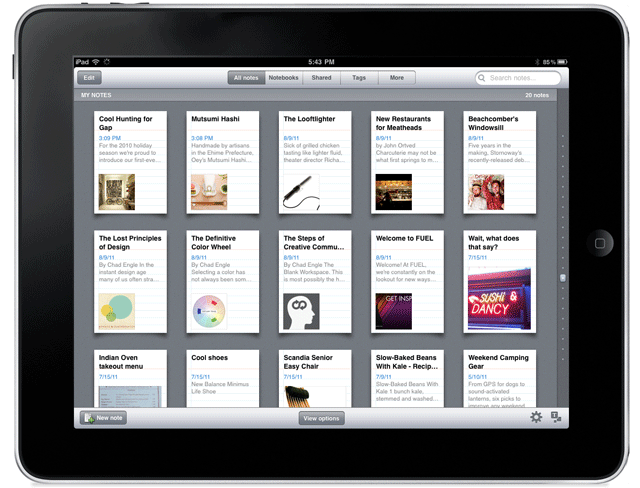
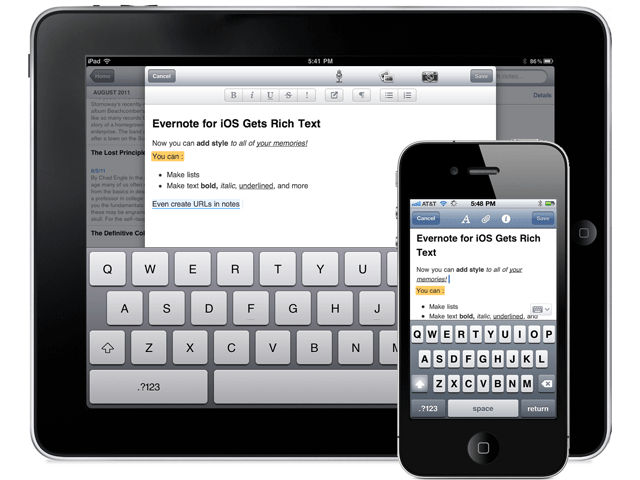
Last week, when it was still August (where the hell did the summer go?), Evernote released the mother of all iOS updates. There was a lot to it — a cool redesign, a lock feature for premium users — but the big deal was the inclusion of a rich text editor and the ability to access notes in shared notebooks.

The new features aren’t as robust as the desktop version of Evernote, of course, but are nonetheless dripping with the sort of awesome that makes you want to find your Irish roots and dance a merry jig.

Here are the highlights:

Rich Text Editor

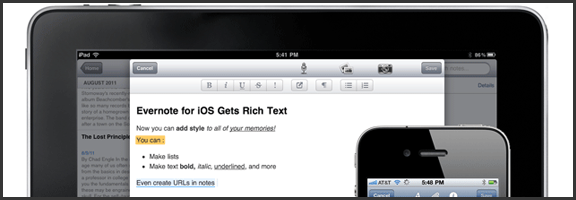
The new editor allows for basic bold, italics, underline, bullets and the like, as well as strike-through, header text, highlighting and linking. You can also edit notes that were already created with rich text, which is great, but don’t think the append prompt is gone for good. If the note has too much fancy in it, even the new editor may not like it. There is a new option, though, that saves at least a bit of headache: the ability to simplify the formatting to be workable in the iOS apps. This way, you only lose some of the formatting, instead of everything.

Evernote for iOS (iPhone, iPod Touch, iPad) Now Has a Rich Text Editor | From Evernote Blog

Note: Checkboxes are still not able to be created in Evernote for iOS. You can check them, but not make them.


Shared Notebooks

Tired of not being able to access a note or notebook that someone shared with you? Now that Evernote has added shared notebooks into iPhone, iPad, and iPod Touch, you can breathe easy. Note that I said access, however. You can only read them, not create new ones. Yet.


Another handy feature is the new ability to search within notes. Want to find a word or turn of phrase from your note? Now you can, quickly and easily. It’s no desktop search, but it’s definitely a good start.

This is only the tip of the update-iceberg. There’s a lot more going on under the hood and in the form of a new look and feel for Evernote’s iOS apps. If you haven’t updated yet, you should. Get the full list of new features here.

New Evenrote Design for iPad | From Evernote Blog

Thoughts on Evernote’s new iOS features? Head down to the comments!


Eyeborg: So This Guy Replaces His Eye With a Wireless Web Cam… [Random Tech Video]

Rob Spence, Eyeborg: Endoscopic, Wireless Web Cam in Prosthetic Eye   40Tech

It may sound like a joke — but it’s not. If you’ve been poking about on YouTube or TechCrunch today, you may have already seen this: an interview (and partial commercial for the new Deus Ex) with Rob Spence, a man who has successfully created a prosthetic eye for himself that is actually an endoscope turned wireless video camera. It doesn’t plug into his brain or anything (we’re a while away from that yet), only outputting to a handheld LCD receiver/viewer, but hey — that’s still good enough for a decent bit of spy-tech, right? At the very least, it makes for a good “neeeeeeat” or “oh-ye-gods-that’s-gross” story.

Check out the video, below. Yep, video — and you do get to see him install and remove the eye, so if you’re squeamish… well, you’ve been warned.

http://www.youtube.com/watch?v=MTlFgtjLLCE&feature=player_embedded


So who wants one?


Memonic: A (Not So) Quiet Rival to Evernote and Springpad [App of the Week]

image

I just confirmed with the CEO of Memonic that the crazy premium account deal ($3.33 Euro for 10,000 notes and 50GB storage) link works until the end of October. And it works for whomever, not just the Swiss/Germans. Translate the page from German and get it while it’s hot!

There’s been a lot of discussion on 40Tech about which is the best note-taking app. While the battle is generally between Springpad and Evernote, occasionally a new option steps in for a punch or two. This week’s contender has been watching, learning, and in many cases even improving upon the competition. I’d like to introduce you all to Memonic — there’s a reason it made App of the Week.

When it comes to note-taking apps, there are five key things to look for: how easy it is to get information into the app, organization and sharing features, overall usability, cross-platform possibilities, and personal preference. That last is a huge factor in user adoption. Depending on what you need your notes app to do, one or another may work better for you.

Evernote, for example, is well suited to those who just need a straight ahead, highly searchable portable filing cabinet. It can do many other things, true, such as be used for a GTD system, but portable (and searchable!) filing cabinet is what it does best. Springpad, on the other hand, is great for taking notes, but has this fantastic capacity for making certain types of notes “smart.” If you like to comparison shop, find good deals, or get value from what the people in your network are interested in, Springpad’s note-alerts system offers you something no other note-taking app can match.

Memonic doesn’t have the budget that Springpad or Evernote has. They’ve been bootstrapping their system for a while now, and when you consider that and then see what they’ve put together, I have no doubt you’ll be impressed. I was — and am. Just as Evernote and Springpad differ in their approach and target markets, Memonic has brought its own angle to the field: research and collaboration. Now, before the Evernote lovers start touting shared notebooks, and the Springpad-enamoured bring up the oh-so-very-cool Board, hear me out. Those are all excellent features — but if you want an app that makes it easy to share and organize notes on a project (or projects), easy to be notified when new notes and research snippets have arrived or been commented on, and ridiculously simple to gather information in the first place, then Memonic is the clear choice. Here’s why:


Groups

Memonic can be used as a central collaboration notebook for research, planning, and discussions on projects. You can create a group, invite a few people, and then get to work. The group gets its own page with its own activity feed, too, which makes it simple to be notified and to keep an eye on progress.

If you run into the ever-present problem of working with someone who doesn’t want to use the service, sharing notes with people outside of Memonic is easy, too. You can share via Facebook, Twitter, email, or a link, RSS feeds, and you can even embed notes on web pages — which is a nice touch.

Share Memonic Notes on Facebook, Twitter, Email, or Embed in a Web Page | 40Tech


The Dashboard

Memonic’s group and contacts features are fully realized with the feed-like Dashboard. The Dashboard not only shows you a quick clip of everything you’ve posted recently, but it also shows the public posts of your contacts — which can be opened and read in full right from the dashboard itself. See something you like? Copy it to your own collection of notes, or share it with others via email, link, Facebook, or Twitter (or even copy it to Word) with just a few clicks.

Memonic Dashboard | One of the Best Note Taking Apps | 40Tech


The Best Clipper I’ve Come Across

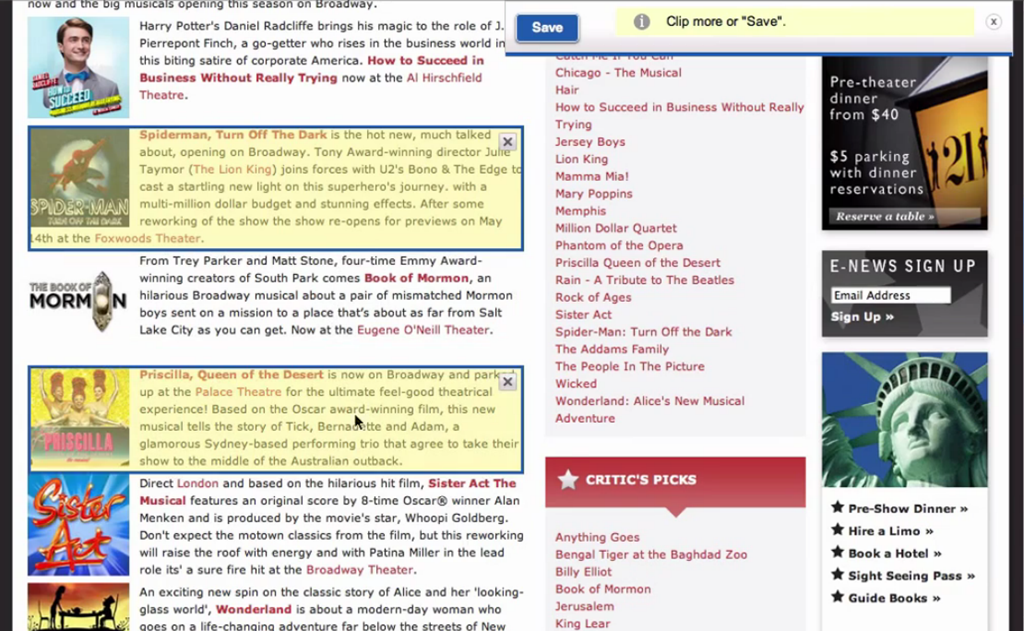
I love the Evernote Web Clipper, and I like the Springpad Clipper even better, but both can get a bit irritating if you’re in a hurry. Memonic’s clipper does away with the click and drag highlighting and breaks each section of content on a page into regions that can be selected with a single click. You can do multiple parts of the page, or even the entire page in one go. When you’re doing a lot of web research, this speeds up the process immensely.

Memonic Clipper is the Best Web Clipper in the Business | 40Tech

Quick content selection isn’t the only reason the Memonic clipper stands out over the others. The other big one is Gathering Mode, which is a little toggle switch that allows you to lock in your settings for where you want to put your notes — folder, privacy level — and save you the trouble of having to re-establish those settings for every single clipping. It’s awesome — and I have no idea why other clippers don’t do the same. The only thing I would like to see added to Gathering Mode is the ability to lock in tags, as well.

Finally, the Memonic clipper has a variety of other useful modes that can replace a number of other services with just this one:

  • Read Later mode that allows you to grab entire pages
  • Bookmark mode (which provides a nice snippet description as well)
  • Screenshot mode that attaches an image of the visible browser area
  • Write a note (to get to the note taking without even opening the service)

Memonic Web Clipper Can Replace Read It Later, Bookmarking Apps | 40Tech

The web clipper works with all major browsers — and even works by bookmarklet with Safari for iPad. If that isn’t enough, there is also a clipper for Windows that allows you to clip content outside of the browser.


Clean and Simple Design — Across all Platforms

Memonic focuses on the minimal. The way notes are displayed in expandable windows that are neatly separated from one another is easy on the eyes and easy to use. The look and feel is distinctly uncluttered, and is fairly persistent across all versions of the app. And you can get Memonic pretty much anywhere: Windows and Mac desktop apps, iPhone, iPad, Android devices, and the web app for everything else. Mobile versions don’t have the Dashboard, unfortunately, but everything else you could want is there, both online and off.


Crazy Integrations

For a small operation, Memonic is throwing around some important integrations, especially for the business set. Here’s just a few: Salesforce, SugarCRM, Confluence, Sharepoint — and guess what… they are planning to integrate with Evernote! That may seem a bit weird, but soon, all those who can’t bear to walk away from Evernote, but love the power of the Memonic clipper, will be able to use the super-awesome clipper to save content directly to their Evernote accounts. A nice, tidy little bit of genius on the part of Memonic, if you ask me.

Memonic Clipper Integrates with Evernote | 40Tech

If, for some strange reason, you need more than the promise of Evernote integration, well, Memonic also integrates a save button into Facebook so you can save your favourite photos, status updates, and wall posts. Want more? How about Google Reader integration so you can clip your favourite posts while reading your feeds? How’s that tickle you?

More ways to Use Memonic | Save Facebook, Google Reader Posts | 40Tech


Memonic’s co-founder, Dorian Selz, and the rest of the team have worked their butts off on a bootstrap budget to put together one of the most robust note-taking apps I’ve ever come across — a definite rival for Evernote and Springpad if it gets the notice it deserves. The only issue I personally have with Memonic is that their free version is limited to only 100 notes and doesn’t have Gathering Mode. To get the full service, though, only costs $28/year — which isn’t bad considering Evernote premium is $45/per year — and Memonic doesn’t have any advertising to clutter up your experience. If you do a lot of research on your own, or as part of a student or business team, give Memonic a try — you just might love it. And there are discounts for students, too.

What do you think of Memonic?