Menu Close

Author: Bobby Travis (page 10 of 51)

Bobby isn't 40-something, but is a strong supporter of the Grown-up Geek kind. He's a loving husband and father first, but is also a freelance writer, productivity nut, operatically trained singer, and (not-so) closet geek.

Check out his random thoughts, wackiness, and Instagram pics on Tumblr, Twitter, or Google+-- or just head over to bobby-travis.com.

Springpad Mobile Clipper is the (Near) Seamless Content Clipper You’ve Been Waiting For

Springpad Mobile Clipper is the (Near) Seamless Content Clipper You've Been Waiting For | 40Tech

It’s been a long time coming. Since I got myself an iPhone, and especially since the iPad, I’ve joined the ranks of the millions of users out there who have been waiting for a simple and easy way to clip web content on my mobile device. I’ve used Read It Later and Instapaper, I’ve copied things into email and sent them to Evernote, Springpad, Producteev, and myself. I’ve even used the desktop clipper bookmarklets with reasonable — if time-consuming — success. That’s all in the past now: Springpad has hooked up the mobile world with a new and improved web clipper that is near to seamless.

The new Springpad mobile clipper doesn’t have the fancy bells and whistles of the Chrome extension, of course, but the updated bookmarklet is straightforward and easy on the eyes, and it works just as well in Mobile Safari and Atomic Web Browser as it does on desktop browsers. I used to use the old Springpad bookmarklet, and sometimes the Evernote and Memonic ones as well, but more often than not, they would load or function slowly — if they loaded at all. I’m presented with or stumble across a plethora of juicy things I want to follow upon in any given day – and most of it happens while I’m not at my computer. Now I can grab a bookmark for later, organize it, and move on within seconds. No fuss, no later processing, and no clutter in my email inbox.


Clipping Content is Great on iPad, a Bit Neutered on iPhone

Clipping bits of content from an article or page is a bit of a problem, though, at least on the iPhone. When using the iPad, I had no issues at all. Select a bit of the text or an entire article, fire the clipper, and it appears in the bookmark’s description area, complete with formatting — unless you want to edit it, of course. That strips the HTML. On the iPhone, however, no amount of selecting or even copying text to the clipboard will get the content you want to clip to show up. All you will get is the description write-up. I’m not sure why this is, and it definitely limits the iPhone to a quick link-grabber as opposed to a full-fledged clipper.

If you really want to clip that bit of content or entire article for later reading while on the iPhone, you can copy the text and edit it into the description field by doing a select-all-and-paste maneuver. Once again, though, you will lose all formatting, including any links and images.

The iPhone issue aside, the clipper rocks for getting those bookmarks into Springpad and organized in your notebooks and tag structure. Notebooks are an easy drop down, and tags auto-complete as you type. You can also change the type of save you want it to be. Bookmark is the default, but you can change it to Business, Restaurant, Recipe, Product, and all the rest with just a few touches. Almost all the rest, that is — Note is missing, and so is Task. Not a huge loss, I suppose, unless you want to save a bookmark to a task or a note, which could happen. If you really need that functionality, you can always go into Springpad and add a reminder or a note directly to the bookmark.

Springpad Mobile Web Clipper for Mobile Safari in Atomic Web Browser | 40Tech   Springpad Mobile Safari Web Clipper | 40Tech

Selecting Post Type in Mobile Safari Web Clipper, Springpad | 40Tech   Tagging Bookmarks in Springpad Web Clipper for iPad, iPhone | 40Tech

image   image


Installation is Easy

Springpad has made it easy to install the bookmarklet to Mobile Safari. They provide step-by-step instructions in the Settings area of the most recent versions of their iPhone and iPad apps. If you use another browser, just follow the instructions and let Springpad load up Mobile Safari, as it will automatically add the JavaScript to your clipboard. After that, open up your browser of choice and add a bookmark, pasting the JavaScript into the URL field. There is no guarantee your browser will work, but I can tell you that Atomic Web Browser does just fine.

image


Springpad Has a Few More Tricks Up Their Sleeves

The new mobile clipper isn’t the only thing Springpad’s been up to lately. They also released a Quick Add bookmark for your home screen that makes it faster for you to load up the Springpad app to add a note, photo, or whatever else you choose. This is nice for those of us without widgets like those Android folks.

I also have received word from Springpad CEO, Jeff Janer, that they have some big moves in the works that will differentiate them even more from Evernote. Having a mobile clipper that consistently works and works well is a good start though. They just need to fix that pesky iPhone issue…

What are your thoughts on the Springpad Mobile Clipper?

If You Haven’t Heard — or Noticed the Huge Sign — Google+ is Open for Business and More Awesomer than Ever

If You Haven't Heard -- or Noticed the Huge Sign -- Google+ is Open for Business and More Awesomer than Ever | 40Tech

So let’s get the dust out of the air right away: I am fully aware that “awesomer” is not a word. I am also fully aware that all of the big tech blogs and probably everybody else with a post up today (or yesterday, by the time you read this) has already talked about this. I don’t care. This is 40Tech dammit! And I want to talk about it. With you.

So here it is: Google+ dropped a ton of new goodness for their social network today, opened it up to the public (bye bye preview, hello open beta!), and worked with wil.i.am of the Black Eyed Peas (who also loves the tech) to put together the first publicly broadcast on YouTube video Hangout. Big day — and those are barely the highlights.


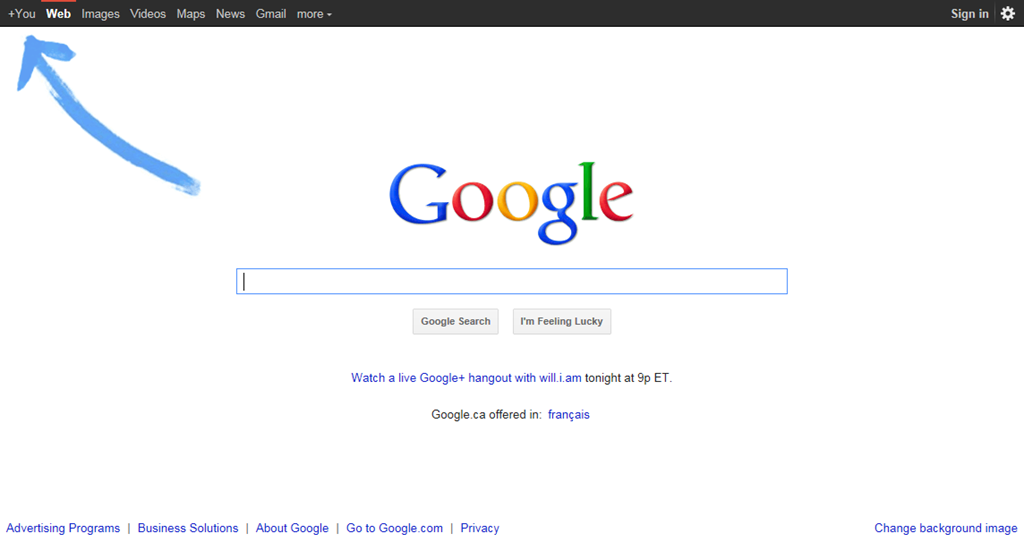
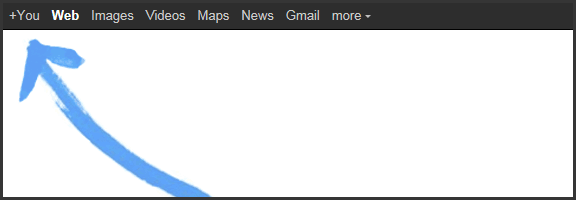
Here’s the Big Sign — Come One Come All!

Google+ is Open to the Public, has a Big Sign to Prove it | 40Tech


Here’s Just a Few of the New Features

Search!

It’s finally here. You can search for whatever in the Google+ search box and get back relevant people, posts, and web content. You get the public stuff and the items that only you can see.

Hangouts on Your Mobile Device

Available for Android first, of course, with iOS on the docket soon. Full-fledged multi-person video chat while on the go.

Hangouts On Air

Webinars, video broadcasts to large audiences (with up to nine other people to team up with), and session recording for those who miss it. The broadcasts are limited for the moment, but anyone can watch.

Hangouts with More Awesome!

Screensharing, sketchpad, Google Docs sharing, and the ability to name your Hangouts so you can focus your topic. These are still under construction, According to the Google Blog, but you can try them out by clicking “Hangouts with extras” in the green room.

Messenger for Mobile (Formerly Huddle) — Also More Awesome.

You can now share photos in your mobile chats!

APIs

And let’s not forget that they’ve dropped their first API for developers to play with. Klout has already jumped on board, adding Google+ to their social scoring platform, and you know that others are going to start coming out of the woodwork too, especially as the API improves and allows for more integration possibilities — for example, they are going to be releasing some Hangout APIs soon…


Here’s the Bottom Line

I’m not saying that Google+ doesn’t still have its work cut out for it, especially with social networking overload already frustrating the hell out of your average, or even super-social-geek, user. The kid gloves are off though. The most widely used tool for finding information has made Google+ its focal point. Google is creating a platform to personalize search, and give you a permanent home on the web — you can search for new information, search for things your friends are talking about, easily find and share and talk about whatever interests you, do all of that with only the people you care to, play games by yourself or socially, easily upload and share pictures, hangout with people via chat or video from your computer or your mobile device, broadcast yourself for the hell of it or for conferences or webinars, handle (or even throw away) your email, and more more more for the simple and effective cost of free.

Facebook may have the people, at the moment, but Google+ isn’t going away. Remember when Gmail came out? It didn’t look like a very likely competitor to Hotmail or any other webmail service at the time. Look at it now — especially since the rise of Google Apps. Google hasn’t even launched the business aspect of Google+ yet. What do you think will happen then?

What are your thoughts on the new, fancy, public Google+?


Springpad Clipper for iOS and an Evernote eBook

Springpad Clipper for iOS and an Evernote eBook | 40Tech

Heads up folks! Great things are happening surrounding two of your favourite apps: Springpad and Evernote. Firstly, Springpad is doing something that has been long-awaited and needed — namely, adding a web clipper that is optimized just for Mobile Safari. They’ve also caught up with Android by finally giving us iPhone and iPad users a Quick Add button for the home screen.

More importantly though — and this is no slight to the awesome Springpad, but credit where credit is both due and needed — my friend and one of our most informative and helpful commenters, Daniel Gold, has just released his first eBook [affiliate link]! It’s about Evernote, it’s about GTD in Evernote, it looks awesome — and it’s only $5 bucks!

I will be testing out the new Springpad awesome for a full report next week, and will also read and review Daniel’s Evernote eBook. I’m already a bit biased in its favour, because I’m familiar with Daniel’s work on his blog and his many awesome comments here (where I met the man). In fact, he has been a major contributor in both inspiration and expertise to several of my posts on this blog. Nonetheless, I’ll be as narrow-eyed and judgemental as any good reviewer should be… :P

Stay tuned for more next Wednesday night!


iPhone 5 Thief Doesn’t Know Who He’s Messing With… Just Ask Conan [VIDEO]

iPhone 5 Thief Doesn't Know Who He’s Messing With... Just Ask Conan [VIDEO] | 40Tech

You might remember the whole “iPhone 4 prototype swiped in a bar” fiasco. You’re probably aware that history has recently repeated itself with the iPhone 5. What you might not know is what Apple is planning to do about it. Never fear, however! Conan O’Brien and the good folks at Team Coco have put together a commercial that shows exactly what fate awaits the intrepid thief — and it ain’t gonna be pretty.


If you were Apple, what sort of fun things would you have in store for the prototype thief? How about the dumbass who let it happen – again? Presuming that it’s not all some sort of weird publicity stunt, of course.

Source: The Next Web


Google+ for iPhone and Android Sharing — Too Little Too Late?

Google+ for iPhone and Android Sharing -- Too Little Too Late? | 40Tech

Though the initial excitement of Google+ has worn off, millions of users are still using the service and more people connect every day. For its part, Google has been working hard at bringing the preview social network closer to a production offering, adding social gaming without annoying people, verified accounts for prominent users and famous folk, and ironing out their sign-up rules (the heavily debated real name only policy). They have also been paying attention to their mobile apps, finally adding post sharing into the Android app. iOS users had to wait a bit, as is per usual, but the much awaited update is now available in the app store.

But is development coming along too slowly to keep up interest?

Personally, I’m a huge fan of Google+. There are a lot of innovative uses that are cropping up — cooking classes via hangout, blog replacement, collaborative writing groups; Evan and I are even putting together a hangout-based pen and paper roleplaying game, cementing our geek status once and for all. Google+ is also a fantastic place to meet and converse with new people, focusing on like interests over general broadcasting, which makes for better conversation and better relationships.

The problem is, I’ve started to notice that my streams are starting to degrade. People appear to be less active, less conversant, or generally gone and gone. This could be due to the end of the summer — people are getting busier as the school season and work focus heat up — and it could be part of the overall ebb and flow of a new product. It could also be that Google is taking too long to get their service off the ground and into the hands of the general public.

Gmail was in beta for years, and to the point that it was really more of a long-standing joke than anything else, but the Internet back then was, if you can believe it, less fickle. With the world takeover of social networking and subsequent obsession with real-time streams, the attention span of your average user is practically gnat-sized. And let’s not forget that, in order to get noticed in the massive amounts of information flowing through the digital-verse, bloggers and people in general tend to gravitate toward sweeping sentiments of “wow this is awesome” build-up and “it’s never gonna make it, and here’s why!!!” doom and gloom statements. And yes, I realize that it wouldn’t take a stretch if the imagination to lump this post in with them, no matter what I say t the contrary. The point is, it makes it really hard to accurately gauge if a service will live or die.

To top things off, Facebook hasn’t been sitting about with thumbs in nethers, either. They’ve been paying attention to what people like about G+ over Facebook and have been making changes to how their own streams work, attempting to make it easier to share with those you want to share with, and even (finally) updating their mobile apps for new sharing and privacy options.

I say again, I’m digging Google+ — but I dug Google Wave, too. I think that Google’s push to integrate Plus into their overall offerings will help keep things moving, but I have to wonder: if users as a whole notice their streams downgrading in quality and movement, will it start one of those slow spirals into web oblivion?

It’s been a few months now, what are your thoughts?