
 We’ve recently started using Google Wave here at 40Tech, and have found it be extremely useful, especially for site-related tasks. In fact, we wrote our first collaborative post using Wave recently. As useful as Wave can be, it can also be overwhelming. Once you’ve followed a few waves, your Inbox can be overflowing, making it very difficult to find what you want. How to tame this? For starters, you can organize waves into folders. But what if you want to organize waves by tag? Tags have some advantages over folders, including the fact that a wave can only belong to one folder, but a wave can possess multiple tags. Even if you tag your waves, however, there doesn’t appear to be a way to make your tags easily selectable in the sidebar. It might not be built into Wave’s UI, but there is in fact a way to get your tags into the sidebar. Read on for how to do it.
Author: Evan Kline (page 151 of 164)
Hello, I'm Evan. I write about tech from my perspective – that of the average tech geek, sometimes with my lawyer glasses on. You can also find me on Twitter and at my real-life job as a lawyer. MORE ABOUT ME.
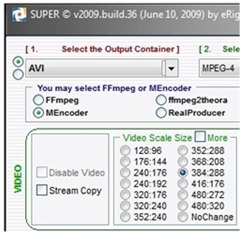 Years ago, video editing was restricted to those with high-end computers, and was a cumbersome, problem-riddled task, filled with dropped frames, out of sync audio, and other headaches. Some of us even attempted to edit video without a computer. I remember the days of trying to splice together a family video, using dubbed VCR’s. Let’s just say that those efforts didn’t turn out so well. Now, though, video editing has come to the masses. Almost any modern computer can handle video, and editing software comes preinstalled on most operating systems (or is a free download, in the case of Windows 7). In addition to the software to edit video, there are other free programs that are worth carrying in your arsenal. Here are four handy ones, which are Windows-only unless otherwise noted.
 So you’ve installed Windows 7, and have decided you want to repartition your disks. You could use Windows 7’s built-in disk partitioning features, but what if that doesn’t work? That recently happened to me. Windows 7 refused to partition the disk, telling me ‘There is not enough free space on the disk to complete this operation,’ even though I had ample space on the disk. A Google search revealed this to be a common problem. I searched for and found an alternate solution.
 Earlier, we discussed 5 compelling reasons to upgrade to Windows 7. Windows 7 is a big step up from Windows Vista, with several compelling features, but it isn’t perfect. While there are no deal breakers, there are a few spots where Windows 7 could use some improvement. Here are a few of them. I’m sure there are more, so let us know in the comments if you have any ideas for how to improve Windows 7 (and no, "get a Mac" doesn’t count).
 Unlike Bobby, the other writer here at 40Tech, I wasn’t brave enough to install the Windows 7 Release Candidate or Beta. As a result, I’ve only been using Windows 7 for about 5 days now (unlike Bobby, who has been using it and loving it for quite some time). So far, I’m impressed. Here are the five features that I’ve enjoyed the most, and have made me pleased with my decision to upgrade from Vista, at least at this early stage. Later in the week, we’ll take a look at a few features that could use some improvement.