Menu Close

Author: Evan Kline (page 109 of 164)

Hello, I'm Evan. I write about tech from my perspective – that of the average tech geek, sometimes with my lawyer glasses on. You can also find me on Twitter and at my real-life job as a lawyer.    MORE ABOUT ME.

A 40Tech Gaming Night – Are You Interested?

gaming poll

I don’t know about you, but my gaming time is pretty limited nowadays. When I do game with others online, I don’t want to join in with a bunch of griefers, cheaters, and immature players. Where then can I look for some like-minded players? Well, here at 40Tech, we’ve got a great community, with many mature commenters and friends. Perhaps some of you would like to do some gaming, in the right environment, and with the right game and platform? If so, let’s set up a time that we can game together.
Read more


How to Add Folders to the Finder Sidebar [Mac]

Finder1.png

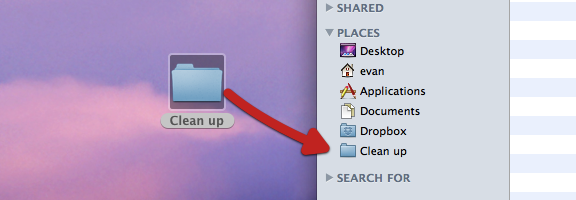
If, like me, you’re relatively new to the Mac world, you stumble across tips that are both incredibly useful, and incredibly simple. One such tip concerns how to add folders to your Finder sidebar. There are several reasons you might want to do this. Perhaps you have a folder that you access all of the time, and don’t want to go digging for it. Or perhaps you’re in the middle of a project, and want to temporarily access your project folders with one click. Getting those folders into the Places section of your Finder sidebar is easy, using either of two methods.

Read more


How to Sync Your Text Expansion Snippets Between Windows and Mac

breevy and textexpander.jpg

Yesterday we covered five ways to boost your productivity using a text expansion program. If we’ve sold you on the value of a text expansion program, your next question may concern which program to get. We previously mentioned how to use text expansion for free on Windows using Texter, an app that we identified as one of five tech tools to increase your productivity in a non-tech job. Texter was the first text expander that I used. When I added a Mac to my repertoire, though, one problem that I ran into was that Texter is a Windows-only app. I started using TypeIt4Me on the Mac, but then I had to manually enter my expansion snippets to keep them in sync between Mac and Windows. Recently I discovered a better solution – two separate apps (one on each platform) that can use the same snippet file, synchronized over Dropbox. I’ve been in text expansion heaven ever since.

Read more


Five Ways to Increase Your Productivity Using Text Expansion Software

text expansion productivity.jpg

We love apps that can make you more productive, and help you get things done. One type of app that can give a tremendous boost to your productivity is text expansion software, such as Texter and Phrase Express on Windows, and TypeIt4Me and TextExpander on the Mac. With text expansion software, you create snippets of text, and then set up abbreviations to trigger the typing of those snippets. If you’re not sure how you can fit text expansion software into your workflow, read on for some examples of how to use it.

Try before you buy! And see what we have to say tomorrow, when we’ll look at our favorite text expansion app for Windows, and our favorite on the Mac, and how to get them to sync with each other so that you don’t have to manually recreate your snippets in each app.

Read more


App of the Week: FeedDemon Lite [Windows]

FeedDemon.jpg

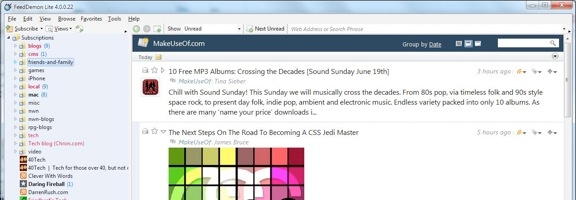
Four months ago, we asked you if you liked your apps in the cloud or on the desktop. The votes were pretty evenly split between the cloud, the desktop, and no preference. One type of app that I’ve grown to appreciate more on the desktop than in the cloud is an RSS reader that syncs with Google Reader. Why? Speed and elegance. On the Mac and iOS, I’ve grown to love Reeder, which I’ve counted among my 10 essential Mac apps, and among 10 killer content consumption apps on the iPad. But what about Windows?

Read more