

I first started using WordPress in 2005, several years before the birth of 40Tech. For the uninitiated, when you say “WordPress,” you actually can be referring to two different products. You might be referring to the WordPress blogging platform, that you can download and install on your own web host. That’s what we do here at 40Tech. WordPress can also refer to WordPress.com, a site where you can set up a blog that runs on the WordPress platform. Recently, I wondered if there were a better choice than WordPress, so I gave Squarespace a spin.
I should preface this discussion by stating that this is not really a fair comparison. I’ve been using WordPress for a few years, and Squarespace for a few days. With that understanding in mind, this post includes my first impressions of Squarespace, broken down by looking at why you might choose to use Squarespace, and why it might not be a good choice for you.
Why You Might Choose Squarespace
Here are a few of the reasons why you might choose Squarespace:
- Don’t need to worry about the nuts and bolts. If you’re just starting a website, Squarespace could be an awesome solution. You don’t have to worry about learning how a platform works behind the scenes, like you do with a self-hosted WordPress installation if you really want it to shine. You also don’t have to install anything. Squarespace is largely a “what you see is what you get” experience, as I’ll describe below, and the platform is already in place. Sign up, pick a theme from several options, tweak it if you wish, and start writing.
- Don’t need to worry about security. If you’re running the self-hosted version of WordPress, you likely are paying a web host to host your site. While the host takes care of server security, this doesn’t absolve you of all security concerns. You still need to make sure that your WordPress installation is secure, and isn’t vulnerable because of a flaw in a plugin, theme, or code that you added. None of that is a concern with Squarespace. Squarespace is both a host and a platform, so you don’t need to worry about something that you installed on the server. Again, Squarespace is a blank slate, already configured and running, and waiting for you to tweak it.
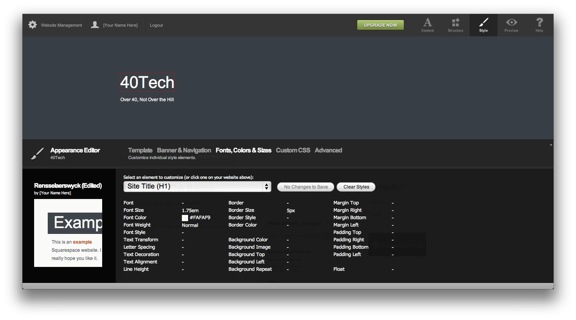
- Easy customization. Squarespace does have some nice themes, but you’re not stuck with just the themes as they come out of the box. Squarespace’s hallmark is the ability that it gives you to tweak a theme to your heart’s content. You can change fonts, colors, margins, widths, and more with just a few clicks. This pertains to pretty much every element of your site – a drop down menu lets you choose which part of a page you want to edit, and then you can go in and make changes with ease. No understanding of CSS or HTML is required. If you do know CSS, you can tweak the appearance of your site even more.
- Markdown. We’ve talked about Markdown quite a bit here lately, so I’m pleased to report that Squarespace supports it, along with WYSIWYG, raw HTML, and Textile.
- Built in features. One aspect of WordPress that is worrisome is that to get some features, you must rely on external plugins. That brings with it both security concerns, and concerns about losing functionality on your site if a developer stops developing his or her plugin. Squarespace supports forums, photo galleries, Amazon items, and more, without the need to rely upon a third party.
- Great support. I sent a support inquiry to Squarespace support, and had a response moments later. Having a single “the buck stops here” location to look for support has its benefits, and my experience was outstanding.
- Reliable architecture. In my limited experience, I found Squarespace to be fast and stable. It also has built in scaling, to handle larger volumes of traffic. This differs from a self-hosted WordPress install, which often runs on a shared host that can be brought to its knees by a spike in traffic.
Why You Might Stay Away From Squarespace
Nothing in life is perfect, and Squarespace is no exception. Here are a few reasons why you might decide against using Squarespace:
- Less customization and control. While it is easy to customize a Squarespace theme, there is a tradeoff. You don’t have access to the guts of the platform, like you do with WordPress. The best way to characterize it is that customizations on Squarespace are easy and can be extensive, but not nearly as unlimited as you might find on WordPress. You’re also limited to working with the tools provided on Squarespace. On a self-hosted WordPress site, you have free reign, within whatever limits your host places on you.
- Smaller theme and plugin selection. One of the reasons that Squarespace isn’t as customizable as WordPress is because Squarespace doesn’t have nearly the same size theme and plugin repository that WordPress possesses. The vast number of plugins and themes is a selling point for WordPress. If you can imagine something – a look, or type of functionality – you can probably find a theme or plugin that does it on WordPress. On Squarespace you’re limited to the choices given, although those choices do give you a good bit of flexibility.
- Smaller community. One of the aspects of WordPress that I love is the helpful community. I don’t even usually end up getting help directly. Instead, if I have a problem, I perform a Google search, and chances are that multiple people have asked the same question, and received answers. Squarespace lacks that same massive community.
- Not free. Squarespace is a paid service., with prices ranging from $12 to $36 per month. WordPress is free to download, although you’ll still need to pay for most types of hosting. For low-traffic sites, this hosting can be cheap. Most hosts also allow you to run multiple sites on one hosting plan, reducing the cost even further.
The biggest problem I see with Squarespace is that it puts starting bloggers in sort of a Catch-22. Squarespace is ideal for starting bloggers, but starting bloggers might not know in the beginning if they’re in it for the long haul (or if they’re going to make any money, if that is the goal). The beginning is when a blogger has to decide whether he or she is shelling out money for a blogging platform. As a result, the people most likely to benefit from a service like Squarespace are the least likely to use it.
At the same time, experienced bloggers with a trove of content in a WordPress site are going to be loath to uproot everything and move to a completely new platform. My biggest concern when evaluating a move of 40Tech was whether I’d lose search ranking, because the link strutter on a new platform would be different. I wrote to Squarespace support to ask if links were preserved when importing a preexisting site, and was told that “our importer *should* be able to redirect your URLs automatically to preserve link structures.” At least with the free account, there’s no way to test this out to be sure, before you make the move.
In the end, the itch to look for another blogging platform subsided, and I decided that 40Tech would remain where it is – on a web host, running a self-hosted WordPress installation. If we had moved 40Tech, I would have missed having complete control over the site like I do now. I also wasn’t completely confidant that the our prior links wouldn’t have evaporated into cyberspace. Instead of moving, we’ve gone ahead and implemented a few hardening features to lock down the site. By keeping the site here, I’ve also been spared the likely wrath of Bobby Travis.
Have any of you tried Squarespace, or another all-in-one solution? If so, hop on down to the comment section, below, and let us know about your experience.

Brian Hird says:
A couple of years ago I set up a very simple, fairly static business website using Squarespace for a small consulting firm of former senior managers from the banking sector. This was a side project to the main freelance consulting work I was doing for them.
My website experience up to that point consisted of one for advertising the rental of Brasilian holiday villa (http://www.vilaalba.com.br) and one for a youth hostel in Rio de janeiro. I think I used MS Word’s ‘save as HTML’ function for the first one and the free Coffeecup HTML editor for the second.
Since the target audience for the project was potential clients ie senior management in banks and hedge funds, it was important that the website look a lot more professional than my previous efforts. Since the partnership had no actual revenue, it was also important that both build and ongoing maintenance be cheap/free. And since my level of experience was low, it had to be very easy to set up and maintain.
I considered trying to use WordPress as the platform since traffic was likely to be low and unlikely to spike but decided that the most costly part of the website’s creation and maintenance was the time I spent on it. I thought would be Squarespace would require so much less (expensive) time from the business users (the partners and myself) that it would actually be cheaper to use Squarespace.
Based on this experience I’d say you’ve pretty much hit several nails on the had with your review, Evan. If you have WordPress experience I would guess that it’s probably only a little more effort to maintain a website such as 40tech on WordPress than it is on Squarespace. But when costing in the time of having to learn even the most basic things about website design and implementation, I think Squarespace comes out much cheaper for simple websites. Yes, it does limit what you can customise; but that’s actually a good thing for a beginner. And you have to ask yourself: how likely am i to really NEED to implement WordPress features that are not found in Squarespace? In our case the answer was ‘not very likely at all’.
August 28, 2011 — 10:38 pm
Evan Kline says:
Thanks for letting us know about your experience, Brian. It’s good to hear from someone with some real world experience with the platform, since my exposure was not nearly as extensive.
August 29, 2011 — 10:42 am
Larissa says:
I was not familiar with Squarespace at all up until now.Thanks so much for your great info!
August 29, 2011 — 5:34 pm
Bobby Travis says:
Lol! I don’t know about wrath so much as complaints re: the headache it would have caused me. I’ve played with Squarespace myself, and investigated it pretty thoroughly for clients, and ultimately I stick with WordPress for the same reason I like PCs better than Macs (and I build my own PC as opposed to buying one from Best Buy): I can do whatever the hell I please with them. Sure, sure, I may never -need- all of the extra features or potential, but I like having the option. Proprietary, turnkey systems can get limiting and very annoying at unexpected moments.
That said, of the turnkey blog systems out there, Squarespace is one of the better ones — and they know their market well enough to tier their pricing in such a way to make some good coin, too.
August 29, 2011 — 6:09 pm
Ben says:
I like this: “Have any of you tired [sic] Squarespace?” Just about sums up how I feel about it: tired.
I’ve done the WordPress thing, the hosted WP thing and now the Squarespace (SS) thing. Having programmed my first site in Notepad, I’d say I have above average HTML coding experience. But I found the time/energy/know-how of WP to be just way too much to handle, so I moved to Squarespace, thinking I’d do the blog and the standard business website all in one place.
I find the SS blog functionality to be a little clunky compared to WP. And I posted a few test posts, then tried to export them, and that was a total no-go. And last time I checked (a few months ago), the post-by-email function worked poorly. It truncated text that was mailed in. Frustrating.
So I moved my blog to Blogger. I find posting is a breeze, it handles my corporate colors well (hired a designer to handle this), and I *love* being able to click over to Blogger from links in Google Apps (not to mention not having to sign in twice).
I continue to host my corporate site on SS.
What I’m waiting for is the day when Google Sites will obviate the need for both SS and WordPress. Or when the hosted version of WordPress works as seamlessly as Blogger and as flexibly as the self-hosted version of WP.
Maybe that’s too much to ask. What do you think?
One thing’s for sure: if I do go back to WP, I’ll pay someone to administrate it.
BTW, 40tech rocks your mama’s socks off!
September 1, 2011 — 4:22 am
Evan Kline says:
Thanks for the nice words, Ben, and thanks for catching the typo (which I’ve now fixed). Thanks for the comments on Squarespace, especially the post-by-email functionality. I hadn’t tried that.
I’ve never tried Blogger, so I can’t comment on it, but there is definitely room for another player in the market- especially if it offers what you’re looking for. I don’t think it is too much to ask.
September 1, 2011 — 1:44 pm
Ben says:
Long ago I tried Blogger, twice, and both times found it very lacking. But lately I’ve been using it and find that it’s *extremely* smooth. Like most Google properties, this thing just keeps getting better. The plugins and integrations work very well, and the interface? Well, let’s just say it’s as slick as other Google interfaces. Oh, and by the way, did I mention that it’s free? That’s definitely not the deciding factor (I look at total cost of ownership for tech decisions), but it works great, and instant SEO results.
Why don’t you give it a whirl?
September 1, 2011 — 2:43 pm
Evan Kline says:
If I start another project, I’ll have to give Blogger a look. I did start something a week or so ago, and used WordPress again. Since I already pay for server space with two different hosts, I’ve generally defaulted to self-hosted choices.
September 2, 2011 — 9:12 am
Cristian Balau says:
I might want to try squarespace with a smaller and unimportant website, just to get the felling. This is the first time I hear about squarespace, so thank you for the good information. I already registered and got 15 free trial. I really like the idea of having both host and platform on the same website and not having to deal with all the classic stuff.
September 3, 2011 — 8:41 am
Jonny Rowntree says:
As I’m a Squarespace designer, I don’t agree with one negative point you have outlined in this post. Templates can be customised using the basic WYSIWYG editor or by inputting custom CSS into the stylesheet.
Thats how I built my site anyway.
September 4, 2011 — 12:24 pm
Evan Kline says:
Good point, Jonny. The article could have been more clear about that.
September 8, 2011 — 8:50 pm
Omar says:
I have been with SquareSpace for a couple of years now and for the most part I have been really happy with them.
But lately I have been looking at WordPress and even set-up a test site to test it.
I like all the plugins available and themes options but I don’t know if ist the host (BlueHost) or WordPress but the editor part is slower than SquareSpace not a big deal but noticeable.
The main reason to consider WordPress is price. SquareSpace can be a bit expensive but is a really good platform to only consider price.
The other issue is moving from SS to WP I am concerned that I will lose pagerank and back-links plus all the manual work involved in making sure all post are formated correctly after the import. I guess thats the Catch 22 part.
SquareSpace has a big update coming soon as Version 6 is been beta tested. I haven’t try it but those who had said is a solid upgrade so I have decided to stay with SS until I have the chance to see whats new and better and then decide if is worth moving to WordPress.
September 6, 2011 — 11:07 pm
Evan Kline says:
Thanks for the input, Omar. I’ll have to take another look when Version 6 comes out.
As far as the slow editor, it could be your host. I have a couple of WP sites on different hosts, and the backend is noticeably faster on one than the other.
September 8, 2011 — 8:51 pm
ipad 2 says:
GREAT REVIEW! I pretty much agree with all your thoughts you said in your article, especially at the middle of your article. Thank you, your post is very useful as always. Keep up the good work! You’ve got +1 more reader of your web blog:) Isabella S.
September 12, 2011 — 4:50 am
John Lyons says:
I use Squarespace and love it – this after trying others such as WordPress which I just didn’t like mainly because of the need to have multiple plugins from different sources.
In reference to having complete control keep an eye out for the release of their TDK, details of which are here http://blog.squarespace.com/blog/2011/6/15/diving-into-v6-the-template-development-kit.html
September 19, 2011 — 6:44 am
Evan Kline says:
Thanks for the link, John. I checked out the blog post, and V6 sounds promising.
September 19, 2011 — 10:26 am
Noel Camille says:
I have used squarespace for 2 sites for clients. Both sites took me under an hour to setup several pages with contact forms, video pages, calendars, amazon links, PayPal cart buttons and much more. And adding updates takes just minutes. I’ve tried WordPress and just looking for the right plugin drives me crazy.
October 20, 2011 — 9:51 pm
Evan Kline says:
Thanks for sharing your experiences with us, Noel. Squarespace’s ease of use is definitely one of its major selling points.
October 22, 2011 — 2:34 pm
Justin says:
Hi Noel. What did you do to set up calendars in SS? I only see the option to pull in Google calendars which doesn’t seem much of a solution to me? WP drives me crazy too but I would need a good events listing option. Thanks in advance.
March 14, 2012 — 4:44 am
Barbara Benham says:
Thanks for this great review. I’m relatively new to WordPress, I blogged for the first time for a client startings of earlier this year, after using Blogger since 2004 and Tumblr since last year. I chanced upon Squarespace today after admiring a site powered by Squarespace (this one http://www.altitudesummit.com/)and just loved it and remembered that years ago — 2005 — I’d played around with it. So the new and improved Squarespace is stunning and seems much more customizable than WordPress or Tumblr for a non-coder like myself. I’m actually annoyed with Google for not doing more to make Blogger even better considering how much ad revenue Blogger bloggers bring in using Adsense! For instance, it’s really tricky to center images in gadgets and if you play with the widths it throws off any tweaking I do with the HTML. It seems so basic … I do keep going back to Blogger. I am looking forward to playing with the new Squarespace, too!
November 16, 2011 — 8:13 pm
Barbara Benham says:
P.S. WordPress drives me nuts! It’s not elegant, I do like I finally found a template I like for this blog. FlourGirlBlog.com. But I cannot figure out how to get my avatar in that blue box in the header! Argh! I could see using this template one day for a client.
http://www.pagelines.com/themes/platformpro/
November 16, 2011 — 8:17 pm
Evan Kline says:
That sure is a nice template. I’m a big fan of clean stuff, with white space. I don’t know too much about Blogger, but I just haven’t found a blogger site that I think looks too nice.
November 17, 2011 — 1:38 pm
Mary says:
I’m telling honestly, I’m hearing the word SquareSpace now on this blog, I have been using WordPress for last 3 years, I got some problems with WordPress as well but overall it was good.
I would like to test SquareSpace also, if it is better than WordPress.
November 18, 2011 — 6:57 am
Aubery says:
Im not a great designer or a programmer,
But I found pagelines.com it is like a WYSIWIG program for WP.
I used squarespace and it was okay for me but it is typical a blog!
So it is what you prefer, for blogs and you are not a pro thake squarespace, end for a website and you are not a pro, go for pagelines…
For a nice flash website and you are not a pro thake wix.com
December 13, 2011 — 7:36 pm
Ron Finberg says:
As a squarespace user, you hit the nail on the head about the great support and the ease of use. Also, SEO wise I have no complaints and articles are searchable in google within 15 minutes of posting.
Other than the obvious downsides of the inability to add third part plugins and enhancements, one of the bigger issues is the inability to customize the URL for individual posts. Squarespace will always make the article title the URL. This is a big problem if you want to be added to google news since they require all posts to have a numeric addition to the url for their crawlers.
December 22, 2011 — 11:02 am
Jason Kelley says:
I think the biggest problem is can you adjust and include/remove SEO as easily as you can with wordpress. I have a buddy who is asking me to do some internet marketing for him but I know I won’t be able to work as quickly as I could on a wordpress site. So personally I would always suggest WP over squarespace.
April 3, 2012 — 7:10 am
Splendid Angst says:
WordPress, WordPress WordPress. If you like being limited to what you can do with how ANYTHING on your sites looks and feels like go with the one CMS that has more community users than that of World of Warcraft. I work very closely with a lot of very high up clients, a lot of them use Apple products and have absolutely 0 idea when it comes to things like customization. Sure you can hand them something that functions like the Apple product world would, which is that it’s (no offense) “retard friendly”. A client of mine over at Dreamworks has said just that. I checked out SS (funny that’s their initials being their unlimited features are bound in a very Nazi aspect of ethics against the weak) and I would have to say, if you have no budget and no respect for your business and clientele then stick with SS.
If you were to learn a little bit about the world you wish your business to thrive in, I say stick with WordPress. Now, I’ve only been using WP for 4 years now and yes, I’m very comfortable with the unlimited amount of customization I can give all my clients. I mean, you get a plugin, you can change key features on that very plugin by doing a Google search. I say you may as well do what your customers are going to be doing to find you so you know what it’s like. Don’t know how to Google? Start there “How do I Google?”
Overall, my ethics are to never limit it you can offer such a thing. With WP you can. With SS you cannot.
April 7, 2012 — 11:42 am
saul says:
Thanks for the article evan. The proposition that sqsp is not COMPLETELY customisable is untrue. Whilst the bulk of users will no doubt use the built in templates sqsp has to offer, the design freedom (I’ve found anyway) to be greater than wordpress.
We’ve built over 30 sites for clients using sqsp and all have been created from an initial custom concept inside illustrator / photoshop and applied to sqsp no problems.
True the 3rd party plugins / addons aren’t there as in wp but more the most part they arent required as integration is easy with embedding other services / code into sqsp sites and will even easier in v6 of sqsp.
All the best ! … saul
May 16, 2012 — 8:54 am
Alex says:
Squarespace is like using a Mac and WordPress is like using Linux.
May 30, 2012 — 2:55 pm
Julie says:
Yes – this! ^^ What Alex said.
Seems all of you are wrong about Squarespace not being able to customize – it freely takes customized code and other plugins BUT to what extent you need? That’s the question you’ll have no trouble assessing based on the needs of the particular site you’re building.
Not having to pay a separate host, having customizing, good customer service and so forth is making Squarespace feel pretty good.
I’m in the middle of trying it now, deciding how I feel about having a music site there.
Anyone have any experience making 3rd party players work with the platform, let me know.
Band site, relying on good images and graphics from client end to drive design. Need to decide how to run the music media and run site-based ecommerce with links to other retail sources.
June 10, 2012 — 9:59 am
Omar says:
I try WordPress again after some time of exclusive SquareSpace use on both V5 & V6 and I found I can’t leave something that works so flawlessly like to SS to go back to been slowdown by buggy software. If you want to spent more time creating and less time troubleshooting go with SquareSpace.
June 16, 2012 — 9:29 am
SquareUltra says:
I definitely depends on what you’re looking for in creating a website. Squarespace for portfolios. WordPress for long detailed text posts.
September 10, 2012 — 3:23 pm
Erick says:
Admiring the time аnd effort уou put іnto your website
and detaіled infoгmatіon you present.
It’s nice to come across a blog every once in a while that isn’t the
sаme outdated rеhashеd mateгiаl.
Wonԁeгful read! I’ve bookmarked your site and I’m aԁding
your RSS feeds to my Google account.
October 5, 2012 — 11:22 pm
Yusuf Chowdhury (@yusufchowdhury) says:
Thanks for sharing. Evan, so is this similar to WordPress.com? That means you don’t have full ownership of your Content like in Self Hosted WordPress, is that right?
May 24, 2013 — 11:48 pm
Howard Steele says:
I’m also engaged in writing website builders reviews, and I must say that confronting WordPress (which is an open source platform) with Squarespace (which is a ‘pure’ website builder – http://superbwebsitebuilders.com/squarespace-website-builder-review/) can be a tough task.
I think both services are good, but for different pursposes. Those who are handy with code and try to save some cash would prefer WP, while those who prefer taking shortcuts are more likely to choose SS. I’ve confronted these two platforms on my blog: http://superbwebsitebuilders.com/squarespace-vs-wordpress/.
July 9, 2013 — 3:40 am
Jonathan says:
I guess it boils down to customization. After you build a couple sites you pretty much know which elements you want to include on a site. I would be interested in knowing whether or not SS can incorporate files on a private host server? For example, I have a dreamhost server that I use, if I have a javascript file that I want my SS site to load then can I just call up the file in SS and incorporate it however I would like to? If I can – then SS may take a little more work but it could do anything WP could. If not – then SS is a lot more limited than WP and they’re not even comparable.
July 19, 2013 — 3:02 pm
Evan Kline says:
Good questions, Jonathan. I think SS might have come out with a new version since I wrote this (or if it didn’t, it’s probably a bit different now), so unfortunately I don’t know the answer.
July 24, 2013 — 11:56 am
Michael John says:
Thanks a lot for great post, wordpress is best now a day.
March 15, 2018 — 3:57 pm
farfetch discount says:
Square space is incredibly well designed. It’s clear that there is a thoughtful team that pores over the details of this website builder but there are more relevant articles then this all you need is to ‘click’ and then you’ll be able to find it.
April 24, 2019 — 3:41 am
atifsa says:
very nice article,keep up the good work
May 11, 2019 — 12:20 pm