
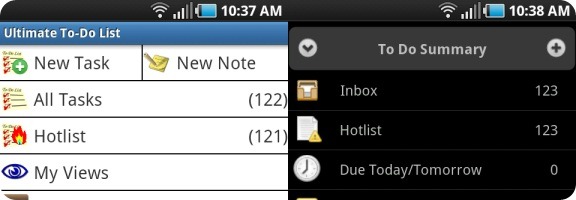
If you can find an app in the iPhone app store, chances are that you can find an equivalent app for your Android device. Sometimes, though, an official app isn’t available, so you have to look a bit harder. That’s the case if you’re a user of Toodledo, a task manager that we’ve raved about before here at 40Tech. Fortunately, Android developers are a resourceful bunch, and, as a result, third party alternatives have sprung up that bring Toodledo to your Android device. Two of the best are Ultimate To Do List and Got To Do.
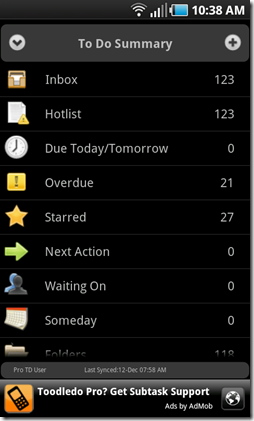

First, a couple of caveats. This review is based upon a few days use of Got To Do Lite, and the trial version of Ultimate To-Do List. The trial of Ultimate To-Do List is identical to the final version, minus the nag bar at the bottom. Got To Do Lite does have differences from the full version of Got To Do. The Lite version, which does not expire, does not support management of sub-tasks, or their indented display. These are supported in the full version.
Got To Do
UI and Overall Feel
Of the two user interfaces and appearances, I preferred Got To Do’s look and feel. It was just a bit slicker looking, and had less of a cluttered feel than Ultimate To Do List. That is a matter of personal preference, though. Of course, you’re probably not using Toodledo because of its looks, so that might not matter much to you.
Got To Do allows you to to set the default page that you will see upon startup. Your choices include summary, inbox, hotlist, due today/tomorrow, and next action. If you start with the summary, that is customizable, as you can hide the fields that you don’t want to see (but this customization doesn’t extend to fields throughout the rest of the app, as we’ll discuss below).
Features and Toodledo Integration
Got To Do’s integration with Toodledo is well-rounded. The paid version of Got To Do supports the indented display of subtasks. Both versions support the syncing of most of Toodledo’s other fields, including context, folders, tasks, task reminder, repeating tasks, notes attached to tasks, start dates and times, due dates and times, tags, task priority, task status, and starred tasks. There are a few fields, such as Goal and Length, that aren’t found in Got To Do.
One of the nice features of Toodledo is how it lets you slice and dice your data. Got To Do is similar in this regard. You can choose between several ways to sort each list, such as Priority then Due Date, Due Date then priority, by Context name, by Folder Name, and more. You can also hide task fields that you don’t want to see, but only in the summary field (see more on this, below).
Another nice feature of Got To Do is the ability to set up customizable templates. With these templates, you can pre-fill data into a task form, and then set that form to be a template that will be selectable when creating new tasks. When setting up the template, you choose the lists from which it will be accessible. To access the template, simply do a long press on the add task button, and you’ll be presented with a list of the available templates for that list.
Got To Do also offers a home screen widget, if you like to quickly check your tasks.
Shortcomings
A few Toodledo features that seem to be missing in Got To Do (or at least that I’ve been unable to find) are notebooks and goals. I don’t use these two features much, so their absence isn’t a big deal to me, but your mileage may vary. Of bigger concern for me is that, as best I can tell, the task input fields are not configurable. For example, if you don’t use the “repeat” field, you will still see this as an option on every task.
Finally, as noted above, there are some Toodledo fields that aren’t present, such as Goal and Length. Before splurging on the full version, you should check to make sure that Got To Do supports the fields that you use.
Cost
Got to Do Lite is free, and contains ads. It does not support management of sub-tasks, or their indented display. The full version of Got To Do is £2 on the Android Market, which, as of the time of this writing, comes out to $3.16.
Ultimate To Do List
UI and Overall Feel
As noted above, I preferred the look and feel of Got To Do. That was more of a “feel thing” than anything, as Ultimate To Do List also allows you to customzie what you see when starting the app. For your startup page, you can choose between Home Page, All Tasks, Hotlist, My Views, Notes, Due Today/Tomorrow, Overdue, Starred, Status, Folders, Contexts, and Recently Completed.
Ultimate To Do List somehow just had a cluttered look, while at the same time having a Spartan feel to it. I’m not a UI expert, so I’m not sure if this is due to font sizes, spacing between entries, or something else. Font sizes are customizable, which is a nice touch, so some of this may be fixable.
Features and Toodledo Integration
Ultimate To Do List edges out Got To Do when it comes to Toodledo integration. I haven’t been able to find a task field that Ultimate To Do List doesn’t sync. Goals and Length are both there. Unlike Got To Do, you can also hide fields that you don’t want to see.
Ultimate To Do List also supports notes (not just those attached to tasks). The default home screen has a “new note” button independent of any task, that you click to enter a note.
The most exciting feature for me, compared to Got To Do, is the availability of saved searches. You can’t sync your Toodledo saved searches to the app, but you can recreate them. Once you’ve done so, they then appear under My Views from the main menu.
Ultimate To Do List’s power also extends to how you can sort your data. You can sort up to three levels on any task field. For example, you could sort by Start Date, then Priority, then Title.
Some other features of Ultimate To Do list include support for multiple accounts, the ability to search on any task field, and a home screen widget.
I would compare Ultimate To Do list to Toodledo itself – it may not be the prettiest tool out there, but it is highly customizable, and, as a result, very powerful.
Shortcomings
Aside from the UI issues mentioned above, Ultimate To Do List has a few other shortcomings. First, unlike Got To Do, it does not support task templates, so you have to create every task from scratch.
My other complaints are minor quibbles. I wish that there were a way to get a saved search into the top level menu (i.e., the home page, so that it was quickly accessible), and also that there was a “reverse sort” option when sorting by date, so that I could choose between viewing the oldest or newest tasks first.
Cost
There is no “lite” version of Ultimate To Do List. Instead, you can get the full app from the Android Market on a 14 day trial. After that, it costs $5 for a license.
And the Winner Is . . .
Both of these apps are great. Got To Do feels slicker, and is easier on the eyes, while Ultimate To Do List is more powerful. If I weren’t such a heavy user of saved searches in Toodledo, Got To Do might have won out. As it was, though, I went with Ultimate To Do list. If you don’t use saved searches, you should make sure that the fields that you use are supported by Got To Do. If they are, give both versions a try, and see which one you like before making your purchase.
Do you have a task management app that you use on Android? How about one that works with Toodledo? Share your experience with us in the comments.

Daniel Gold says:
Hey guys – Great review and I’ll jump in the fray here. I’ve loved Toodledo and it’s 3rd party apps for awhile now. Since I’ve been so engrossed though lately with Springpad (have you noticed?!), I found a way to leverage my GTD obsession within Springpad and in way that’s more meaningful than Evernote.
Take a look at this screenshot I took – http://awesomescreenshot.com/04d4oh92f – you can see that I have created tasks within Springpad, which can be organized by notebook (i.e., Area of Focus), by category (i.e., context such as @contact, @computer, waiting for), and even a reminder that’ll go to my work, personal e-mail addresses, and/or SMS. I also tag my action items by subject matter (i.e., client or product). What’s more is that I set it up so that it’s organized by category. While I do have reminders, if this was something that really does have a due date, I’ll create an event and do the same as described above.
Just my two cents (for what it’s valued at these days!)! :)
-DEG
December 14, 2010 — 10:55 am
Laura Stein says:
Springpad is fantastic! Having practiced GTD for many years, I would love to hear a few more details on what your setup looks like.
I am currently moving my info from Outlook to Springpad, and would especially be interested in where you set up projects as well as how you handle email that requires action (task).
December 17, 2010 — 11:17 pm
Daniel Gold says:
Hi Laura! I’d love to help. In fact, as a result of your post and some others on Twitter, I wrote this post on my blog that should answer your questions! I hope this helps! http://wp.me/ptgV6-8O. Thanks!
December 20, 2010 — 9:50 am
Evan Kline says:
Interest system, Daniel. I always find it interesting how people can put these tools to use in new ways.
December 20, 2010 — 1:05 pm
Kestutis says:
Due today is best android apps for me for GTD with toodledo. Is has unique feature to store projects in folders, so there can be project (folder) inside another project(folder)… unlimited deep like subtasks without toodledo pro subscription. I has tryed also pocket informant, shuffle.
April 11, 2011 — 9:08 am
Evan Kline says:
Thanks for the suggestion, Kestutis. There’s another app to add to the list of apps that I want to check out.
April 15, 2011 — 10:41 am
RandyN says:
Check out DGT GTD Toodledo on the market. It’s currently alpha but even as an alpha it looks and works better than other available apps.
April 14, 2011 — 8:53 pm
RandyN says:
Sorry correct name is DGT GTD & ToDo. The item above is an add-on that enables it to sync with Toodledo.
April 14, 2011 — 8:55 pm
Evan Kline says:
Thanks for the tip, Randy. I’ve just installed the app and add-on, and will check it out.
April 15, 2011 — 10:34 am
RandyN says:
After using DGT GTD & ToDo for a while, I’ve uninstalled it. The app itself is well done and works well but the syncing portion causes issues: tasks not syncing properly, repeating tasks once checked off on the phone and synced to Toodledo, disappear.
Now both programs are still alpha and if the issues are worked out, they may very well be great programs. Until then Ultimate To-Do list is the way to go.
May 4, 2011 — 8:32 pm
Evan Kline says:
Thanks for the update, Randy. I downloaded the app at your recommendation, but I haven’t gotten around to using it yet. I’m going to hold off a bit for now.
May 6, 2011 — 9:40 am
John. C. says:
I tried several toodledo app inlcuding DGT GTD and utlimate to do list. I had some sync problems with DGT GTD and I don’t like utdl interface. Since a few days I use toodleTasks Tablet and toodleTasks Phone Edition. Both app offer the same features but the tablet version show all the information on the main screen. tooldeTasks support nearly all the toodledo features including repeating tasks and subtasks, it as a very clean and intuitive and configurable interface and the sync works flawlessly. Currentyl you have to purchase the two apps (for phone and tablet) separatly but it’s not a big deal as this is the best toodledo app for android right now.
September 7, 2012 — 7:44 am
Hope Freebourne says:
Grateful for crystal clear review with just enough info. for this novice to understand but not be overwhelmed by. Even with changes since your review, it was incredibly instructive as I try to navigate all these task/project apps. Problem: desire great aesthetics but desperately need goal mgmt. , which means Ultimate To Do wins out… :(
June 15, 2013 — 12:35 pm
Dinkar Sitaram says:
A great feature of Ultimate todo is Google calendar integration. When creating the task, you can also schedule it for a particular day. This is great for making realistic plans!
August 12, 2013 — 2:52 pm
Evan Kline says:
Thanks for the note, Dinkar. I’ve moved back to iOS, so I haven’t used this one in a while. Good to know, though.
August 12, 2013 — 3:06 pm