

Has this happened to you? You’re in the middle of working on that important document for work, when you step away from the keyboard for a break. You return an hour later . . . to find that your little bundle of joy has hammered away on your keyboard. If you’re lucky, your document is now only a mess, and not lost. To prevent situations like this, check out two free Windows programs, Kid-Key-Lock, and Toddler Keys, which were both covered in the Lost in Technology blog.
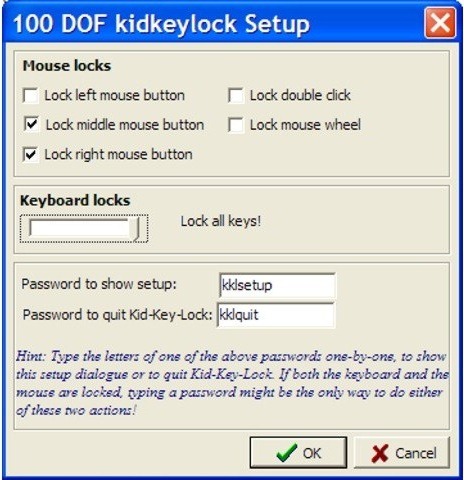
Both programs work similarly, allowing you to lock down your keyboard and mouse. Kid-Key-Lock allows you to specify exactly what you want to lock out. For example, you can allow just numbers, letters, and spaces, while locking other keys, like system commands. This can be handy if you want to allow your toddler to use your keyboard to work on typing.
Toddler Keys allows you to lock your keyboard, mouse, and CD drive door, and even the power off button in Windows XP. It will play a sound every time a key is pressed, and you can even select which images and sounds to play. You can set a time period, after which the app kicks in and the lock is set.
Head on over to Lost in Technology for a look at the two apps. Do you have other ways you protect your work from your kids?
Kid-Key-Lock and Toddler Keys [via Lost in Technology]

Kosmo @ The Soap Boxers says:
Around 20 years ago, there was an app for the Mac that made Oscar the grouch pop out of the trash can and and “I love trash … I love it because it’s trash” when you emptied the trash.
Not only was the Henson crew not pleased, but neither were some parents … as kids trashed important documents in order to see Oscar.
October 27, 2010 — 1:44 pm
Evan Kline says:
Too funny. I can only imagine the outcry today, if the copyright police were upset back then.
October 27, 2010 — 1:45 pm