

[amazon-product align=”right”]B001F51G16[/amazon-product]Even the mention of gadgets spurs excitement among the geek crowd. Cell phones, laptops, tablets, and more all get our hearts racing. On the flip side, there are keyboards. You can’t get much more utilitarian an item than a keyboard. Most of us peck away at keyboards much of the day, without giving much thought to a device that is decidedly unsexy.
The Logitech Illuminated Keyboard is one exception to that. I’ve used many keyboards over the years, including a Logitech G15 that was my primary keyboard until recently, and the lluminated Keyboard is my favorite so far. Read on for the full review.
Photo by ryaninc.
Typing
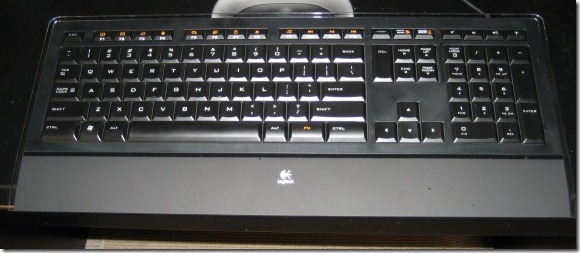
The most important aspect of any keyboard is how it handles typing. I had always thought that the only way to differentiate a keyboard was through the various features that were offered, such as volume control, USB ports, and more. Beyond that, though, they all felt fairly similar to me, despite claims of manufacturers. Sure, there were some nuances in how the keys felt, but nothing drastically different.
Until this one. I actually enjoy and look forward to typing on it. It is a matter of personal preference, but this keyboard suits my typing style perfectly. The keys have a feel that is soft, but not too soft. They also don’t feel as concave as an a traditional keyboard. I really feel like I’m gliding between keys on this one. Words won’t adequately capture the feel of the keyboard, so check it out at your local electronics store to see if it suits your style. At the very least, you will probably notice a difference in feel between this keyboard, and other keyboards.
Features
The main draw for me of this keyboard is how it feels when I type with it. That doesn’t mean that it is without features, however. The most obvious feature of the keyboard is suggested in its name. The letter on each key can be illuminated if that is what you want. This is handy if you play games or type in the dark, which gamers are prone to do. The illumination isn’t some gaudy color, but a crisp white color. You can vary the intensity of the illumination between four levels, including turning it off entirely.
When I was shopping for a keyboard, another requirement for me was volume control. I hate having to turn to my speaker knob, or to the slider in the Windows system tray, to adjust the sound level. I don’t even like having to fiddle with the Function key, combined with some other key. The Logitech Illuminated Keyboard has three keys for volume control, allowing you to increase, decrease, or mute the volume. Changes to the volume briefly appear in a graph on the bottom of the screen.
Other changes, such as activating or deactivating CAPS lock, also appear on screen briefly. At first I didn’t like this, as it was a change for me (don’t we all feel uncomfortable with change, to some degree?), but now I’ve grown to appreciate the confirmation.
There are other specialty keys that can be assigned to work with or without using the Function key. The default keys will control your music, open your email program (or can be set to open a site, like Gmail), go to a search page, cascade your open programs, and more. The software that comes with the keyboard allows you to configure each of these buttons if you prefer to change the default behavior.

Finally, the keys are also very quiet. While not silent, they make significantly less noise than other keyboards that I’ve used.
Appearance and form factor
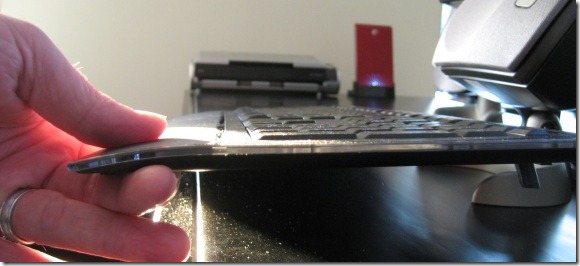
This keyboard knocks it out of the park in the looks department. In addition to the illumination, you’ll notice just how slim the keyboard is. This keyboard is only 9.3 millimeters thick, which gives it a very stylish appearance.
The keyboard also isn’t too deep or wide. One of the problems with my old G15 was that it was so wide and deep that it made it difficult to fit it on my desk, along with a center channel speaker. I have no such problems with this keyboard.
It comes with two legs that can be folded out, to raise the back of the keyboard slightly off of your desk. There is also a soft palm rest, that seems to be made out of soft plastic or rubber. Unlike my last keyboard, this doesn’t feel cheaply tacked on to the rest of the keyboard, but feels like it is part of it.
Drawbacks
My recommendation of this keyboard isn’t without caveats. It doesn’t come with any type of external inputs, such as USB ports or audio jacks. I did miss the USB ports that I had on my old keyboard. I have several USB devices, and had to get creative with how I use the available ports on my PC and monitor.
There are also reported issues among some users with how the keyboard handles key blocking. Key blocking is a feature in many keyboards, whereby the keyboard ignores a new keystroke if a certain number of other keys already are being held down at the same time. This is done in order to prevent mistypes.
As a result of key blocking, some users on Amazon complained that certain letters regularly were getting dropped when they were typing. I almost didn’t purchase the keyboard for that reason, but the reviews seemed to narrow this down to people who “slur” while typing, i.e., people who linger their fingers on keys after depressing them. In any event, I haven’t been able to reproduce this problem on my keyboard, and with the keyboard receiving an average Amazon customer rating of 4.5 out of 5 stars with over 300 customer reviews, this can’t be too widespread of an issue. Still, it is something to be aware of if you have a “slurry” typing style.
Summary
When it comes down to what counts – typing – this is the best keyboard I’ve ever used. This is also the best looking keyboard I’ve ever owned. While other keyboards might have more bells and whistles, this keyboard is a great choice for anyone who wants an easy and pleasurable typing experience, with a keyboard that will look great on almost any desk. If you “slur” while you type, test it out first to make sure that you don’t run into any key blocking issues.
Do you have a keyboard that you love? Tell us about it in the comments.
The links on this page take you to the product page at Amazon. These links are affiliate links, which means that 40Tech gets a small portion of the sale if you purchase the keyboard there. As always, we only use affiliate links for products that we’ve tried, and in which we believe.

Anthony Russo says:
Good review. The most attractive thing about this keyboard to me is the quiet factor. I tend to be a key masher and have been known to wake my kids with late night typing even if they are 2 rooms away.
Anthony Russo
http://www.anthonyrussoblog.com/Anthony
Skype: anth.russo
Twitter: @AnthonyRusso
July 1, 2010 — 11:17 pm
Evan Kline says:
I don’t have that to worry about, but there is definitely something soothing about typing without all that clatter. In fact, I’m in my work office now on a “normal” keyboard, and I can’t help but notice how loud this keyboard is.
July 2, 2010 — 9:03 am
Daniel Gold says:
Ryan – 1st let me say that I love your site! My comments on using one notebook for Evernote coming soon. Anyway, great review of this keyboard! I own it myself and can attest to how awesome this keyboard really is for someone who is constantly on the computer. I can easily type notes in Evernote during conference calls and nobody knows I’m typing! So much better than a colleague of mine who types when we talk and all I hear are archaic sounds of a keyboard clanking away – reminds me of the old days of a Commodore 64!! Great review!
.-= Daniel Gold´s last blog ..Applying Principles from “Presentation Zen Design”- Part 1 =-.
July 21, 2010 — 7:10 pm
Anthony Russo says:
Commodore 64 mention gets points for awesomeness.
Anthony
July 21, 2010 — 10:12 pm
Evan Kline says:
Yea, Commodore 64, wow! I remember jamming those cartridges into one at a friend’s house many many years ago, and thinking how cool it was.
And I agree about the keyboard, Daniel – the silence is great.
July 22, 2010 — 1:37 pm