
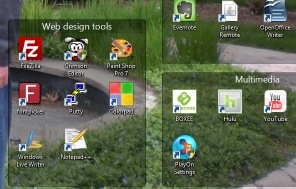
 Windows only: Fences is a program, free for personal use, that helps you organize your Windows desktop. I don’t know about you, but I have problem with organization when it comes to computers. When I install an application, I often install the startup icon for that application on my desktop. When I download files, I usually download them to my desktop, thinking that if they are on my desktop, I won’t forget to clean them up later. That’s the plan at least. The reality is that after time, this results in a desktop filled with many application icons, downloaded files, and other debris that makes my desktop a virtual mess.
 Fences helps to bring order to this mess. The screenshot above (yep, that’s my wife and I) should give you a pretty good idea of how Fences works. Fences lets you draw shaded areas on your desktop, almost like you are creating boxes or fenced in areas, and drop icons into them. You can label the boxes, and move and resize them. For example, my desktop has one area for games, another for PC tools, another for web design tools, etc. Once you have your desktop fences set up to your liking, you can then lock the fences, so that you don’t accidentally move or resize them. You can still drop icons into a locked fence. Also, you can double-click your desktop to cause all of your icons to fade out, so that you can show off your wallpaper. Another double-click will make them return. Fences isn’t really a launcher or dock alternative, because you still need to go to the desktop to launch programs. I typically still use the Quick Launch bar or the Start menu for most programs. But for organizational purposes, Fences is great. As a result of Fences, I have much neater desktop. I still download files to my desktop (a habit that I may change), but I am much more motivated to keep my desktop clean now that it is otherwise so organized. Fences is Windows only, and is free for personal use. On Vista and Windows 7, both 32bit and 64bit versions are supported. While we’re on the topic of launchers, docks, or desktop organizers, do you have any tools that you’d recommend?

Helen says:
Although I prefer a clean desktop, I have recommended Desktop Fences to my father who's more of a point-and-click person. I'll probably wait until one of us buys and installs more RAM for the pc to test this.
As for the topic of launchers, I'm a big fan of launchy. In fact there's nothing about it that I find missing or difficult so I've never bothered to test others.
July 19, 2009 — 9:58 am
Evan says:
I like to have a clean desktop, too, but unfortunately I can never keep it that way. I've been meaning to look at something like Launchy for a while now. Thanks for suggesting it.
July 19, 2009 — 1:05 pm
holas84 says:
Interesting program. I've never heard of it before. Seems like I learn new things every day! Thanks for sharing it. I'm definitely going to try it out. I have more icons on my desktop than actually fit on there. I've had to set my desktop to hide the icons and I just access my desktop by opening it in a folder. I really need to get it cleaned up!
July 19, 2009 — 1:37 pm
Bobby Travis says:
I wish this had been around (or at least known to me) before I started using Windows 7 RC… The cluttered desktop used to be a huge problem for me that I have since solved using the Libraries system in Windows 7 and a little discipline. I may still install it and try it out though — does it slow down your start up? Even more than having a bunch of clutter on your desktop does, I mean?
As for launchers/docks, I used RocketDock for a while and enjoyed it. Tends to slwo things down a bit though and would some times hang — at least on computers with lower ram.
Also, I have used Launchy. It is pretty cool and never seemed to cause slow down for me. On my old xp machine I used Google Desktop for a while, but that thing caused massive slowdown after a while. I am pretty sure you can tweak it to be less of a hog, but it was a bit piggish for me.
July 19, 2009 — 4:55 pm
Evan says:
@holas84- Wow, sounds like your desktop is even more cluttered than mine! I once had my mess stretch onto my second monitor, which really spurred me into getting things tidied up.
July 20, 2009 — 9:01 am
Evan says:
@Bobby- I've been tempted, but haven't tried out the Windows 7 RC. I do have 2 copies on order, though, so I'm a few months away.
When I first installed Fences, I couldn't decide whether it slowed my system down or not. I'm pretty obsessive about stuff like that, so really tried to watch for it. Now that I've used it for a few months, I definitely don't notice any speed issues. My system is just over a year old (3.0 Core 2 dual core, 4 gigs of RAM, 64 bit).
July 20, 2009 — 9:04 am
Bobby Travis says:
LOL! Not likely to see much slowdown with that, anyway… And you'll love Windows 7. It really is what Vista should have been.
July 20, 2009 — 6:04 pm
curiouslittleperson says:
VeryNice, the best part that i like about fences is that you can organize the icons in such a way that your photos are easily viewable..
Will Need to check this out…
Thanks
Sandeep
July 21, 2009 — 2:29 pm
Evan says:
Good idea- I hadn't even thought of using it that way. The ability to double click to hide the icons, and show off the wallpaper, is pretty nice too.
July 21, 2009 — 2:58 pm
Ruchi says:
I just tried it out , it is awesome, it really removes all the clutter from your desktop. Thanks for such a nice information.
July 21, 2009 — 9:33 pm
Evan says:
I'm glad you like it, Ruchi. I hope it continues to work out for you.
July 22, 2009 — 9:10 am
Term Paper says:
my desktop always looks like if all things are messed outside. my frds shout at me as to keep it clean, lol
this seems to be good one atleast to make it look well mannered
July 23, 2009 — 2:45 am
Malcolm Bastien says:
Not to say that this or that got it first, but these sort of fences are something that they are marketing a lot as a feature of KDE 4 now for people on Linux. Not sure exactly the differences between the two, but on KDE all fences are actually just folders (last time I checked) that are rendered like this on the desktop.
It look like Fences is built up differently, but the idea with folders (which is a heavy part of how Linux works) is that shortcuts, apps, files, or even other folders need aren’t just being displayed on the desktop, but you are actually seeing the contents of the folders. This is good when you interact with the same folder from other places like applications, the console, or your ‘explorer’, as you’ll see you’re desktop folders reflect those changes automatically.
August 4, 2009 — 10:00 pm
Evan Kline says:
@Malcolm. It sounds like it works a bit differently, but I wonder if that is where the Fences folks got the idea. Linux is one tech itch I have yet to scratch, but it is on my list when I have the time to roll up my sleeves. I know people who use it, and would never look back.
August 4, 2009 — 10:14 pm