Menu Close

Tag: Web Apps (page 10 of 15)

And They’re Off! Compare Website Loading Times With Whichloadsfaster

whichloadsfaster 576x200

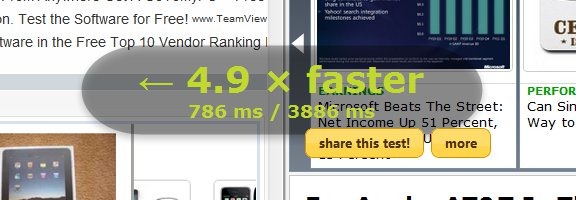
If you’re a blog owner, or just curious by nature, you may be curious about how the loading time of one website stacks up against another.  You can see two sites square off at whichloadsfaster.  Whichloadsfaster couldn’t be easier – input one site in the box at the top left of the screen, and another site in the box at the top right, hit the “Go” button, and sit back to watch the results.

whichloadsfaster site speed comparison

The service has some other features as well, such as a repeat feature, which lets you specify how many times you want the faceoff to be run.  This can give you a better idea as to which site truly is faster, since load speeds on any given visit can vary due to traffic and other factors.  There is also a “race” feature, that allows you to list up to three sites in one column, three in another column, and have the two groups square off against each other.  It sounds silly . . . but don’t knock it until you try it, I guess.  That can be said for whichloadsfaster in general – it may sound whimsical, but it is oddly addicting.

What tools do you use to measure the speed of your site?  Coming soon, we’ll take a look at a tool we use here at 40Tech to help improve site speed.

Try out whichloadsfaster


Use Your Email to Set Reminders

followupthen1

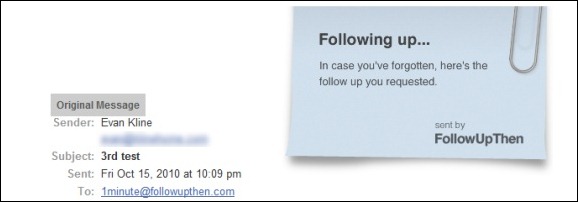
If you want to set a reminder for yourself, you could do it the hard way by manually adding a reminder to your calendar.  You could also do it the easy way, by using FollowUpThen.  FollowUpThen is a service that allows you to schedule follow-up reminders by simply adding a special email address to the TO:,CC:, or BCC: line of an email message.  This makes it particularly handy as a tool for getting reminders to follow-up with your email recipient, but it also can be used to set normal reminders.

The best way to illustrate how to use FollowUpThen is with an example.  If I email a question to Bobby, and I want to receive a reminder in one day to follow-up with him, I would send an email to Bobby’s address, and add 1day@followupthen to the TO:, CC:, or BCC: line.  In one day, I would then receive a reminder, consisting of my original message along with a “following up . . .” note.  Bobby would also get that reminder, if I used the CC: option when sending the message.

The timing of the reminder can be set with several options.  You can set the reminder by time elapsed (1minute, 3hours, 2days, etc., all followed by @followupthen.com) and day of the week (tuesday@followupthen.com).  You can also set reminders using some natural language words (tomorrow@followupthen.com, nextmonth@followupthen.com, etc.), and by using specific dates or times (mar30@followupthen.com, 9amTomorrow@followupthen.com).  You can even set up recurring reminders, such as everyweds@followupthen.com.  To see a list of all of your reminders, along with links to cancel reminders, send an email to pending@followupthen.com.

For messages sent to followupthen.com using a CC:, both you and the recipient will receive a reminder if your reciepient has not responded by the scheduled time.  In order for the reminder to be canceled, your recipient must use “reply to all” so that the reply is also sent to FollowUpThen.  If you send your email using BCC:, then only you will receive a followup, regardless of any reply by your recipient.  If you just use the “TO:” field, then you will get a reminder after the time interval that you specify.

A service like FollowUpThen does raise some privacy issues, as a third party is receiving your email message.  FollowUpThen claims that it doesn’t share your information with third parties, and that it automatically deletes your email contents, and your recipient’s address, once the follow-up has been sent

For a service that is similar to FollowUpThen, check out FollowUp.cc.  FollowUp.cc has additional features, like a web interface with a calendar, and a clickable link in your reminder email to postpone a reminder.

FollowUpThen [via Cybernetnews]


Create and Publish Your Own Children’s Book with Storyjumper

Create, Publish Your Own Children;s Book with Storyjumper | 40Tech

If you’re an aspiring children’s author, a teacher, or just looking for something fun to do with a kid in your life, Storyjumper is something you’ll want to take a look at. I came across the web app randomly and was amazed by how easy it was to jump in and start creating. In fact, me and my two year old made a book just tonight — and she wrote it.

Read more


Cliqset Adds More Facebook, a Bit of Digg, and Social Search

Cliqset Adds More Facebook, Digg, Social Search | 40Tech

When I last wrote about Cliqset, users were able to fully integrate a Twitter and Google Buzz account, but services like Facebook were one-way only. You could share something from your various connected streams to Facebook, as well as to a multitude of other services, but you couldn’t pull content from Facebook and interact with it. Now you can.

Read more


FREE: Stream Music and Movies from Computer to iPhone, iPad, iPod Touch – and Access Files Too – with ZumoCast

ZumoCast Streams Music, Movies, Files from Computer to iDevice

If you want an easy way to stream media from your home computer to your iPhone, iPod Touch, or iPad, and want it to be free, you’re going to want to check out ZumoCast. It appeared in the app store on September 8th, and it has been awesome ever since! Read more