Summify has been acquired by Twitter and will be shutting down. See this post for more detail.
I’d like to take a moment to step away from the general worship and awe of Google+, and circle back (hehe) to our old friend Twitter. Actually, I plan to talk about Summify, and how it can take the often-overwhelming amount of information that is travelling through your Twitter stream at any given time, and sort it into a “highlight reel” that can be shared as a whole and as individual posts. It’s easy, it’s effective, and maybe just a little bit brilliant — and I have no doubt it will save you time and make your online reading much less hectic.
Multiple Accounts
Summify isn’t just about Twitter, either. Sure, it can connect to as many Twitter accounts as you like, but it also connects with Facebook and Google Reader. In fact, the more accounts you add, the better your summary will be.
Control
You get to decide how often you get a summary, how many stories it contains, when it gets delivered to you, how it gets delivered, who gets to look at it, and whether or not it gets published to your accounts. For example: my Summify is set up to deliver a new summary of 10 stories, twice per day (at 8:30am and 8:30pm), to my email inbox. Others can view it, and I automatically publish a link to the summary on my main Twitter and Facebook accounts. I could have allowed Summify to send me a Twitter DM notification as well, but between email and the recently released iPhone app, I’m covered.


When you select a link in Summify (from email or your main summary), the article opens up with a handy toolbar on top (which you can close, if you want) that allows you to share the post on one or all of your connected networks. You can also see the avatars of the people who shared the article with you in the centre of the toolbar, and hover over them to view the originating tweet and click through to their account.
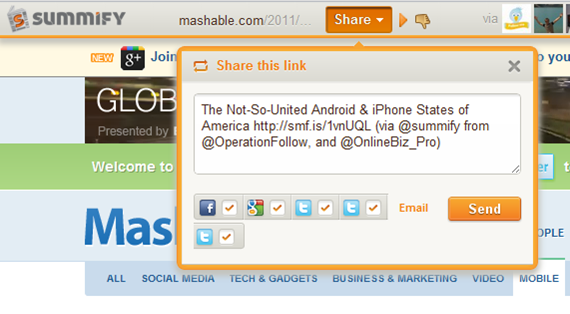
If you don’t like the article and think it shouldn’t have been in your summary, you can click the little thumbs-down button to add it to your Filters list. This is a nice and easy way to weed out spammers and other annoying sites that occasionally sneak through. In fact, when you are in the Summify web app, itself, you can thumb an offending article down right then and there, without ever opening it. You can also filter by contributor, allowing you to block specific people from contributing to your summary. All you have to do is hover over one of the avatars below any given article, and then move your mouse over the little “x” that appears in the top right, and click it. This, and the thumbs-down functionality aren’t available in the email, of course, but they are also missing from the iPhone app; something that I hope changes, soon. Thankfully, though, Summify is smart enough that it gets it right about 98% of the time. And the iPhone app is pretty, and so is easily forgiven.

People-Friendly Messages
When Summify sends out a summary message it takes great care to do two things: 1) It mentions some of the people who provided you with the information in the first place; which makes for nice Twitter etiquette. 2) It varies the messages so they aren’t always the same boring words with a new link. As an example, take a look below at three recent tweets (not clickable) that Summify sent out on my behalf.


It should also be noted that mentions are automatically included in share of single posts, as well, and that you can edit the content of single-post shares before posting.
Easy, Good Looking, and Smart
Take the section-title anyway you like, but understand that it’s true, and it’s awesome! The apps (and even the emails) are easy on the eyes and easier to work with, and the service is smart enough to not only consistently deliver articles that you like, but it also will list out several other stories from websites that post multiple posts. This makes sure that you get all the highlights from Mashable and other large sites without having to visit them directly or open up another app.
I’ve been using Summify for a month or two now, and I’ve lost count of the number of hours I’ve saved by not scanning through the muck that is sometimes Twitter, and by not chasing down every shiny post in my 49 or so RSS feeds. Summify helps keep things clear and easy to manage, and has even kept me relevant on Twitter while I play with Google +. Speaking of Google +, I’m hoping that we’ll see it integrated into Summify soon (they already have the +1 button). Even better, Summify should be integrated into the Sparks feature! Now, that would be sweet! * pokes Google *
Note: For those interested, Summify is located right here in my (rarely) sunny home-city of Vancouver, and they have had the benefit of advising from the CEO of another little local social app called HootSuite. Maybe you’ve heard of it? :D
Give Summify a try and tell us what you think!
UPDATE: Summify has recently updated its look (pretty much the day after this post went up). It was pretty before, but now it’s awesome! It also includes Instapaper integration.