Menu Close

Tag: Security (page 4 of 11)

Use a Linksys Router? You’ve Got Security Problems

Burglar breaking in

One of the bigger security-related stories over the past week concerns a vulnerability in WiFi Protected Setup (WPS). WPS is designed to be an easy way for inexperienced users to set up a secure network, using methods such as inputing a PIN from your router into your computer or other device. The problem is that the PIN, which is 8 digits long, is susceptible to brute force attacks. In fact, a free tool named Reaver can crack that PIN in just a few hours. This vulnerability exists regardless of the kind of security you’re using on your network, so even WPA2 is at risk. This means that the kid next door could get Reaver running, go off and watch a movie, and a few hours later he is in your network. The solution? Turn off WPS. Unfortunately, you can’t do this with modern Linksys routers.

Read more


App of the Week: Use JavaRa to Update Java and Get Rid of Old Versions

Use JavaRa to Update Java and Get Rid of Old Versions | 40Tech

Java is a bit tricky. A lot of applications use it, and many of them come bundled with their own version of the Java Runtime Environment (JRE) — which they happily and oh-so-helpfully install on your system. This leads to multiple and redundant installs of Java on your computer, each of which may contain potential security threats, and may well leave you scratching your head as to whether you can or should delete them. Wonder no more… JavaRa is a free, light-weight utility that will clean up the redundant versions of the Java runtime, as well as update you to the latest version — and it has a few other tricks up its sleeves, besides.

There is no installation for JavaRa. It’s just a simple executable with some language options (English, Dutch, Spanish, Italian, French, German, and Finnish). Just click and go — though you may want to run it in Administrator mode for Windows Vista and Windows 7. The buttons are fairly self-explanatory: Search for Updates will search for the latest Java version, and Remove Older Versions will clean up your system.

If you’re looking to do a little bit more, click on Additional Tasks. You’ll get a pop-up that allows you to remove startup entries, other useless Java bits like logs and temp files, as well as get rid of the Sun Download Manager, and a few other goodies.

JavaRa Additional Tasks | Remove Old Java Files | 40Tech

JavaRa is a great little tool and can be found for free on SourceForge.


Hotspot Shield VPN Officially on iOS — Secure Browsing, Bandwidth Compression, Access Blocked Sites/Services

Hotspot Shield Now Officially on iOS -- Say Hello to HTTPS, Bandwidth Compression, Out-of-US Netflix, Pandora | 40Tech

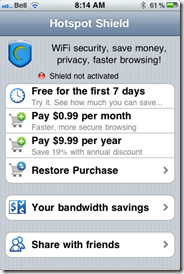
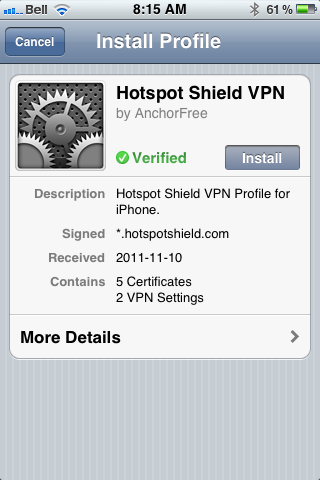
When we first told you about Hotspot Shield, it was to use the free Virtual Private Network to bypass blocked media, as well as increase your browsing security. Over a year later, we posted a tutorial on how to use the VPN to watch US Netflix outside of United States, using your iOS devices. Unfortunately, the Hotspot Shield sign up process for iOS was broken soonafter, and their customer service team didn’t have a lot to say about it. Now we know why: Anchorfree, the creators of Hotspot Shield have released an iPhone app that makes all of the steps go away, and even solves a few of the problems.

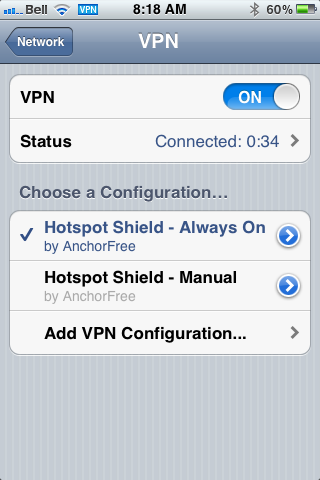
The new Hotspot Shield app will have you up and running with a couple of touches, installing two VPN configurations on your iPhone or iPad. The second one is for manual use — you turn it on when you need it, and leave it off when you don’t. The default configuration, though, is Always On, which handily accomplishes two things: it allows you to automatically have the VPN’s data compression and additional security in place whether you are on WiFi or mobile broadband, and it also fixes potential annoyances by automatically re-establishing the VPN’s connection when it drops (which is still a regular occurrence).

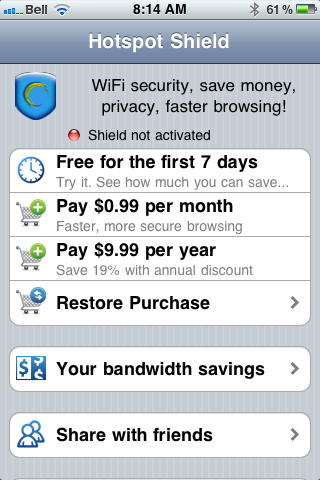
In testing, I found that the VPN is more stable on iOS than it was previously, and that using it was practically painless. I also discovered, very quickly, that the free-ness of Hotspot Shield — at least for mobile — is a thing of the past. In comparison to other VPNs, though, especially services that are as effective, the price is still more than worthwhile. You can use the VPN free for a week, after that, it’ll cost you $0.99/month or $9.99/year. You can also use a purchase code the app provides you to activate up to five personal devices that are connected to the same iTunes account. If the incredibly attractive price is to much for you, and you already have an old Hotspot Shield VPN installed on your iOS device, it should still work, at least for now — mine does, anyway.
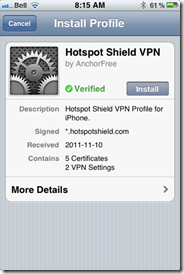
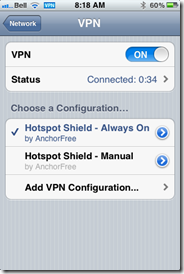
Hotspot Shield VPN for iOS, iPhone, iPad, iPod Touch | 40TechHotspot Shield VPN App for iPhone, iPad, iPod Touch | 40TechHotspot Shield VPN App for iOS | 40Tech

Some other fun features of the app are the abilities to track your bandwidth savings and to control your compression level. You can turn it off completely for WiFi, or turn it up to maximum to save bandwidth on images and the like. This will downgrade image quality, of course, but how much is your data worth to you?

All in all, I recommend it to pretty much everyone on iOS with even a passing interest in security (or in using Hulu, Netflix, Pandora, etc., outside of the US). You can never be too careful with your data, and HotSpot Shield does a decent job of protecting you. According to ReadWriteWeb, it was even used during the revolutions of the Arab Spring to allow “users to skirt detection of officials that may have been monitoring mobile internet activity.” Handy, that…

If you do decide to use Hotspot Shield for iOS, do keep a couple of things in mind:

  1. The terms of service are very explicit about the VPN being for personal use only. Don’t use it for business or they may cut you off.
  2. Using a VPN to access a US-only service outside of the US may be considered breach of that service’s terms of use. You may want to double-check that before going ahead to make sure you don’t have any issues — especially if you pay for said service.

What do you think of Hotspot Shield for iOS? Do you plan to use it to increase your browsing security? Let us know in the comments!


Make Your LastPass Account Uncrackable: LastPass Adds Support for Google Authenticator

LastPass Google Authenticator two factor authentication

LastPass, our favorite password manager, has just introduced support for two-factor authentication through Google Authenticator. Two-factor authentication is a form of security that requires a user to present a second form of confirmation before being able to log in to an account. We previously wrote about how, for Google accounts, that second form of authentication can come via a one-time code generated by the Authenticator app for iOS, Android, and Blackberry. That same app can now be used with LastPass.

Read more


What to Do If Your Email Account Gets Hacked

Hacker email

Perhaps it is just a coincidence, but I’ve had a couple of people that I know who have had their email accounts hacked recently. Given all of the personal information we send and receive in email messages, that can be a traumatic experience. One victim wondered if she should take a scorched earth policy, and move completely to a new email account. That’s normally not necessary. If you still have access to your account, you can take some steps to secure it, and keep the slimy criminal out.

Read more