
Menu Close

Tag: iPhone (page 14 of 19)

Get Creative Date Ideas with DateBank

Get Creative Date Ideas with DateBank for iPhone | 40Tech

Whether you are single and dating or have been married for years, it is always a challenge to come up with interesting date ideas. Sometimes “dinner and a movie” just isn’t enough, you know? Thankfully, some folks up in Canada — in the Greater Vancouver area, just like l’il ol’ me — have taken the time to create an iPhone app that helps solve that problem.

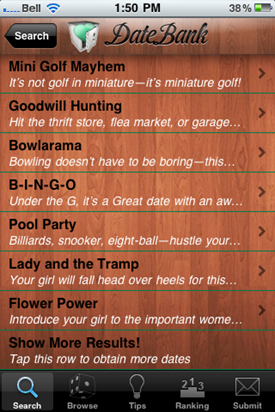
DateBank is a simple, slot-machine style app. There is a slot for Style, one for Budget, and one fore Time of day. Select from a range of style entries like Playful, Chatty, Artsy and, Outdoorsy, pick a price range and a time of day, hit “Show Results” and voila! A list of interesting date options will appear, each with a fun description and some tips on how to take it up a notch. If you’re unsure of what to select from the slots, there is an option for that, as well, along with some tips, a ranking/sharing element, and the ability to submit your own ideas for inclusion.

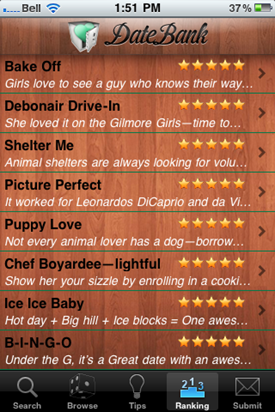
Here are a few results from a search for Playful/$20-60/Afternoon, as well as the top-ranked dates on the app, currently:
Some Date Ideas form DateBank for iPhone | 40TechTop-Ranked Date Ideas from DateBank for iPhone | 40Tech

DateBank costs $0.99 and is a fun and useful app. There are a few things I hope to see in the near future, however, such as a local component (which ought to work well with the suggestions area), and the “shake for a random idea” function to start working. Other mobile apps and a web app for the mobile-impaired would also be useful, as would a social element that allows people to give a brief description of how the date went.

In fact, I think it would be very cool if some of you grown up geeks out there were to try DateBank and let us know how it worked out for you! I’ll show you mine, if you show me yours…
Use “Niggle It” to Back Up and Track Contracts, Product Warranties, and More

Niggle It Backs Up, Tracks Contracts, Product Warranties, More | 40Tech

If you’re like me and have a tendency to lose track of your warranty information, Niggle It is a service with a singular purpose: to help you keep track of the details of all of your agreements, including warranties, business contracts — even those conversations that you have with your mobile carrier’s customer service agents. Niggle It will track anything you feel important enough to be reminded about, be it personal or business related.

You can add electronic copies of your documents to Niggle It by emailing in a scan or a photograph taken with a digital camera. You can also use any mobile phone capable of taking pictures and sending email — or use the iPhone app to create the entire Niggle on the go.

The value of Niggle It is the ability to create reminders based on contract dates, and to add additional information and documents to the file (Niggle) that is dedicated to that one item/contract. You have a dedicated, always on hand back up of the documents you need if something goes wrong, and a tool that is able to remind you to, say, get that last full service in on your car before the warranty runs out — just in case.

Niggle It guarantees that your information is always available from anywhere you can access the internet, and that everything is private and secure, with no personal information ever shared with a third party.

Niggle It is free up to five Niggles, and also includes the following pricing plans:

  • Basic: 70 Niggles, 300 MB, 5 MB filesize limit –> $24.95/year
  • Household: 200 Niggles, 800 MB, 10 MB filesize limit, and a Tax Deduction report –> $29.95/year

What do you use to track your warranties and contracts? [Niggle It]


UPDATE: The pricing page for Niggle It is somewhat unclear. I assumed it was per month, but it could, in fact, be $25 and $30 per year — much more reasonably priced.

UPDATE 2: The price is yearly — not monthly — and has been corrected.


My iPhone Just Killed My FRS – Hello HeyTell

My iPhone Just Killed My FRS -- Hello HeyTell

I used to love my FRS. I didn’t have to pay for anything; I could talk to people a fair distance away — and it always reminded me of playing with walkie talkies as a kid. Good times. Well, those days are gone. The iPhone/Android app HeyTell has put the proverbial smackdown on my FRS use — when it comes to other HeyTell users, anyway.

Read more


FREE: Stream Music and Movies from Computer to iPhone, iPad, iPod Touch – and Access Files Too – with ZumoCast

ZumoCast Streams Music, Movies, Files from Computer to iDevice

If you want an easy way to stream media from your home computer to your iPhone, iPod Touch, or iPad, and want it to be free, you’re going to want to check out ZumoCast. It appeared in the app store on September 8th, and it has been awesome ever since! Read more


What Is Worse: Apple’s Restrictive App Store, or Android Bloatware That You Can’t Remove?

android bloatware vs iphone restrictiveness

Engadget posted an interesting article yesterday, pondering whether carriers are destroying Android, by preloading Android devices with “bloatware.”  The article compared this to what happened in the PC industry, where computer vendors loaded all sorts of crapware on machines, filling up the drive and slowing the system down.

It’s deja vu all over again for mobile phones. More and more devices I look at are coming installed with applications I don’t want, often popping up messages to try and upsell me on services I have no interest in. Even worse, unlike PCs where offensive applications can be removed or the OS reinstalled cleanly, there’s often nothing that can be done to get rid of unwanted mobile software without arduous work.

The iPhone certainly restricts what apps can get into the App Store, but at least the user isn’t forced to keep an undesirable program on the phone (aside from the basics, like the App Store app, the Photo app, Mail, etc.).  Or is it worse to not have access to certain apps at all, like on the iPhone?

You tell us – what is worse, a smartphone where you can’t even get certain applications because of a restrictive app review process, or a smartphone preloaded with garbage that you can’t remove?

Entelligence: Will carriers destroy the Android vision? [Engadget]

Photo by svensonsan.