Menu Close

Tag: Cloud (page 3 of 4)

Get 50GB in Your Box.net Account Just for Logging In to the Mobile App

Get 50GB in Your Box.net Account Just for Logging in to the Mobile App | 40Tech

We give cloud storage a lot of love here. And why not? Having access to, and the ability to share, your files wherever you are is peachy keen — and convenient too. It’s a competitive world, though, and the main contenders — Dropbox, Box.net, and SugarSync — have been battling it out via pricing, free storage offerings, and promotions to ensure they get a solid chunk of the target market that is you. The latest play has come from Box.net — and it’s a doozie: 50GB of free storage just for logging in to their iPhone, iPad, or iPod Touch app.

Before you ask, there’s no catch. You don’t have to sell the idea to your friends, you don’t have to buy anything after so many days of use, and you don’t have to give them your first-born child. All you have to do is log in and the 50GB is yours! The promotion started October 12th, 2011 and runs until December 2nd, 2011 (50 days). Just make sure you have the most recent version of the iOS app, and away you go.

For those who take advantage of the promotion, Box.net has also increased the maximum file-size upload to 100MB — it’s usually 25MB for free accounts. That doesn’t beat out Dropbox, for me, but there’s a lot you can do with 50GB of 100MB files, and Box has cool collaboration features that most of the competitor services don’t match. The only other thing to watch for is the 10GB bandwidth limit.

If you’re already paying for an account with Box.net, don’t fret. You can get the 50GB, too, if you downgrade to a free account. You lose out on the more advanced security and collaboration features and the like, as well as your 1GB+ upload limit, but you will still be able to share your files quickly and easily.

If you’re on Android, you might be feeling a bit of “What the hell! Can I haz…???” For Android users in general, at the moment it appears you’re out of luck. However, if you have a Sony Tablet S — which uses Android — there’s a similar promotion running. BlackBerry Playbook and HP TouchPad users are on as well. But don’t get too upset, Android Army (or those with other devices), according to the Box.net blog, they have some more promotions up their sleeves just for you guys.

What will you do with your 50GB of free storage?


Springpad Mobile Clipper is the (Near) Seamless Content Clipper You’ve Been Waiting For

Springpad Mobile Clipper is the (Near) Seamless Content Clipper You've Been Waiting For | 40Tech

It’s been a long time coming. Since I got myself an iPhone, and especially since the iPad, I’ve joined the ranks of the millions of users out there who have been waiting for a simple and easy way to clip web content on my mobile device. I’ve used Read It Later and Instapaper, I’ve copied things into email and sent them to Evernote, Springpad, Producteev, and myself. I’ve even used the desktop clipper bookmarklets with reasonable — if time-consuming — success. That’s all in the past now: Springpad has hooked up the mobile world with a new and improved web clipper that is near to seamless.

The new Springpad mobile clipper doesn’t have the fancy bells and whistles of the Chrome extension, of course, but the updated bookmarklet is straightforward and easy on the eyes, and it works just as well in Mobile Safari and Atomic Web Browser as it does on desktop browsers. I used to use the old Springpad bookmarklet, and sometimes the Evernote and Memonic ones as well, but more often than not, they would load or function slowly — if they loaded at all. I’m presented with or stumble across a plethora of juicy things I want to follow upon in any given day – and most of it happens while I’m not at my computer. Now I can grab a bookmark for later, organize it, and move on within seconds. No fuss, no later processing, and no clutter in my email inbox.


Clipping Content is Great on iPad, a Bit Neutered on iPhone

Clipping bits of content from an article or page is a bit of a problem, though, at least on the iPhone. When using the iPad, I had no issues at all. Select a bit of the text or an entire article, fire the clipper, and it appears in the bookmark’s description area, complete with formatting — unless you want to edit it, of course. That strips the HTML. On the iPhone, however, no amount of selecting or even copying text to the clipboard will get the content you want to clip to show up. All you will get is the description write-up. I’m not sure why this is, and it definitely limits the iPhone to a quick link-grabber as opposed to a full-fledged clipper.

If you really want to clip that bit of content or entire article for later reading while on the iPhone, you can copy the text and edit it into the description field by doing a select-all-and-paste maneuver. Once again, though, you will lose all formatting, including any links and images.

The iPhone issue aside, the clipper rocks for getting those bookmarks into Springpad and organized in your notebooks and tag structure. Notebooks are an easy drop down, and tags auto-complete as you type. You can also change the type of save you want it to be. Bookmark is the default, but you can change it to Business, Restaurant, Recipe, Product, and all the rest with just a few touches. Almost all the rest, that is — Note is missing, and so is Task. Not a huge loss, I suppose, unless you want to save a bookmark to a task or a note, which could happen. If you really need that functionality, you can always go into Springpad and add a reminder or a note directly to the bookmark.

Springpad Mobile Web Clipper for Mobile Safari in Atomic Web Browser | 40Tech   Springpad Mobile Safari Web Clipper | 40Tech

Selecting Post Type in Mobile Safari Web Clipper, Springpad | 40Tech   Tagging Bookmarks in Springpad Web Clipper for iPad, iPhone | 40Tech

image   image


Installation is Easy

Springpad has made it easy to install the bookmarklet to Mobile Safari. They provide step-by-step instructions in the Settings area of the most recent versions of their iPhone and iPad apps. If you use another browser, just follow the instructions and let Springpad load up Mobile Safari, as it will automatically add the JavaScript to your clipboard. After that, open up your browser of choice and add a bookmark, pasting the JavaScript into the URL field. There is no guarantee your browser will work, but I can tell you that Atomic Web Browser does just fine.

image


Springpad Has a Few More Tricks Up Their Sleeves

The new mobile clipper isn’t the only thing Springpad’s been up to lately. They also released a Quick Add bookmark for your home screen that makes it faster for you to load up the Springpad app to add a note, photo, or whatever else you choose. This is nice for those of us without widgets like those Android folks.

I also have received word from Springpad CEO, Jeff Janer, that they have some big moves in the works that will differentiate them even more from Evernote. Having a mobile clipper that consistently works and works well is a good start though. They just need to fix that pesky iPhone issue…

What are your thoughts on the Springpad Mobile Clipper?


Netflix, Starz Battle Ends with Netflix Down Disney and Sony Content on February 28, 2012

Netflix, Starz Battle Ends with Netflix Down Disney and Sony Content on February 28, 2012 | 40Tech

Recently, Netflix angered a large amount of its US subscriber-base by announcing changes to its pricing model. It used to be that, if you wanted to do the Neflix videos-by-mail thing and stream content as well, it would only cost you an extra couple of bucks per month. Now (as of two days ago, in fact), if you want both, you need to pay double — $7.99 for each service. While the Netflix move may be understandable, and part of a potentially larger plan to phase out physical delivery altogether, the customer backlash was also unsurprising — and significant.

To make matters worse for Netflix, on the very day that the new pricing came into effect, Starz, the distributor of Sony and Disney content decided not to renew their contract with Netflix. This is probably going to hurt Netflix customer relationships even more, but believe it or not, it happened as a result of Netflix attempting to preserve their pricing model, and, presumably, to keep their customers from imploding.

Netflix has been doing well, business-wise, of late. They opened up content streaming in Canada — which I use all the time, even though we don’t get the coolest content up this way — and they have plans for world internet-streaming domination that could be very viable. Unfortunately, their content and entire business is dependent on their relationship with content license owners. Starz Entertainment apparently insisted that Netflix put their content behind an additional pay-wall, making customers pay more to access it. Netflix offered them in excess of $300 million per year for the content, but that wasn’t good enough for Big Media, who initially asked for more than 10 times what Netflix paid them in 2008, according to the Wall Street Journal.

In a press release, Starz cited the usual spiel regarding “protecting the premium nature” of their brand and “preserving the appropriate pricing” of their “exclusive and valuable content.” The bottom line here, however, is that Starz holds all of the cards here. Disney and Sony content is good content. It is sought after. In a statement to Business Insider, Netflix CEO Reed Hastings maintains that it only marks 8% of their overall audience views, and that the content would have likely gone down to 5-6% of domestic views by Q1 2012 anyway, but as we all know, it takes less than 8% of pissed off people who perceive that they’ve lost something they felt they paid for to make 80%-sized noise about it.

One also has to wonder if other Big Media groups will follow Starz lead. To many of them, Netflix is likely more of an experiment that they tolerate to see if it will pay out big in the long run. Now that the dollars are coming in, naturally, they are going to want a bigger cut — one that makes them feel more like they are returning to their original business model that made them a money hand over fist — you know, before the advent of broadband and the explosion of extremely easy content piracy.

Speaking of piracy… it has been proven that consumers, by and large, are willing to pay a subscription price for content. If they weren’t, Netflix would never work; neither would Hulu Plus, Rdio, Sirius, pay-to-play MMORPGs, or any of the other premium-based multimedia providers out there. However, those prices need to be reflective of the general feel of pricing online — pricing that Apple was the baseline for with iTunes and apps taking over the online world as we know it. That is to say, the pricing needs to be low-ish. If all of the major license holders start clamouring “premium subscriptions for our content or else,” Netflix and their sizeable customer base will be threatened. When a media consuming customer base is threatened, they jump ship — and they have a tendency to land in a submarine that stealths its way into a dialect punctuated with “yo ho ho’s” and the occasional “Aaargh!” Not to beat the pirate metaphor to death or anything…

So what do you think of Starz demands for a Netflix pay-wall for their content? What about their decision to pull out? Should Netflix have given in?


Summify Cuts Through the Chatter, Helps You Get The Real Goods From Your Social Streams

Summify Cuts through the Chatter, Helps You Get The Real Goods From Your Social Streams | 40Tech

Summify has been acquired by Twitter and will be shutting down. See this post for more detail.

I’d like to take a moment to step away from the general worship and awe of Google+, and circle back (hehe) to our old friend Twitter. Actually, I plan to talk about Summify, and how it can take the often-overwhelming amount of information that is travelling through your Twitter stream at any given time, and sort it into a “highlight reel” that can be shared as a whole and as individual posts. It’s easy, it’s effective, and maybe just a little bit brilliant — and I have no doubt it will save you time and make your online reading much less hectic.

Multiple Accounts

Summify isn’t just about Twitter, either. Sure, it can connect to as many Twitter accounts as you like, but it also connects with Facebook and Google Reader. In fact, the more accounts you add, the better your summary will be.

Control

You get to decide how often you get a summary, how many stories it contains, when it gets delivered to you, how it gets delivered, who gets to look at it, and whether or not it gets published to your accounts. For example: my Summify is set up to deliver a new summary of 10 stories, twice per day (at 8:30am and 8:30pm), to my email inbox. Others can view it, and I automatically publish a link to the summary on my main Twitter and Facebook accounts. I could have allowed Summify to send me a Twitter DM notification as well, but between email and the recently released iPhone app, I’m covered.

summify-1 Summify-2

summify-2a summify-3

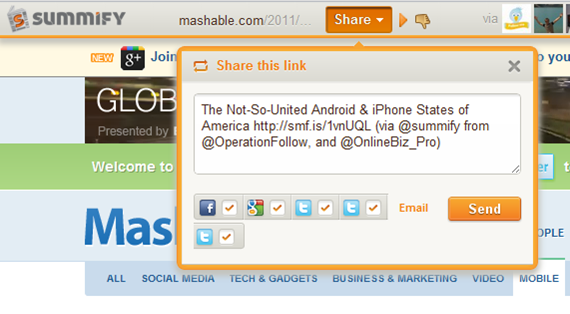
When you select a link in Summify (from email or your main summary), the article opens up with a handy toolbar on top (which you can close, if you want) that allows you to share the post on one or all of your connected networks. You can also see the avatars of the people who shared the article with you in the centre of the toolbar, and hover over them to view the originating tweet and click through to their account.
summify-5

If you don’t like the article and think it shouldn’t have been in your summary, you can click the little thumbs-down button to add it to your Filters list. This is a nice and easy way to weed out spammers and other annoying sites that occasionally sneak through. In fact, when you are in the Summify web app, itself, you can thumb an offending article down right then and there, without ever opening it. You can also filter by contributor, allowing you to block specific people from contributing to your summary. All you have to do is hover over one of the avatars below any given article, and then move your mouse over the little “x” that appears in the top right, and click it. This, and the thumbs-down functionality aren’t available in the email, of course, but they are also missing from the iPhone app; something that I hope changes, soon. Thankfully, though, Summify is smart enough that it gets it right about 98% of the time. And the iPhone app is pretty, and so is easily forgiven.

summify-4

People-Friendly Messages

When Summify sends out a summary message it takes great care to do two things: 1) It mentions some of the people who provided you with the information in the first place; which makes for nice Twitter etiquette. 2) It varies the messages so they aren’t always the same boring words with a new link. As an example, take a look below at three recent tweets (not clickable) that Summify sent out on my behalf.

tweet1tweet2tweet3

It should also be noted that mentions are automatically included in share of single posts, as well, and that you can edit the content of single-post shares before posting.

Easy, Good Looking, and Smart

Take the section-title anyway you like, but understand that it’s true, and it’s awesome! The apps (and even the emails) are easy on the eyes and easier to work with, and the service is smart enough to not only consistently deliver articles that you like, but it also will list out several other stories from websites that post multiple posts. This makes sure that you get all the highlights from Mashable and other large sites without having to visit them directly or open up another app.

I’ve been using Summify for a month or two now, and I’ve lost count of the number of hours I’ve saved by not scanning through the muck that is sometimes Twitter, and by not chasing down every shiny post in my 49 or so RSS feeds. Summify helps keep things clear and easy to manage, and has even kept me relevant on Twitter while I play with Google +. Speaking of Google +, I’m hoping that we’ll see it integrated into Summify soon (they already have the +1 button). Even better, Summify should be integrated into the Sparks feature! Now, that would be sweet! * pokes Google *

Note: For those interested, Summify is located right here in my (rarely) sunny home-city of Vancouver, and they have had the benefit of advising from the CEO of another little local social app called HootSuite. Maybe you’ve heard of it? :D

Give Summify a try and tell us what you think!

UPDATE: Summify has recently updated its look (pretty much the day after this post went up). It was pretty before, but now it’s awesome! It also includes Instapaper integration.


Summify-new.


Quick, Get Your Invitation to Try Spotify For Free

spotify

Spotify invitations are now hard to come by (or so I’m told), but as of the posting of this article, you can get one, thanks to Coca Cola. Just follow the link below. I tried it, and have been playing around with Spotify for the last hour or so.

The link is here:

https://www.spotify.com/us/coca-cola/

Let us know how it works for you.