![App of the Week: Move2Picasa [Chrome] | 40Tech](https://www.40tech.com/wp-content/uploads/2011/07/image4.png "App of the Week: Move2Picasa [Chrome] | 40Tech")
Our last post on Google+ was a question on what you thought of the hype surrounding it. We’ve had a chance to play with it now, and so have many of you — and all in all, we like it. That’s not what this post is about though. This post is about taking advantage of Google opening up unlimited storage in Picasa as a result of Google Plus, and how you can use that, and a handy migration tool called Move2Picasa to backup your Facebook photos — whether you plan to use Google’s new social network or not.
UPDATE: The creator of Move2Picasa has changed the URL to the Chrome extension (the correct one is now in the post), and has changed the name of the Move2Picasa extension to Move Your Photos. Thanks to Peter Pawlak on Plus for catching that!
Note on Unlimited Storage: Google has opened up storage in Picasa, in general. Plus users have free, unlimited storage for photos that are a maximum resolution of 2048X2048 pixels (and videos that are a maximum of 15 minutes), and 1GB of free storage for larger resolution photos. Anything over the 1GB (or whatever you have paid for additional storage) will be automatically resized down to the maximum free resolution. Non-Plus users get basically the same service, but their maximum resolution for photos is only 800X800 pixels.
Move2Picasa started as a website-based tool put together by Aman Kumar Jain, a web developer from Pune, India. It was leapt upon immediately by many of the early adopters of Plus, and the servers were quickly overloaded to the point that the site wouldn’t even load. Aman worked to solve the issues, and has now migrated Move2Picasa to a Google Chrome Extension .
The extension works beautifully! I copied over 1600 photos from Facebook to Picasa in less than an hour, and I barely had to lift a finger.
Here’s how it works:
After installing the extension from the Web Store, click on it to log in to Facebook. You will be presented with a page that, after a minor load time, has all of your Facebook photos broken down into albums. The top left of the page shows a legend that identifies the coloured boxes surrounding the photos, which are yellow for “In queue,” by default. The top right of the page provides some simple tools to select or deselect all, pause and close to come back later, and to logout from the tool completely.
Each album has check boxes directly below the album name that allows you to make quick choices to Upload All or Upload None of the photos of that album. You can also click on individual photos to select or deselect them for uploading, which is handy, because you may have certain photos that you want to weed out before they are copied to Picasa. Like the yellow boxes, Upload All is selected by default.
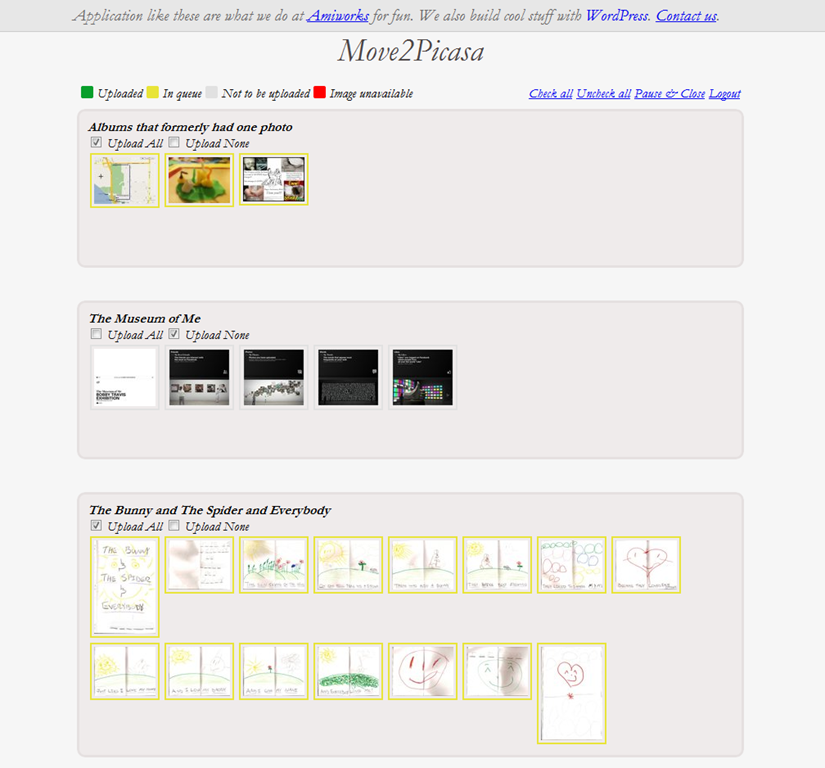
NOTE: At this point you may notice one weirdness: some of your albums may not be showing any pictures. Don’t panic. This is either because there are no pictures in that album, or because the albums have only one photo. Hopefully, this minor bug will be fixed soon — in the meantime, you may want to head to Facebook and add those errant solo photos to a combined album (you may have to log out and log back in to Move2Picasa to see the changes), or simply download them manually from Facebook and upload them to Picasa without the tool.
Once you have chosen the photos you want to copy over to Picasa, click the Upload button on the bottom of the page, and sit back and let Move2Picasa do all the heavy lifting for you!
When I did it, I didn’t notice any extra load on my computer, and had no problem doing whatever else I needed to do while it ran in the background. Some people have reported the occasional error pop-up that breaks the operation (this happened to me, too), but Aman posted to my thread on Google+ (find me here, we can add each other to our respective circles and you can read it) that the issue had been fixed. It was barely a problem, in any case, as all I and the other users who had the problem needed to do was click the upload button again, and the handy countdown picked up right where it had left off.
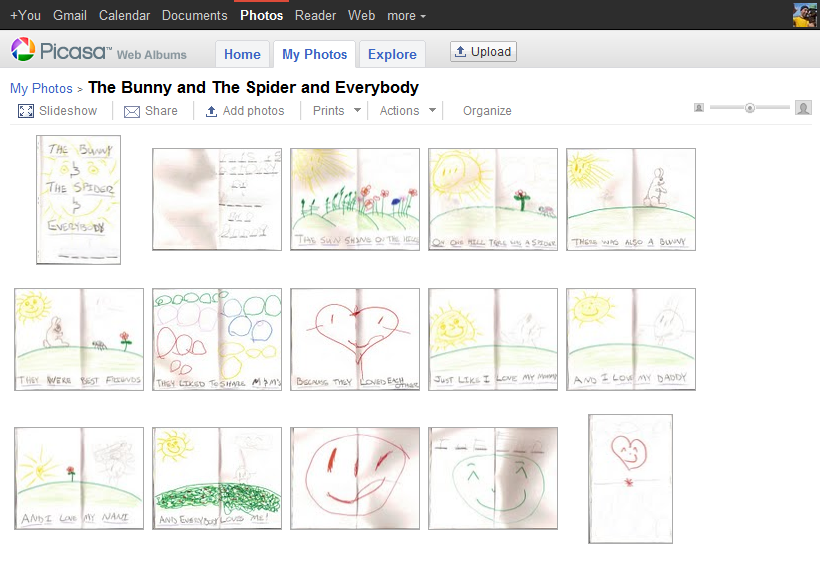
Before you know it, you will have complete duplicates of your Facebook albums living in Picasa, ready to do with as you please. The only caveats I have discovered so far is that the images appear to be the Facebook-resized versions only, as opposed to the full-res photos Facebook supports now (though I would love for someone to confirm otherwise), and that Move2Picasa does not support caption importing. That last bit is too bad, but hopefully will change at some point in the future. Move2Picasa as a Chrome Extension is only a couple of days old, after all.
Why Bother?
Some of you may wonder why you should care. You may have no use for Google+, or Plus, or whatever people want to call it, and think that it is just another hyped Google product that will crash and burn. And it might; you never know. The fact that Plus has already surpassed 10 million users (though many are probably not active — but then, neither are bulk of Facebook’s hundreds of millions) indicates otherwise, however. The efforts that Google is putting into design and to integrate Plus into its overall offerings — possibly making it the connecting flagship of Google’s main products — is another strong reason to think Google+ may be around for a while yet.
Whichever way Google’s social efforts go this time, it is unlikely Picasa is going to fizzle away anytime soon. Take it from someone who lost the entire first year of photos with the lovely lady who is now my wife (due to a backup hard drive falling off of a bloody coffee table!), it never hurts to have another backup of your precious photos. The fact that this is an online backup with practically unlimited storage, an interface that allows easy viewing and sharing, and a built-in photo editor doesn’t hurt either. So why not use it?
If you still don’t want any part of Plus, Picasa does offer unlimited storage for everyone, now, but, as mentioned in the note at the beginning of the article, you will only be allowed to upload photos that are 800X800 pixel resolution, as opposed to the 2048X2048 resolution offered to Plus users. If you go that route, though, I’m not entirely sure Move2Picasa will work for you. I don’t see why it wouldn’t, but I haven’t tried it that way. Why would I? Whether I stick with Google+ or not, I’m definitely ok with having dust bunnies swarm over my account if the trade off is the unlimited storage and backup of higher resolution photos.
How about you?
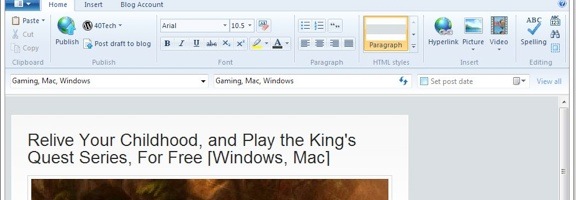 One piece of software that Microsoft got right was Windows Live Writer. If you’re a blogger, and don’t want to dig around in HTML (and arguably even if you do), Windows Live Writer is the software that we recommend for your drafting needs. One flaw with Live Writer, though, is that it doesn’t offer a setting to change where your blog posts get saved on your machine. By default, your drafts and recent posts get saved to your user folder, in the \Documents\My Weblog Posts\ directory. What if you want to save your posts elsewhere? You can do this, with a registry hack.