
Menu Close

Archives (page 24 of 199)

ABA TECHSHOW 2017

If you’re a lawyer interested in technology, ABA TECHSHOW should be right up your alley. I’m excited to announce that I’ll be presenting at the conference this year. The conference and expo takes place from March 15-18 at the Hilton Chicago. TECHSHOW regularly draws over 2000 attendees and 100 exhibitors. Whether it be the conference sessions, the massive EXPO hall, or just rubbing elbows with fellow geeks, this is a really fun and educational few days.

I’ll be co-presenting at two sessions on March 17:

  • Set Your Mac on Auto-Pilot, with Katie Floyd, at 9 a.m.
  • Your Office, Don’t Leave Home Without It, with Channa Loyd, at 3:45 p.m.

Registration is open now, with early bird pricing through January 30 UPDATE: Early bird pricing has been extended through February 13. You can find pricing and registration here:
http://www.techshow.com/pricing/


Airmail to TaskPaper

I’m currently trying out TaskPaper as my task manager of choice, after almost five years with OmniFocus. More on that in the future, but for now don’t read too much into this – OmniFocus is a great app, and if it works for you, I don’t recommend switching.

TaskPaper has many strengths (again, more on that in the future), but one weakness is its lack of integration with third party apps when it comes to capturing tasks. On iOS, for example, native TaskPaper integration isn’t built into any email apps. There is a thread in the TaskPaper forums that points to a workflow, using the iOS Workflow app, to get Airmail email links into TaskPaper. I couldn’t get that working, though.

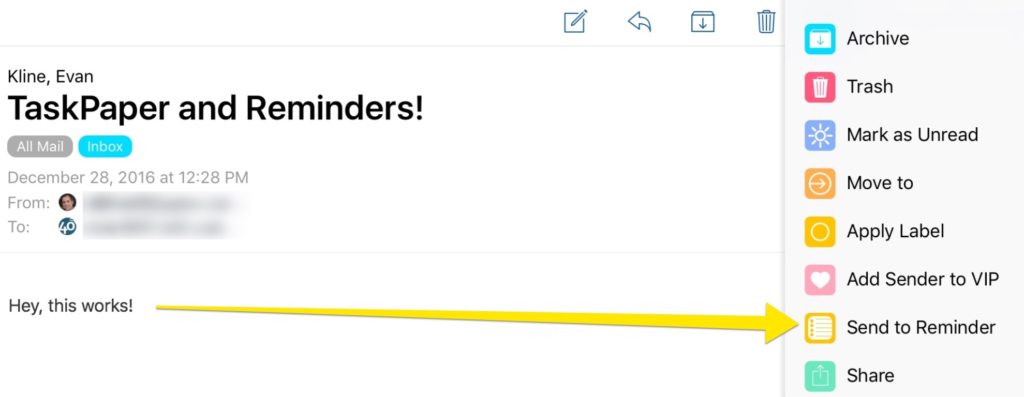
Instead, I stumbled upon a thread with instructions on how to get items from the Reminders app into TaskPaper (scroll down in the thread for the script). I set the JavaScript in that thread up on my Mac, and have Keyboard Maestro run the script every 10 minutes. That script slurps anything that appears in a designated list in Reminders into TaskPaper. Of course, for this to work, you’ll need to make sure you have Reminders syncing between your Mac and your iOS device.

Suddenly, TaskPaper is WAY more functional for me. I can use any iOS or Mac app that supports Reminders to get tasks into TaskPaper. One of those is Airmail, and the task contains a link back to the mail message.

More to come on how I’m using this Reminders integration to open up all sorts of possibilities with TaskPaper.


Use Your Wemo with HomeKit

wemo-and-homekit

In my last post I discussed how I was able to get my Liftmaster garage door opener working with HomeKit, even though it wasn’t officially HomeKit compatible. I used a HomeKit bridge called Homebridge, running on my Mac, to accomplish this (Linux would work, too). Setting up Homebridge and the first plugin (Liftmaster) was the hard part. From there, getting the Wemo plugin set up and installed was easy.

Read more


Use HomeKit With Your Chamberlain Liftmaster MyQ Garage Door

If you have a MyQ-enabled garage door opener, and you want to hook your door into HomeKit, take a look at Homebridge. Homebridge is a NodeJS server that runs on your Mac, or on a Linux machine such as a Raspberry Pi. Homebridge acts as a HomeKit bridge and allows you to use certain non-HomeKit devices with HomeKit. That might sound like a mouthful, and it certainly isn’t trivial to set up, but it isn’t as difficult as it might seem.

Read more


Arq Backup and Amazon Cloud Drive – a Perfect Match

There’s a new sheriff in town when it comes to my online backups, and that’s Arq Backup. For several years, I’ve been using Crashplan for all the Macs in my house. It was hard to beat the price of the Crashplan family plan, but my subscription expires in the next few months, and it doesn’t look like I’ll be renewing it. Instead, I’m switching to a combination of Arq Backup and Amazon Cloud Drive.

Read more