
We’ve come a long way from the days when a 32 inch television set was considered huge. Widescreen high def televisions are common, and more and more people are setting up home theater rooms, complete with high definition projectors. If you’re in the market for a projector, put the Panasonic PT-AE4000U at the top of your list.
Background
Consider this to be a review from the average Joe, as it comes from the perspective of someone (me) who had seen high def projectors in action at other people’s homes, but had never owned one himself until a few months ago. I’m also not a home theater buff, but I thoroughly research an expensive purchase before making it.
The AE4000U is the projector that I ended up with, based on two converging circumstances that both pointed to this projector: my extensive research, and my wife secretly plotting to buy me the mother of all birthday presents (a high def projector). When researching the present, she solicited the advice of a friend who is a home theater buff, and he pointed her to the AE4000U.
Little did my wife and I know, but we both had our eyes on the same projector, as the reviews that I read overwhelming pointed to the AE4000U as the one projector that could compete with projectors costing thousands of dollars more. My wife ended up talking it over with me prior to purchasing it, so it was an easy decision once we realized that we had both picked the same projector.
Picture Quality / Performance

Let’s cut to the most important aspect of a projector purchase – picture quality. Again, I’m not a home theater buff who breathes this stuff every day. I know what I like, though, and, after owning this projector for four months, the picture quality still takes my breath away.
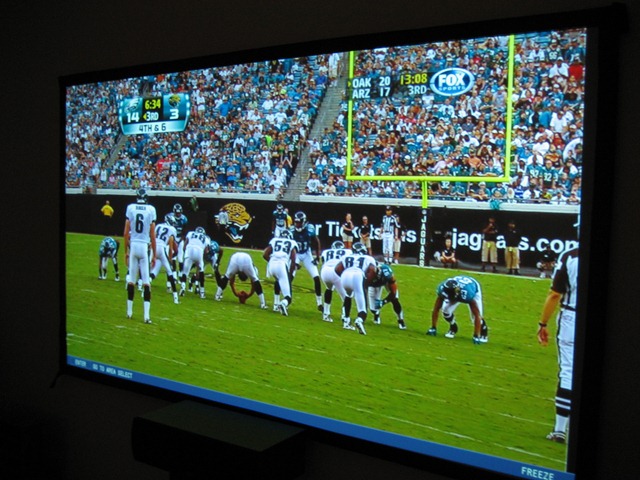
I am using the projector with a 110 inch screen, and the images are crisp and clear. During sporting events, I feel like I can walk right onto the field. A Blu-ray movie, such as Avatar, is stunning.
If you’re not one to fiddle deep into settings, there are different settings for color that you can cycle through with one button on the remote control. You can have an image with very natural colors, an image with vibrant colors that jump off the screen, or something in between. Much to the chagrin of home theater geeks everywhere, I haven’t tweaked the colors at all, and am still in awe of the image quality.
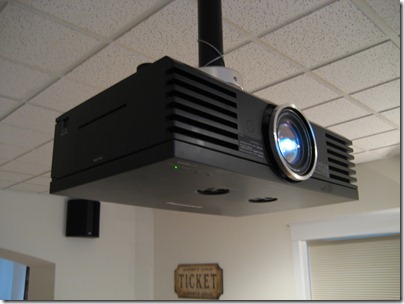
The black levels are good. They are black enough that I don’t even notice or think about it when I’m watching a movie. The Epson PowerLite Home Cinema 8500 is the one projector that is often said to be the Panasonic AE4000U’s prime (and possibly only) competition, and, according to some reviews, the Epson might have a slight edge in black levels (in many other areas, though, the Panasonic wins out).
The only quibble I have the projector, and it is a slight one, is that on a handful of occasions, I have noticed a blur or streaking of a baseball when watching a baseball game. I literally could count on one hand the number of times that I’ve noticed this, and it always happens in the same circumstances. It occurs when a baseball is being thrown a good distance across the diamond, and the camera is at an angle that the ball travels directly across the screen, at an angle almost perpendicular to the camera. Then, the ball blurs or stutters slightly, for a second or two. I’ve never noticed this at any other angle.
I assume this has to do with a refresh rate, which isn’t as good in projectors as it is in televisions. I can’t be sure, though, as it could also be the cable provider, or even the original feed from the game. There is a setting in the Panasonic AE4000U to allow for extra processing of an image in order to interpolate frames and eliminate blur. I haven’t played with that yet, as it delays the image, and therefore would require me to figure out how to set matching audio delays in my surround sound system.
The Panasonic AE4000U does well in rooms that aren’t dark, too. While you won’t want a completely bright room, I’ve found that as long as I have the shades of the windows right near the screen closed (they do almost completely block the light), I can have the other blinds in the room open, or even have some lights on, and the picture is still quite good.
A concern with any projector is noise. You don’t want to be distracted from a movie or television program by the sound of a cooling fan kicking in. The Panasonic does have a fan that can be heard if you listen closely for it, but I have yet to notice it while actually watching content. The fan on my PlayStation 3 is significantly louder.
Controls / Features
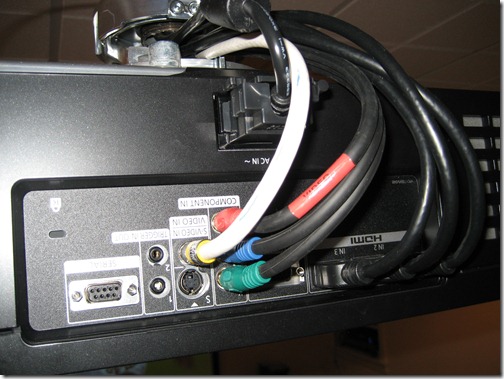
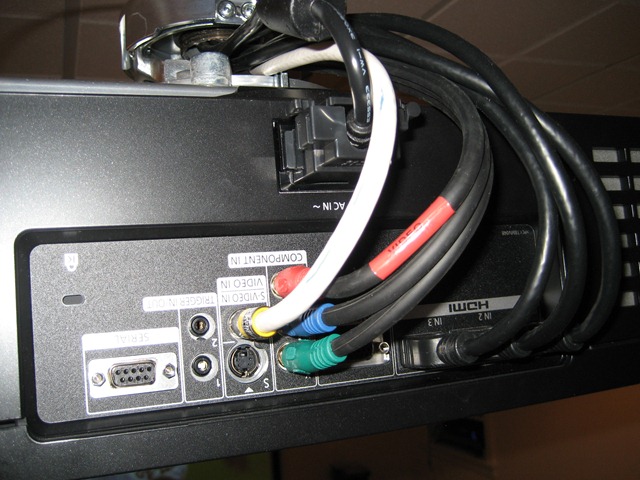
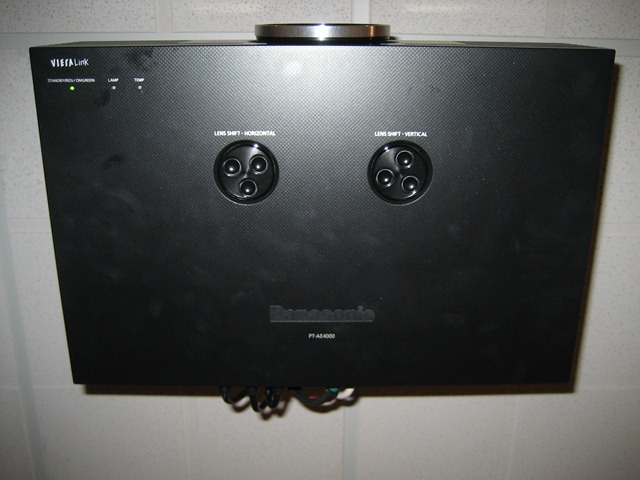
The AE4000U has several inputs on the rear, including 3 HDMI inputs, a DVI input, component input, video and S-video. There are also two programmable triggers, which, if you’re a total geek, can be set to send an outbound signal to activate a screen, open curtains, etc., when you turn on the projector. (The writing in the photos above and below is upside-down because, when hung from the ceiling, a projector is mounted upside-down).

The side of the unit has a flip-up panel, where you can access focus, zoom, and other menu options.
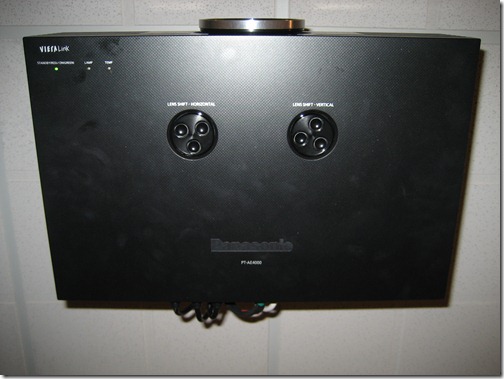
The top (or underside, if mounted on the ceiling) of the unit has two dials to shift the lens left, right, up, or down, in order to center it on the screen.
Despite these controls, you will usually control the projector with the remote. You can access all settings through the remote, and the onscreen menu.
The Panasonic boasts a feature known as Lens Memory. This allows for storing of zoom and focus settings for easy switching between different aspect ratios. This can be set manually, or configured to be detected automatically.
Specs
The Panasonic PT-AE4000U is a 1080p projector that uses 3LCD technology. 3LCD is a technology that divides light into red, green, and blue colors, before combining them and projecting the image onto the screen.
The AE4000U has a 100,000:1 contrast ratio and 1,600 lumens of brightness, and sports a 170 Watt UHM lamp. It has a dynamic irs, which adjusts the lamp power, iris, and gamma curve by analyzing the brightness level of each image, frame by frame.
For a complete list of specifications, see the Panasonic site.
Conclusion
I’ll save you some homework, and narrow down your choices: in this price range, the projector war comes down to the Panasonic PT-AE4000U vs. the Epson PowerLite Home Cinema 8500 UB.
[amazon-product align=”right”]B002W7CW32[/amazon-product]
My wife and I both settled on the Panasonic PT-AE4000U based upon reviews, and a recommendation. Some of those reviews note the Epson’s slight edge in black levels, and the Panasonic’s edge in shadow detail, features, and a cinematic picture quality.
We haven’t been disappointed. I’ve gone from watching 5 movies a year, to watching that many every month. Unlike many tech items, where the excitement and sheen wears off after a few weeks, I’m still in awe of the Panasonic PT-AE4000U. 40Tech is putting its name behind it, and we are using our Amazon affiliate link. This means that 40Tech gets a small portion of the sale if you purchase the projector there. As always, we only use affiliate links for products that we’ve tried, and in which we believe.
If you have experience with the Panasonic, or another high def projector, share your opinions in the comments.


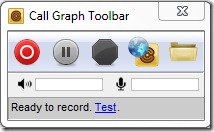 There are a few reasons that you might need to record your Skype audio calls. Perhaps you want to cherish and save all those calls that you make with loved ones, or maybe you conduct interviews for a podcast. Whatever the reason,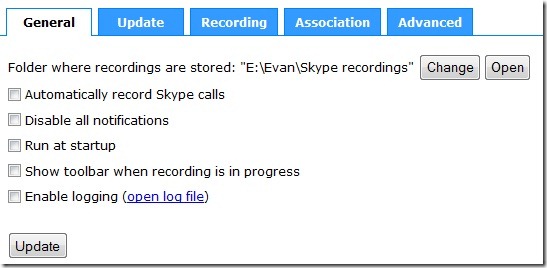


Internet Explorer is Now Losing the Browser Wars? Magic 8-Ball Says: Doubtful
Internet Explorer has been slowly but steadily losing ground in the “browser wars” since the invention of that little hot little vulpine browser, Firefox. Google Chrome shook up the market even more and is continuing what’s considered to be a fast upward climb. Safari is Safari, and Opera is largely underestimated.
In the article I read about IE’s plummet, on Mashable, the tone was very much in the negative for Internet Explorer, citing phrases such as “to little, to late” and “Hail Mary” in reference to the coming improvements of IE9. Now, I am no fan of Internet Explorer (my web-designer-self hates it with a furious feral fire), and no disrespect intended to the knowledgeable minds over at Mashable, but I think a little bit of perspective may be called for.
Yes, IE has finally hit a downward slide (thank you, powers that be!) — but even with the European ruling that dropped IE from Microsoft Windows installations, and the rise of Google Chrome, Internet Explorer still holds 49.87% of the browser market (as stated in the Mashable article). Another unfortunate truth is that a good percentage of that percentage still uses IE6. The fact that anyone is still using that piece of crap is proof positive that people aren’t as far advanced into the world of technology as we might have hoped. But I digress…
The point I am making here is that 49.87%, while still a hefty drop for IE when compared to the gains of other browsers, is still the largest segment of the market by nearly 20%. Internet Explorer 9 may be a bit late, but it is still going to compete soundly with the other browsers out there. IE9 may not win back Microsoft’s haters (count me in that batch), but it will win back some people — and it will keep even more. If Internet Explorer is going anywhere, I don’t think it will be anytime soon.
What do you think?