
Menu Close

Archives (page 137 of 199)

[Sponsored Post] LOVEFiLM – Online Movies and DVD Rentals for European Viewers

LOVEFiLM

This is a sponsored post written by the sponsor, LOVEFiLM.  Please click here for more information on sponsored posts on 40Tech.

One of the most alluring reasons for watching movies online is the freedom it offers. Watching movies online allows film fans to watch what they want, when they want. Another bonus is the fact that all this is possible from anywhere with an active internet connection. This could be at a friend’s house, on a train, in an airport, on holiday, in Wi-Fi hotspots and of course, in the comfort of your own home.

Read more


The Cloud Explained — by Kids

The Cloud Explained -- by Kids | 40Tech

photo by zakwitnij

It was my birthday the other day. I turned 35. Yep, 35, and I write for a blog called 40Tech. I’m mature for my age, ok? Either way, I was feeling pretty good about myself that day. 35 years old is young, right? Well, that’s what I thought until I saw this video by Accenture that has little kids explaining cloud computing.

I now feel positively ancient.

The video, called “Cloud Computing Here and Now — Our Youngest Experts Explain the Cloud,” features a whole bunch of cute, smarty-pants little rug rats that make websites and are working on video games that feature super-spies with heads made out of cheese puffs. They were born with the internet — broadband, even — and it’s as second nature to them as hair bands are to the rest of us. I mean the music variety, by the way, not the hold up your hair type — but I digress.

Watch this video. It may make you feel like somebody’s grandparent, or even great grandparent — but it is a very clear look into the future of tech. Well, the future from the point of view of a high-end consulting company that is obviously convinced of the impending takeover of cloud computing — and trying to sell people on it — but that’s not saying they’re wrong.

Watch the video below — What do you think?

http://www.youtube.com/watch?v=_eq3Sj1GGs8&feature=player_embedded


How 10 Year Olds Explain Cloud Computing [ReadWriteWeb]


Kinect Hacks Could Bring Sci-fi to Your House

Kinect Hacks Could Bring Sci-fi to Your House | 40Tech

Microsoft’s Kinect, has already started a mini-revolution in the geeky world of modding. Since hacker Hector Marcan released the open source drivers that he created for Kinect, innovations using the technology have been appearing with speed that can only be described as plaid (my apologies to anyone who didn’t get that reference — and a cookie to the first commenter to identify it).

Some of the more interesting hacks I’ve come across are:

DepthJS (Fluid Interfaces Group) is a Chrome Extension that allows you to do some sci-fi-like web browsing with hand gestures. Make’s Adam Flaherty compared it to Spielberg’s Minority Report.


Interactive Shadow Puppets (Theo Watson) could have a future theatre and children’s entertainment — the kind they watch or do on their own time. The guy also does the entire video with what looks like a beer in hand — which I just found amusing and awesome.


Multitouch with a hacked Kinect is the first thing I was wondering about, especially after watching the DepthJS video. A fellow named floemuc put together a nice proof of concept using photos.


Real-time People Detection and Tracking with multiple Kinects is a neat (and scary) little demo put together by some students and a professor from EPFL (a French Swiss tech school).

http://www.youtube.com/watch?v=x–xlKWBTAE


There are also Kinect 3D art hacks, some original Mario Kart and Quake Live hacks, 3D object manipulation, cloud viewers and several others. Some of them are floating randomly about the web, but several are listed at the wiki/gallery of openkinect.org.

If you want a review of how well the straight-ahead consumer version of the Kinect works, check out Evan’s review.

What are your thoughts on Microsoft’s Kinect? What other potential innovations could you see coming out of this?


Figure Out That File Extension

filext

Today, 40Tech is pleased to present a guest post by Keith from Computer Repair Vancouver.

File extensions have become a mainstay in the current computing landscape. Those two or three letter codes that follow a file name allow you as well as your operating system to determine what type of file is being dealt with as well as which programs should be used to deal with it.

Read more


WordPress Backup to the Cloud, Made Easy

updraft

Earlier this month, we took a look at 4 ways to backup your WordPress blog.  That post covered steps you could take to backup your site, including the use of WordPress plugins.  We’re always on the lookout for better ways to get things done, and when it comes to backing up a WordPress blog, we’ve found a gem.  Updraft is a dead simple plugin that will backup the contents of your site to the cloud (such as Amazon S3) or to an FTP server.  You can even have the backup emailed to you.

What makes Updraft so awesome is how simple it is.  When I set it up for 40Tech, it automatically set a backup directory on the server.  I only had to set the backup interval (daily, weekly, monthly, or manual), and fill in my Amazon S3 account details.  When I log into my S3 account, I can see the backup files sitting there.

You can set Updraft to email you when a backup is complete, and to delete the local backup on your server (prior to uploading the backup to the cloud, Updraft generates it in a folder on your server).  You can also specify how many backups to keep.  Perhaps the best part of Updraft is that your backup can be restored with the click of a button.
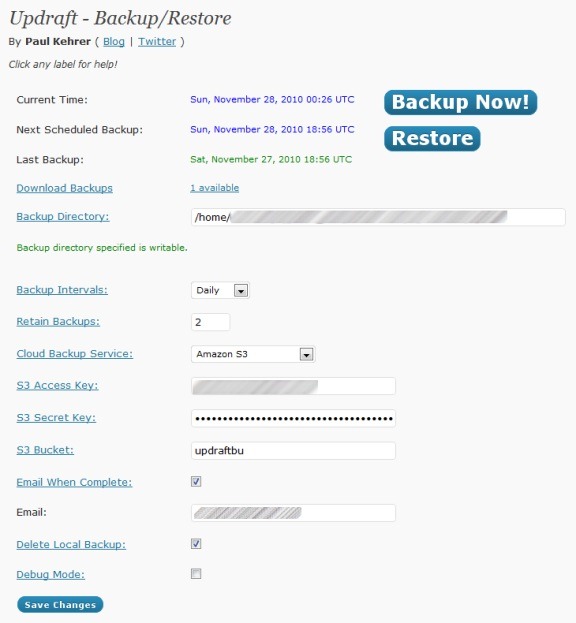
updraft backup

One word of warning: if you’re using Amazon S3, don’t use any non-alphanumeric characters in your bucket name.  When I first set up Updraft, the backups were sitting on the server, and not being transferred into S3.  I had been using a bucket that had an underscore in the name.  When I changed that to a simple name, the backups started working as intended.

Updraft is pretty awesome.  Have you found anything better?

Updraft [via MakeUseOf]