Menu Close

Archives (page 124 of 199)

Block Sites From Search Results with the Personal Block List Extension [Chrome]

Block Sites From Search Results with the Personal Block List Extension [Chrome] | 40Tech

A new and incredibly useful extension has popped up on the Chrome Web Store: Personal Block List (by Google). If you have ever searched for something and been plagued by useless links that wiggle past Google’s algorithm — and odds are you have — then this extension is your friend. Personal Block List adds a handy little “Block [URL]” button to the right of the “Cached” and “Similar” links in Google’s search results. Once clicked, that site is omitted from your search results until you decide otherwise.
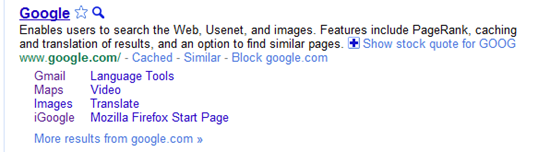
Block Sites from Search Results with Personal Block List Extension for Google Chrome, Rockmelt | 40Tech

Neat, huh? Of course, it should be mentioned that this extension will transmit information to Google regarding the sites you have blocked, including patterns that you create as you block or unblock sites. Google promises to only use this information for good and to improve their products. Actually, there are no promises. They just say that you “agree that Google may freely use this information to improve [their] products and services.” Considering all of the things out there that already track browsing habits — including Google — this sort of tracking may actually be a step forward.

In any case, the extension does its job well. In a few of the coding-related searches I have been conducting lately, looking for help on a particular area of menu design, I repeatedly found myself directed, via several different domains, to the same annoying website trying to sell me their tool that was apparently supposed to make my life easier. My annoyance in this regard is no more. The Personal Block List extension for Google Chrome (as well as Chromium, and Rockmelt) works!

If I were to have any issues with the extension, they would be that it does not work from the searchbar, only from the actual Google site, and that it doesn’t appear to have a master list in the cloud. That last surprised me, and meant that I had to block the same site twice, once in Rockmelt, and once in Chrome. Still, it did the job. I can see that there will be many more sites that will end up being forcibly removed from my search results soon.

Try it out the Personal Block List (by Google) Chrome extension here.


Too Many Facebook Friends May Cause Stress, Anxiety

Too Many Facebook Friends May Cause Stress, Anxiety | 40Tech

Having many friends is classically considered a desirable thing, leading to things like wealth of spirit, a good self-image, and a generally happy life. Not so in the modern days of the internet, where terms like “friend” are used as a label for the barest acquaintance, and sometimes even for enemies. In fact, in a recent study by psychologists from Edinburgh Napier University, it was discovered that the amount of “friends” you keep on Facebook may be linked to heightened feelings of anxiety and stress.

Scream image by Robbert van der Steeg

200 students were surveyed, and it was discovered that at least 12% of them felt that Facebook made them anxious. Each of those 12% maintained an average of 117 “friends,” while the remaining 88% kept an average of 75. Some other interesting findings were as follows:

  • Many felt a great pressure to be on Facebook, but there was “considerable ambivalence” as to its benefits.
  • Stress from Facebook use was caused by many different stimuli, including “feelings of exclusion, pressure to be entertaining, paranoia, or envy of others’ lifestyles.”
  • 63% would delay replying to friend requests.
  • 32% felt guilty rejecting friend requests.
  • 10% didn’t like receiving friend requests at all.

The word “friend” could be the main cause of Facebook-related stresses. Perhaps the social media giant should come up with a proprietary name they can trademark, or use something closer to the word “acquaintance” as opposed to a word that is meant to engender feelings of warmth, familiarity, and long term trust. Keeping things as they are, however helps to foster an environment where users, who are still emotionally tied to the meaning of the word friend (no matter how watered down it has become), feel compelled to log on, invite others, and be a part of the service — and maybe more due to its negative aspects instead of the purported positives.

Perhaps we should all just bite the bullet and prune our lists down to our actual friends?

What do you think?

Does Facebook Stress You Out? [WebProNews]


8 Time-Saving Firefox Extensions

8 Time-Saving Firefox Extensions | 40Tech

Today, 40Tech is pleased to present a guest post by Neil Jones.

My Father has a saying; if you’re paid by the hour, take your time.  Sadly I’m not paid by the hour and I can’t afford to take my time. I guess I’m like most folks and every minute is precious – especially if you are in a job like mine where you are only paid on results, so the more you can get done in a day the better your wage will look at the end of the week. Automation and generally trying to increase your productivity throughout your working day is something that none of us can now overlook, and if any part of your job involves using the web, then, for a start, Firefox is a must .

Make no mistake Firefox will help you get more done, save time and generally help to remove or at least automate any mundane repetitive jobs you have to do. It can’t do it on its own though, it needs the help of these plugins:

Imacros: If you only ever add one plugin to Firefox then add this one, it can fill forms, auto-click buttons and do pretty much whatever else you need it to. I can’t stress enough how good this plugin is, but to help I’ll give you an example. The first thing that most people who own a website do when they sit down to start work is check their analytics for the previous day, I know it’s a little anal but I counted the amount of clicks and the time it takes, and you are talking between 4 and 5 clicks and 30 seconds to get to where you want to go. Imacros can do this for you while you go make a coffee. This is only one example of how this plugin helps and I know 30 seconds doesn’t sound like much, but they all add up!

Autocopy:  As the name suggests this little plugin will automatically copy any highlighted text on a web page, with no longer a need for CTRL+C one hand is now freed to drink more coffee!

URL Fixer: If you’re a typo demon, this plugin will help you whenever you misspell a TLD ( Top Level Domain) like when you type .cm instead of .com. Maybe not a huge time saver but it definitely helps and saves on the number of clicks.

Adblockers: Though there are countless available they all do pretty much do the same thing, they prevent any flash banners or ads from being displayed, this saves on load time and it also removes any distractions from the page. GreaseMonkey in particular has some of the best adblockers.

For the addictive websites that you find you spend too much time on (mine is PassiveAggressiveNotes.com just can’t get enough)  there are plugins that will either block the site completely during certain times (LeechBlock) or if you just want a friendly reminder of the amount of time you have spent on a certain site then use Procrastato. It can be scary to realize how much time can be wasted just on one site alone.

Following on from the idea of the addictive websites there are a couple of plugins that allow you to save a page so you can read when you have more time, the best is probably Read It Later. Essentially, it works in the same way as the bookmarking services but it’s quicker and stores the addresses locally.

Finally, Morning Coffee keeps track of the most visited sites on your browser, giving you quick and easy access to your most popular pages.

If you are looking for your working day to be revolutionized, where you will find yourself with all your work done and an hour to spare every evening, then maybe you are reading the wrong post (start looking for a Virtual Assistant…) but if  you want things to work a little smoother, a little smarter, and a little faster, then any of these plugins are a pretty good place to start.

What are some of your favourite time saving plugins for your browser?


Poll Results – The #1 Freemium App Is . . .

first place

We recently asked our readers to vote for the freemium app that is most worth paying for, and the results are in. 12 different apps received votes, with Evernote coming out on top. Dropbox and Lastpass were the other two apps that received double digits in votes. Here are the full results:

Read more


Schedule Your Tweets for Maximum Impact

timely

Do you ever feel like your tweets are falling on deaf ears? Does it seem like the big shots get all the Twitter love? Timely is a web app that purports to combat those problems, enabling your tweets to be published “when they’ll have the highest impact.”

Read more