Menu Close

Archives (page 117 of 199)

FundedApps Wants to Make Your App Ideas a Reality — Is there a Catch?

FundedApps Wants to Make Your App Ideas a Reality -- Is there a Catch? | 40Tech

If you’ve ever thought that you had the perfect idea for an app, but just didn’t have the time, the means, or the skills to build and launch your gift to the mobile world (and your wallet), well guess what: there’s an app for that. Now before you begin mentally slaying me for my use of Apple’s now cliche slogan, read on — I’m actually not joking. The app is called FundedApps, and its entire purpose is for you to send in your idea so that they can make it happen for you. If they like your idea, you get £250 upfront, plus 25% of the net profit that the app makes.

Read more


Evernote Web App Gets a Makeover–Adds Social Sharing

Evernote Web App Gets a Makeover–Adds Social Sharing | 40Tech

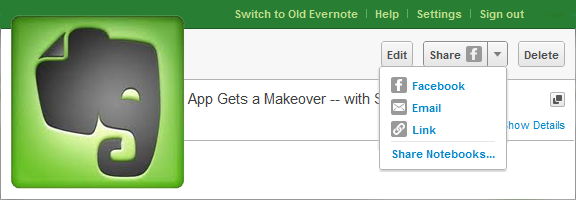
Normally I try to avoid doing Evernote posts every week, but this latest update is too big to pass up! It marks an end to Evernote’s stoic insistence that its service is strictly for capturing information, not sharing it — and if that wasn’t huge enough, the overhaul to the web app makes Evernote a pleasure to use on machines and OS’s without a desktop version. Excited yet? If you’re an Evernote fan, you know you are! See below for details.

UPDATE: The recent pre-release version of Evernote Desktop for Windows (4.3.0.4293) has added social sharing features, including Twitter, which is not yet included in the web app. Word and character counts have also been added, along with a few other niceties and bug fixes.

The first thing you will notice when you log into the web app is that the new interface refreshingly familiar, adopting a three-panel approach that is very much like the desktop version. Notebook stacks are also included, as well as snippet view — which provides a preview of the note’s content to speed up browsing — and the ability to CTRL/CMD + click multiple notes and drag them to notebooks, tags, or trash. The easy to use updated interface also includes a handy toggle to control auto-save — a handy feature when writing in shared notebooks.

Evernote Web App Makeover | Evernote Blog

While the update is impressive, it’s not perfect yet. For example, some of the more advanced functionality, like filtering, printing, attaching files, viewing note history, and creating saved searches, is still only available in the older version of the web app. If you want or need any of these features, you will need to switch back to the archaic mode for the time being.

I love the work that Evernote put into the new version of the web app, but am absolutely thrilled by their decision to include some social sharing capability! Until now, I honestly thought that the only way to share notes I collected would be using tools like Springpad and Shelfster, but Evernote’s inclusion of Facebook sharing, with plans to add Twitter in the near future, gives users the added freedom they need in today’s social web. It would be nice to see them open up sharing to the same extent that Springpad has, but baby-steps, yes? Sharing to Facebook, (soon) Twitter, via email, or by adding a link into your social platform of choice will have to be enough for now. You can also revoke shares at your discretion, which is handy. The Evernote blog promises that the new sharing features will find their way into their other apps in future updates.

So how excited are you about Evernote’s foray into the modern web — and its revitalized web app too, of course?



New York Times Paywall – WAY More Expensive Than the Competition

New York Times Paywall

The New York Times erected its paywall on March 28 in the U.S. While it is a fairly permeable wall (links from various sources will provide you with free access, and your first 20 visits each month are free), the Times’ subscription model is way out of whack with the rest of the industry. Head on over to The Understatement to see a chart showing just how much more expensive the Times will be than any other online source.

Read more


CalenGoo for Android – Funny Name, Great Calendar

CalenGoo for Android

One of the strengths of Android is its open app ecosystem. No approval by Google is required for a developer to get an app into the Android Market. That also creates a problem, though, in that it sometimes can be difficult to find the good apps. Such was the case when I went hunting for a calendar app. AnCal, Gemini, Business Calendar Beta, Pocket Informant, Pure Calendar, CalWidget, iRT Calendar, Agenda Widget. Those are just a few of the calendars available for Android. Some of those are great, and warrant a look, but none of them jumped out at me as the perfect calendar for my needs. After sorting through several, I found one that was – CalenGoo.

Read more


[Sponsored Post] HostingObserver.com: Providing Unbiased Reviews for Optimal Hosting Solutions

hostingobserver

This is a sponsored post written by the sponsor, HostingObserver.com. Please click here for more information on sponsored posts on 40Tech.

Hostingobserver.com is a tremendous resource for anyone looking to compare the best rates for various kinds of web hosting. The site can help anyone chose the right hosting plan for their needs by comparing hosting options, pricing plans, and features across multiple providers. Hostingobserver.com helps users find the right fit for their needs, whether it may be inexpensive mail hosting, full-featured dedicated server hosting, unlimited hosting, or anything in between. The resource helps users choose between reliable options at any price point or customization level. By sifting through various available options to find quality hosts at affordable rates, the site provides a great directory with objective and unbiased comparisons. Their insights, articles, and comparisons can help anyone make the right choice for their business or personal hosting needs. Find a model that fits your needs among the following hosting solutions: Read more