
Bobby Travis also author’s the Bluetoque Marketing Tips blog. This post is a first in a Twitter Series cross-venture with 40Tech and is featured on both sites.
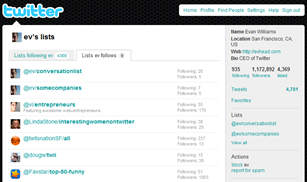 Earlier this month, Twitter finally launched Twitter Lists, a groups feature that helps you to easily organize and share the people you follow (or are just interested in), and view what they’re tweeting about without being hit over the head by the tweets of your (likely) massive general follow list. For example, maybe you want to view only the tweets from your favourite tech blog writers or business peers — all you would need to do is create an appropriately named list and add only those people into it, and whenever you want an update from that group, click on the list in your Twitter sidebar. Voila! Instant filter! I know, I know, many of the Twitter apps you are using probably already do something similar, but Twitter Lists is more than just a simple grouping or filter mechanism. There are a few key features that may make a huge difference in both the way you use Twitter and your reputation and credibility on Twitter.

 Due to the crap that was the Vista operating system (at least without 4 GB of ram and a few tricks up your sleeve), many people have skipped the OS altogether and stuck with XP. Many of those same people, however, are excited to try out the much vaunted
 If Windows 7 presales are any indication, many of you will be upgrading from Windows XP or Vista in a few months. Many of you will likely choose the “clean install” route, completely wiping your hard drives and starting fresh. Although reformatting usually can make for a more solid installation, it can cause headaches if you haven’t prepared ahead of time. With that in mind, I’ve put together a checklist of 10 steps to take prior to upgrading to Windows 7, to save you time later. This list could also apply to any of you who are reinstalling a current operating system, if you don’t have an image of your hard drive for an easy restoration. In a future post, I’ll take a look at steps to take after upgrading to Windows 7. I intend for this to be a “living” list, so please chime in with other suggestions in the comments. My hope is to be able to then take these suggestions, and post an updated list closer to the release of Windows 7. Without further adieu, here is the list.