Menu Close

Category: Problem solving (page 5 of 6)

AirDropper: An Easy Way to Request Files — and Have Them Sent Straight to Your Dropbox

AirDropper: An Easy Way to Request Files -- and Have Them Sent Straight to Your Dropbox | 40Tech

Recently, we talked a bit about Ge.tt, an extraordinarily easy way to send files to people without having to talk them through how to receive them. But what if you are the one who needs a file sent to you, and you want to make it as easy as possible to get that request taken care of? You could explain Ge.tt to people (it really is easy), or you could be a bit more direct and use the tool that one of our readers brought to our attention: AirDropper. After all, when you need something from someone, the best way to get it is to require the fewest steps possible — and to sweeten the deal, AirDropper uses your Dropbox folder, so you will be able to access the file(s) from anywhere.

Getting set up with AirDropper is pretty straightforward. You head to www.airdropper.com and click START. You will then be redirected to Dropbox to authenticate the AirDropper service, which will add an AirDropper folder in your Dropbox folder. Once that’s done, you will head back to AirDropper, and will be presented with a form that allows you to send an email (from your email address of choice) to multiple recipients to request files. The email contains your message, and a large, friendly button that says Upload and brings the user to an even friendlier ADD FILES interface. The file or files — AirDropper has supported multiple file sends since about September of 2010 — will then be sent directly to your Dropbox with no fuss, no muss, and not a worry except for your storage limit.

Note: If you are sending sensitive files, be sure to have a look over the AirDropper terms of service first.

AirDropper is free while in beta, but will likely charge for some of their service in the future, which will likely include tiered pricing for things like the size of the transfer(s), etc. Either way, it is definitely a useful tool!

Thanks to Martin for bringing it to our attention!


Word Lens: Real Time Language Translation (iOS)

Word Lens: Real Time Language Translation | 40Tech

File this under very cool and potentially useful. Word Lens is the kind of app you will want to have on you when travelling, or when presented with text in a language you don’t understand that you just have to know the translation of. I say “will want” because, so far, it only works with Spanish and English, so it is useless for your other translation needs. It’s still awesome, though — the bees knees, even.

All this iOS app needs is a device with a camera, and — with no network required — it will translate the text that the camera sees, in real time. It works surprisingly well, too! I think that, next to (prepare for Star Trek reference) a Universal Translator, this is best thing to happen to translation software in a while. Maybe Google will buy them and offer the tech for free some day soon. For now, however, even though the app looks free, it will actually cost you $10 per language set. That means that you need to spend $10 to get it to translate Spanish to English and another $10 for the vice versa. For what it does, though, and especially as it adds in more languages, Word Lens might actually be worth it.

Check out the video below:

Word Lens is a Mind-Blowing App that Translates Any Text Your Camera Can See On the Fly [Lifehacker]


Ge.tt: File Sharing for the Technology-Challenged

Ge.tt: File Sharing for the Technology-Challenged | 40Tech

How many of you have had that moment in time when you need to share a file (big or small) with someone who just shuts down when introduced to new technology? Tools like Dropbox, while they make obvious sense to anyone who traffics in such things, will, in many cases, be responsible for blank stares, open derision, and comments like “can’t you just mail me a CD?” Alas, not everyone has made it to our little techie corner of the world.

Ge.tt is going to solve that little problem for us all.

The last time I faced this issue was a month or so ago, and in looking for a solution, I happened across a post by our friend from Digitzd, David Pierce. David outlined several other file sharing services he’d tried, like YouSendIt, FileDropper, Dropbox, and Box.net. His findings with these other options were much the same as my own; which is to say that they were either too complex for the tech-challenged (or uninterested), or were unreliable. He thought pretty highly of Ge.tt, though, so I gave it a try.

Ge.tt, as David said, is “stupid simple.” The website is a white-space filled, single-big-button experience that allows you to quickly and easily find a file, upload it, and then share the link via email, Twitter, or Facebook. Any file type you want is just fine, drag and drop is supported in modern browsers, and you can even add multiple files at a time. No logins are required, but you can set up an account if you want a few additional features, like live download stats, or adding/removing files at a later date.

The Best Way to Share Files | Ge.tt

Download files while uploading with Ge.tt | 40Tech

The best thing about Ge.tt, however, is the near real-time download capability. The person or persons you are sharing the files with don’t have to wait until the upload is completed to start downloading — they can actually start as soon as you do, receiving every byte you upload as it goes up on the Ge.tt servers. Sharing large files no longer has to be an all day event — and I can’t express to you how much I dig that! To top it off, the download process is as easy as the upload. Users click the link you give them, find the file they want and download away with just a click. If the recipient has difficulty with that — which is still possible, if unlikely — then the process will still be extremely simple to talk him or her through.

Easily download shared files with Ge.tt | 40Tech

Things to watch for:

  • The obvious — don’t upload anything you don’t own the rights to, or may otherwise be construed as illegal or relating to an illegal act. Big Brother is watching, boys and girls.
  • Shares only last for 30 days from upload, or 30 days from the last download. You can increase this to three months by signing up for a free account. Don’t use this service as a backup tool…
  • There is a 2 GB upload limit, at least according to the terms of service. David was able to upload a 4 GB file with no problems, but the terms may have been updated since then.
  • There is an ad on the receiver’s page, and at least one of the advertisers has an ad with a big download button on it. You may want to warn the people you send the link to to avoid any confusion.
  • Depending on your browser, images may open in a new window, and may require right-click to save actions.
  • Ge.tt is in beta. It seems stable, and I haven’t heard of any problems, but beta is their insurance. Also, their terms of service indicate that they will very likely be implementing paid services at some point, which may add to their current free services, or may reduce their free offerings. Get it while its hot.

What services do you use to share files simply (especially large ones)?

Ge.tt: The Best Way to Share Big Files (or Small Ones) [Digitizd]


Uncluttered Visual Search for Craigslist and Other Online Shops With Spotli

Uncluttered Visual Search for Craigslist, Other Online Shops | 40Tech

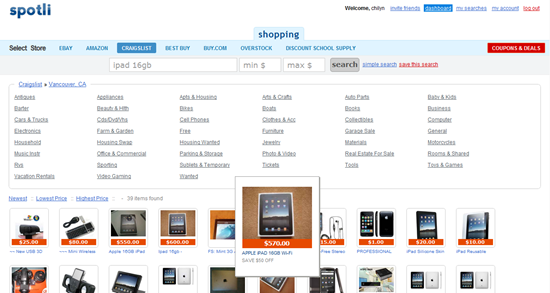
I don’t know about you, but I rarely even look at a Craigslist post that doesn’t have a photo of the product attached to it. I don’t see the point. If someone doesn’t take the time to take a photo of what they’re selling, I simply don’t trust it — and I really don’t want to drive to wherever that person lives for a first look at my potential purchase, you know? Spotli has made my life easier by providing a visual search tool for Craigslist and other places to buy online.

I know that you can already filter Craigslist to only show items with photos, but searching Craigslist is not a pretty experience. At all. It’s uglier than Google — and that’s saying something. Spotli will take your search, even narrowed down to city-level, and display an eye-pleasing grid of images, complete with title and pricing information. Hover over the image that catches your eye and it will expand to a slightly larger size for easier viewing. Click on the image and you will go directly to the listing.

Spotli Visual Craigslist Search | 40Tech

You might wonder what the point is of some of the other online shops (Ebay, Amazon, Best Buy, Buy.com, Overstock.com, Discount School Supply) — after all, they are already visual sites. I find that I like the interface of Spotli much better, however, and highly recommend that you give it a try. I would actually like to see even more stores added, as well as a Canadian option.

Spotli is fully usable without registration, even the Coupons & Deals section, but registering does give a little back, such as saved searches, minor Facebook Connect (to invite friends), and the possibility of more tools in future — maybe sharing functionality for found items?

My only wish for Spotli would be the ability to have my search term be persistent across all stores, so that I don’t need to type it in repeatedly when price-matching. If that were also integrated into the saved search functionality, Spotli could become the perfect shopping companion for me. How about you? What are your thoughts on Spotli? Know of any similar services?

Check out Spotli


Improve WordPress Site Performance and Look Cool by Loading Images On Demand

Improve WordPress Site Performance by Loading Images on Demand | 40Tech

Have you ever gone onto an image-heavy site and marveled at how fast it loads; at how the images just “fade in” as you scroll down the page? Cool, yes? While it may seem, to the average Joe/Josephine, that this nice little bell and or whistle is the result of a fancy and expensive tool created just for big sites like Mashable —  it’s actually just a little jQuery script. It doesn’t take too much to install, either, especially if you have a WordPress site. In fact, there are at least two plugins for WordPress that make it extremely simple for you to do too.

1. jQuery Image Lazy Loader

No configuration required, this plugin is quite literally plug and play. All you have to do is install the plugin and activate it and every page on your site will be treated to faster load times and the awesome that is images that fade in on demand. The bandwidth you will save isn’t hard on your pocketbook, either.

2. Lazy Loader

Lazy Loader does exactly the same thing as jQuery Image Lazy Loader, but it gives you configuration options. For example, you can choose to only use the plugin on pages or posts, or even specific pages and posts, or by category. You can also choose a jQuery effect other than fade-in, a placeholder image, and more. This plugin is not available in the WordPress repository, so you have to download it from the source.

What experiences have you had with Lazy Loader scripts or plugins?

How to Improve Your Site’s Performance By Loading Your Images On Demand [MakeTechEasier]