
Thanks to everyone who requested a Wave invitation. Invitations have been submitted for everyone who requested one as of the time of this writing. As mentioned previously, you now need to wait for Google to act on the invitations. Keep an eye on your inbox and your spam box, and hopefully Google will send them out within the next couple of days. If you get yours, hop on over to the 40Tech Public Wave, and try out Wave.
Category: Google (page 19 of 21)
 12/3/09 update: We’ve hit the 48 hour mark. We’ll get a post up tomorrow, but everyone from Ashish through Randall will be getting an invite. Thanks for posting!
We previously wrote about how to organize the Google Wave sidebar with tags, and we have at least a couple of additional Wave-related posts coming soon. These posts probably don’t interest you, though, if you’re not using Wave. Wave invitations were once very hard to get, but have become more common now. We’d like to do our part by offering 20 invitations. Read on for how to get one, so that you can get in on the fun.
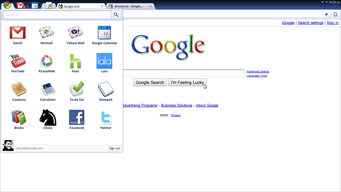 As a not-so-closet techie (or tech-geek, if you will), I find myself instantly attracted to all things new and shiny — even when the polish is not altogether there yet. This is why, on this US Thanksgiving evening, I find myself writing a post about Google Chrome OS from within a recently released build of Google Chrome OS (and I’m writing the post in Google Wave, no less). I’m positively giddy! I know, I know, so much hype is surrounding Chrome OS — and pretty much anything that Google does these days — but I don’t care. I want to play! I like to play!! And so here is my take on the current state and usability of the Google Chrome Operating System and how to check it out for yourself…
 We’ve recently started using Google Wave here at 40Tech, and have found it be extremely useful, especially for site-related tasks. In fact, we wrote our first collaborative post using Wave recently. As useful as Wave can be, it can also be overwhelming. Once you’ve followed a few waves, your Inbox can be overflowing, making it very difficult to find what you want. How to tame this? For starters, you can organize waves into folders. But what if you want to organize waves by tag? Tags have some advantages over folders, including the fact that a wave can only belong to one folder, but a wave can possess multiple tags. Even if you tag your waves, however, there doesn’t appear to be a way to make your tags easily selectable in the sidebar. It might not be built into Wave’s UI, but there is in fact a way to get your tags into the sidebar. Read on for how to do it.
 Google Sidewiki, a tool that allows people to comment directly on nearly any website, launched this past week to muted shrugs from the tech world and a nervous shudder by website and business owners alike. Sidewiki is a part of Google Toolbar, widely available for and in active use on Firefox and Internet Explorer browsers, and will be built directly into Google Chrome (it is not supported at this time).
If it’s handled well, Sidewiki could prove to be a very interesting and useful tool, from a user perspective. If handled badly, it will suffer a long and gruesome death (for both readers and abused websites). Read more