
 As I’m sure many of you are now aware, I recently caved and bought myself an iPhone. Gone are my days of Windows Mobile mediocrity — I now join the movement of Apple users — at least until I get bored of their proprietary whims and move on to the questionable privacy of an Android phone. In any case, I’m here with the rest of you now and have immersed myself in the wonders of the app store while doing my best to spend as little money as possible. So far, in my two weeks of iPhone ownership, I have acquired over 50 apps and am using five pages of my springboard. Over the next few weeks, I’ll share what those apps are, page by page, along with a micro-review. Please feel free to share yours with me in the comments! Here’s Page 1:
Category: Applications (page 25 of 29)
 Dropbox is one of our favorite apps here at 40Tech. The traditional use of Dropbox is to make files, such as photos and documents, available on any computer you use, or even on your mobile phone. But if you think outside the box (bad pun intended), Dropbox can be used in other ways to make you more productive when away from your main computer. Read on for a few suggestions.
 Have you ever wondered what it would be like if you could use your iPhone to watch the same television stations that you watch on your television at home? Wonder no more, for television on your iPhone is a reality, with the right setup. Today we’re going to look at two methods for getting all of your television stations on your iPhone – Slingplayer and OrbLive. The first method, Slingplayer, works anywhere that you have a data connection (3G or via WiFi), while OrbLive only works via WiFi but also works over 3G and WiFi and can be cheaper. (Updated on 2/24/10 to reflect that an OrbLive update has appeared in the App Store, restoring 3G functionality). Both methods require a piece of hardware. Read on for details. Read more
 Many people are annoyed by the country-blocking that is imposed by massive multimedia companies regarding their content; especially since the rise of sites like Hulu, Pandora, and Last.FM. The lure of legitimate, free, and easy to access streaming content is a hard one to pass up! If you happen to live outside of the US, however, you tend to discover rather quickly that you’re pretty much out of luck. So what to do? If you ask around, and most people will tell you to try a proxy site, but average proxy sites are generally blocked by services like Hulu, and, if you do get through, are very, -very- slow. However, if watching Hulu is a dream of yours — or you simply want to be a little safer when you browse online, or access Twitter and Facebook from work — the current version of Hotspot Shield (1.37) is your friend.
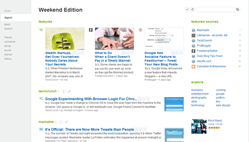 As is apparent from my last article on 40Tech, I have been playing around with a multitude of Google Chrome Extensions since the official beta-door was opened, last week. Last night, I discovered Feedly, a social RSS extension based on Google Reader and Twitter that “organizes your favorite sites into a fun, magazine-like start page” (also available for Firefox). In a word, Feedly is awesome. In two words it is dangerously awesome, or, as the title states, dangerously useful– if you install it for either browser, make sure you set some time aside. You’re going to be there for a while.